
Keyboard Gear earns from qualifying purchases through Amazon links.
A good mechanical keyboard used to cost well over $100. Today, you can get hot-swap sockets, tri-mode wireless, PBT keycaps and even foam and gasket-style dampening for a fraction of that. The hard part is knowing which cheap boards are genuinely good and which just look the part. This guide to the best budget mechanical keyboards picks seven that deliver real value, from a $37 Redragon to a $85 Keychron you can customise forever.
We compared current Amazon US listings and manufacturers’ specs, and checked every product page for stock before publishing. Prices change often, so treat the figures below as a guide. If you’re still deciding whether to switch, read are mechanical keyboards worth it? and our mechanical vs membrane keyboard comparison.
Quick picks
- Best overall: AULA F75
- Best under $40: Redragon K552
- Best wireless value: Royal Kludge RK84
- Best wired TKL: Keychron C1 Pro 8K
- Best for customising: Keychron V3
- Best 60%: Royal Kludge RK61
- Best full-size: Logitech G413 SE
At a glance: best budget mechanical keyboards compared
| Product | Best for | Key specs | Price |
|---|---|---|---|
1 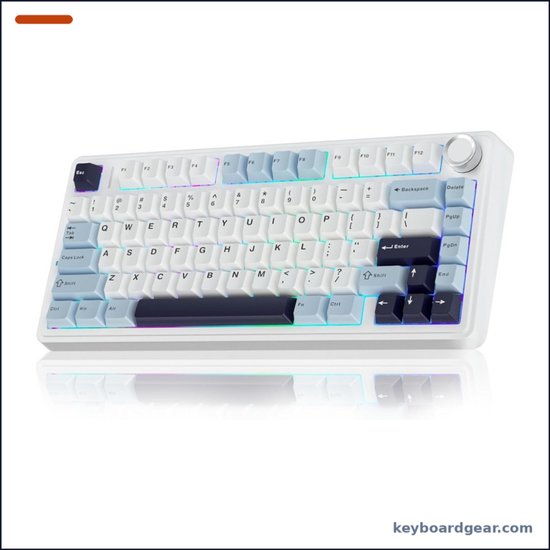 AULA F75 AULA F75 |
Best overall |
|
Check price |
2 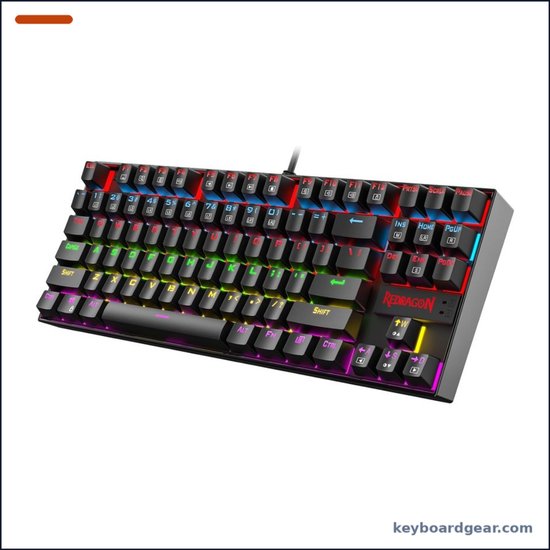 Redragon K552 Redragon K552 |
Best under $40 |
|
Check price |
3 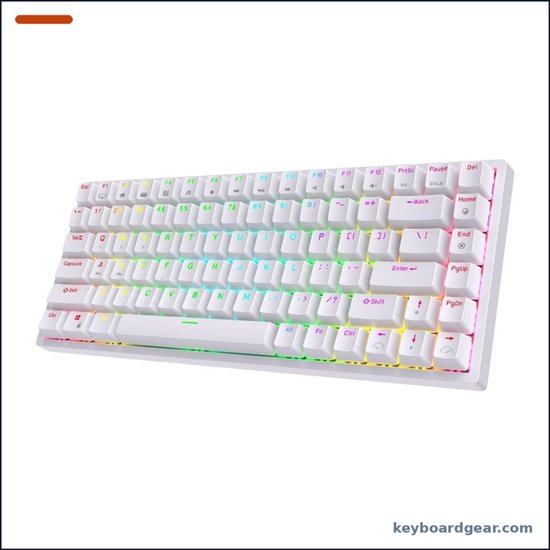 Royal Kludge RK84 Royal Kludge RK84 |
Best wireless value |
|
Check price |
4 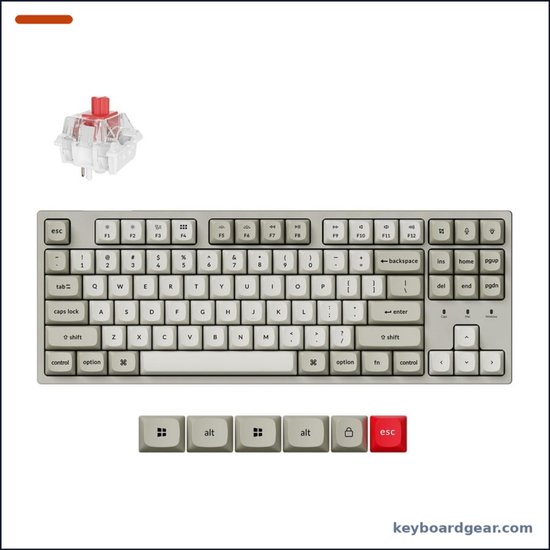 Keychron C1 Pro 8K Keychron C1 Pro 8K |
Best wired TKL |
|
Check price |
5 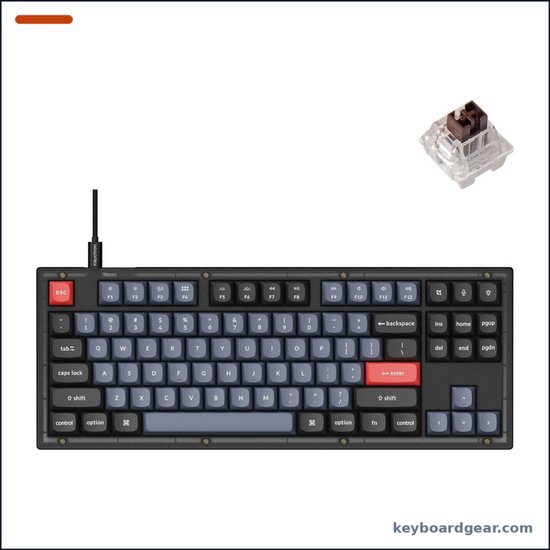 Keychron V3 Keychron V3 |
Best for customising |
|
Check price |
6 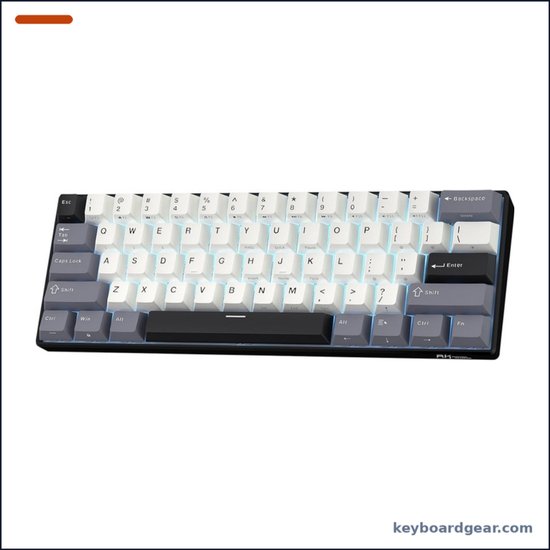 Royal Kludge RK61 Royal Kludge RK61 |
Best 60% |
|
Check price |
7 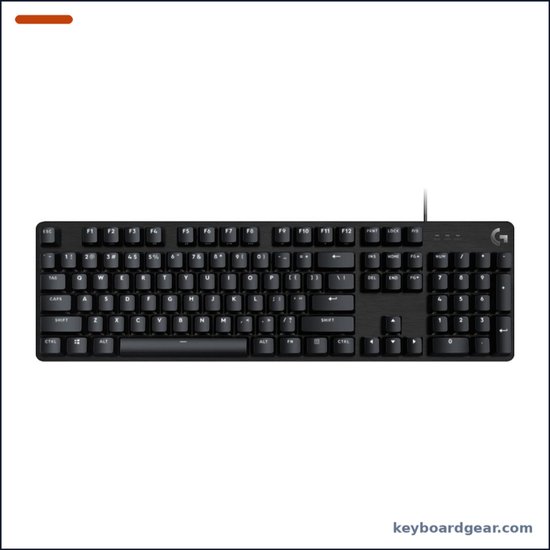 Logitech G413 SE Logitech G413 SE |
Best full-size |
|
Check price |
1. AULA F75 — best budget mechanical keyboard overall
Who it’s for: Anyone who wants an enthusiast-style typing feel, wireless freedom and hot-swap sockets without paying enthusiast prices.
Why we picked it: The AULA F75 is the keyboard that shows how far budget boards have come. Inside, AULA uses an extended silicone pad, a PCB slotted around each key and five layers of sound-dampening fill between the PCB, plate and case. Together with factory-lubricated LEOBOG Reaper linear switches and pre-lubed stabilizers, this gives the deep, “creamy” sound people usually pay much more for. The 81-key 75% layout keeps the arrow keys and function row, and the multi-function knob controls volume or lighting. You can connect over Bluetooth 5.0, 2.4 GHz or USB-C, switch between up to five devices, and the 4000 mAh battery means you won’t charge it often. The 3/5-pin hot-swap sockets let you try other switches later without soldering. At around $65 on Amazon at the time of writing, it’s our top value pick.
Key specs: 75% (81 keys) with multi-function knob; pre-lubed LEOBOG Reaper linear switches; 3/5-pin hot-swap; pre-lubed stabilizers; silicone pad, single-key PCB slotting and 5 dampening layers; 16.8M-colour RGB; full-key macros; Bluetooth 5.0, 2.4 GHz and USB-C; up to 5 devices; 4000 mAh battery.
- Deep, muted sound for the price
- Tri-mode wireless with a big battery
- Hot-swap sockets for 3- and 5-pin switches
- Handy knob for volume and lighting
- Plastic case
- Driver software is basic
- Brand-specific switches are less documented
- Larger than a 60% board
2. Redragon K552 — best cheap mechanical keyboard under $40
Who it’s for: First-time buyers, students and gamers who want a real mechanical keyboard for the lowest sensible price.
Why we picked it: The Redragon K552 has been one of Amazon’s best-known cheap mechanical keyboards for years, and it still makes sense in 2026 because it gets the basics right. You get a compact 87-key tenkeyless layout, light linear red switches that suit both gaming and typing, a sturdy metal top plate and anti-slip feet. Every key supports N-key rollover with full anti-ghosting, so fast inputs won’t get dropped. It’s plug and play on Windows, macOS and Linux, and Redragon’s optional software lets you remap keys and record macros. The listing we checked has rainbow LED backlighting with preset effects, which isn’t per-key customisable. At about $37 on Amazon at the time of writing, nothing else on this list is cheaper.
Key specs: Tenkeyless (87 keys); linear red mechanical switches; metal top plate; rainbow LED backlight with preset modes; N-key rollover on all 87 keys, anti-ghosting; braided USB cable; Windows, macOS and Linux; software for remapping and macros; 1-year warranty.
- Very low price for a mechanical board
- Sturdy metal top plate
- Compact TKL leaves room for your mouse
- N-key rollover for gaming
- Wired only, with a fixed cable
- Thin ABS-style keycaps
- Rainbow lighting isn’t fully customisable
- Louder and more hollow than gasket boards
3. Royal Kludge RK84 — best budget wireless 75% keyboard
Who it’s for: Budget buyers who want a wireless 75% board they can use with a laptop, desktop and tablet.
Why we picked it: Royal Kludge’s RK84 was one of the first cheap tri-mode RGB keyboards, and it’s still a smart buy. The 84-key 75% layout keeps arrows, function keys and a few navigation keys while cutting the width of a TKL. You can connect over Bluetooth 5.0, a 2.4 GHz dongle or USB-C, and the hot-swap PCB accepts 3-pin and 5-pin switches, so you can upgrade without soldering. Royal Kludge rates the battery at up to 200 hours of continuous use with the backlight off, and a full charge takes 6 to 7 hours. It sold for about $57 on Amazon when we checked, which makes it one of the cheapest ways into a wireless, hot-swappable keyboard.
Key specs: 75% (84 keys); hot-swap PCB for 3/5-pin switches; RGB backlight; Bluetooth 5.0, 2.4 GHz and USB-C wired; up to 200 h with backlight off; 6–7 h full charge; works with PC, laptops, tablets and phones.
- Cheap tri-mode wireless
- Hot-swappable switches
- Compact 75% layout
- Long battery life with lights off
- Sound is more hollow than the AULA F75
- Software is dated
- Slow charging (6–7 hours)
- Plain plastic case
4. Keychron C1 Pro 8K — best budget wired keyboard for typing and gaming
Who it’s for: Mac and Windows users who want a well-built wired TKL with real QMK customisation and gaming-grade response.
Why we picked it: The C1 Pro 8K brings Keychron’s software and build quality down to a budget price. It’s a wired tenkeyless board with an 8000 Hz polling rate, which is far above the usual 1000 Hz and means the keyboard reports to your PC more often. If you’re curious whether that matters, see our guide to keyboard polling rate. It uses QMK firmware, so you can remap keys and set macros in the Keychron Launcher web app on macOS, Windows and Linux. Factory-lubed Keychron Super Red linear switches are rated for 50 million keystrokes, and the double-shot PBT keycaps resist shine. The south-facing RGB lights the legends from your viewing angle. It was about $55 on Amazon when we checked.
Key specs: Tenkeyless; wired USB-C; 8000 Hz polling rate; QMK with Keychron Launcher (macOS, Windows, Linux); pre-lubed Keychron Super Red linear switches (50M keystrokes); hot-swappable; double-shot PBT keycaps; south-facing RGB.
- 8000 Hz polling at a budget price
- QMK remapping in a web app
- Double-shot PBT keycaps
- Works well with both Mac and Windows
- Wired only
- No knob or media wheel
- Plastic case
- TKL layout has no number pad
5. Keychron V3 — best budget keyboard for modding
Who it’s for: Tinkerers who want a budget board they can open up, remap and upgrade piece by piece.
Why we picked it: The Keychron V3 is a budget custom keyboard that’s designed to be taken apart. It’s an 87-key TKL with QMK/VIA support, so you can remap every key and build layers in VIA. Out of the box you get an acoustic silicone pad, PCB screw-in stabilizers, pre-lubed Keychron K Pro Brown tactile switches rated for 50 million keystrokes, and double-shot PBT keycaps in Keychron’s OSA profile. The hot-swap sockets accept almost all 3-pin and 5-pin MX-style switches, and a Mac/Windows toggle with extra keycaps for both systems makes it easy to move between computers. It was about $85 on Amazon when we checked, so it’s the most expensive board here, but you get more upgrade room for the money.
Key specs: Tenkeyless (87 keys); QMK/VIA; pre-lubed Keychron K Pro Brown tactile switches (50M keystrokes); 3/5-pin hot-swap; acoustic silicone pad; screw-in stabilizers; double-shot PBT OSA keycaps; south-facing RGB; Mac/Windows toggle with keycaps for both; wired USB-C.
- Full QMK/VIA remapping
- Screw-in stabilizers and silicone dampening
- Hot-swap for almost all MX-style switches
- Mac and Windows keycaps included
- Wired only
- Most expensive pick here
- Plastic case
- Tactile browns won’t suit everyone
6. Royal Kludge RK61 — best budget 60% mechanical keyboard
Who it’s for: Gamers who want maximum mouse space and laptop users who need a small board to carry around.
Why we picked it: The RK61 is the cheapest way to get a wireless 60% keyboard that doesn’t feel cheap. The current version adds dual-layer silencing foam and spacebar foam plus factory-lubricated stabilizers, which cuts down the hollow sound older budget 60% boards were known for. It switches between Bluetooth 5.0, 2.4 GHz and USB-C and remembers up to three devices. The hot-swap PCB takes 3-pin and 5-pin switches, and the double-shot PBT keycaps use the comfortable Cherry profile. Royal Kludge rates the 1450 mAh battery for up to 200 hours with the lights off. Note that this listing has a single-colour blue backlight, not RGB. It was about $45 on Amazon when we checked. New to small layouts? Read our keyboard percentages guide first.
Key specs: 60% (61 keys); hot-swap PCB (3/5-pin); RK linear or tactile switch options; dual-layer silencing foam and spacebar foam; lubed stabilizers; double-shot PBT Cherry-profile keycaps; blue backlight; Bluetooth 5.0, 2.4 GHz, USB-C; up to 3 devices; 1450 mAh, up to 200 h with lights off.
- Tiny footprint leaves lots of mouse room
- Tri-mode wireless at a low price
- PBT keycaps and lubed stabilizers
- Foam dampening for a fuller sound
- No arrow keys or function row
- Single-colour backlight on this version
- Small battery compared with the AULA
- Takes time to learn Fn layers
7. Logitech G413 SE — best budget full-size mechanical keyboard
Who it’s for: Gamers and office users who want a number pad and a big-brand board with a solid metal top.
Why we picked it: If you need a number pad, the Logitech G413 SE is the most sensible budget full-size board. Its brushed aluminium-magnesium alloy top case gives it a rigid backbone with minimal flex, and the PBT keycaps resist heat and wear far better than the thin ABS caps on many cheap keyboards. Logitech uses tactile mechanical switches with 6-key rollover and anti-ghosting, and the white LED backlight is easy on the eyes. Twelve Fn shortcuts handle volume, play/pause, track skipping, lighting and Windows lock. It’s wired only and the switches aren’t hot-swappable, but it’s a clean, well-built board from a brand with good support. It sold for about $70 on Amazon at the time of writing.
Key specs: Full-size (with number pad); tactile mechanical switches; PBT keycaps; brushed aluminium-magnesium alloy top case; white LED backlight; 6-key rollover anti-ghosting; 12 Fn media and lighting controls; wired USB. A TKL version (G413 TKL SE) is also sold.
- Number pad for spreadsheets and data entry
- Rigid aluminium-magnesium top case
- PBT keycaps at a budget price
- Big-brand build quality and support
- Wired only
- Not hot-swappable
- White backlight only
- 6-key rollover rather than full NKRO
Budget mechanical keyboards compared
| Keyboard | Price | Layout, connection, hot-swap |
|---|---|---|
| AULA F75 | ~$65 | 75%; BT / 2.4 GHz / USB-C; hot-swap: yes |
| Redragon K552 | ~$37 | TKL; Wired; hot-swap: no |
| Royal Kludge RK84 | ~$57 | 75%; BT / 2.4 GHz / USB-C; hot-swap: yes |
| Keychron C1 Pro 8K | ~$55 | TKL; Wired (8000 Hz); hot-swap: yes |
| Keychron V3 | ~$85 | TKL; Wired; hot-swap: yes |
| Royal Kludge RK61 | ~$45 | 60%; BT / 2.4 GHz / USB-C; hot-swap: yes |
| Logitech G413 SE | ~$70 | Full-size; Wired; hot-swap: no |
Prices were checked on Amazon US on November 1, 2026 and can change at any time.
How to choose a budget mechanical keyboard
1. Decide on a size first
Size changes how a keyboard fits your desk more than anything else. Full-size boards like the G413 SE keep the number pad. Tenkeyless (TKL) boards like the K552, C1 Pro 8K and V3 drop it but keep the arrows and navigation cluster. 75% boards like the F75 and RK84 squeeze the same keys into a tighter shape, and 60% boards like the RK61 drop the arrows and function row. Our keyboard sizes guide explains each layout, and you can compare more picks in best tenkeyless keyboards, best 75% keyboards and best 60% keyboards.
2. Hot-swap is the best value feature
A hot-swappable PCB lets you pull switches out and plug new ones in without soldering. On a budget board, that matters a lot: if you don’t love the stock switches, or one fails, you can swap them for a few dollars instead of buying a new keyboard. Five of our seven picks are hot-swappable. See best hot-swappable keyboards for more options.
3. Switch type: linear, tactile or clicky
Linear switches (Redragon, AULA, Keychron C1 Pro 8K) feel smooth from top to bottom and are popular for gaming. Tactile switches (Keychron V3, Logitech G413 SE) add a small bump so you can feel each actuation, which many typists like. Clicky switches add an audible click and are best avoided in shared spaces. Our Cherry MX switches guide explains how the main types compare.
4. Look at keycaps and dampening
Cheap keyboards often cut costs on keycaps and internal foam. PBT keycaps, which you’ll find on the Keychron boards, the RK61 and the G413 SE (double-shot on the Keychron and RK61 boards), resist shine and usually sound deeper than thin ABS caps. Read PBT vs ABS keycaps for the details. Internal foam, silicone pads and lubed stabilizers, like the F75’s five dampening layers, remove much of the hollow ping that gives cheap keyboards a bad name. For a softer feel, read about gasket-mount keyboards.
5. Wireless or wired
Tri-mode boards (AULA F75, RK84, RK61) work over Bluetooth, a 2.4 GHz dongle or a cable, which is handy if you switch between a laptop, tablet and desktop. Wired boards are usually cheaper for the same build quality and never need charging. Gamers should use the 2.4 GHz dongle or the cable rather than Bluetooth for the lowest latency. Our wired vs wireless keyboards guide covers the trade-offs, and best wireless keyboards under $50 lists more cheap cordless options.
6. Don’t overpay for gaming extras
Very high polling rates and analog switches are nice, but most people won’t notice the difference in everyday use. If you’re competitive, the Keychron C1 Pro 8K gives you 8000 Hz polling at a budget price. For everyone else, a good 1000 Hz board is plenty. Learn more in keyboard polling rate explained and keyboard ghosting and N-key rollover.
Whatever you choose, a cheap board can sound much better with a few tweaks. Our guide on how to make a keyboard quieter covers O-rings, foam and stabilizer fixes. If your keyboard starts registering double letters, read keyboard chatter: causes and fixes. If quiet matters most, compare our best quiet mechanical keyboards.
FAQ
What is the best cheap mechanical keyboard?
For most people, the AULA F75 offers the best mix of features for the money: tri-mode wireless, hot-swap sockets, a 4000 mAh battery and heavy internal dampening for around $65. If you want to spend under $40, the Redragon K552 is the best-known budget option.
Are budget mechanical keyboards worth it?
Yes, as long as you pick carefully. Today’s budget boards often include hot-swap sockets, PBT keycaps and foam dampening that used to be premium features. The main compromises are plastic cases, simpler software and less polished stabilizers.
How much should I spend on my first mechanical keyboard?
Between $40 and $90 gets you a very good first board. Under $40 you can still get a solid wired keyboard like the Redragon K552, while $60 to $90 adds wireless, hot-swap sockets and better keycaps.
Is a cheap mechanical keyboard good for gaming?
Yes. All seven keyboards here support anti-ghosting, and most have linear switches that suit fast games. The Keychron C1 Pro 8K adds an 8000 Hz polling rate. For more gaming options, see our best wireless gaming keyboards.
Can I upgrade a budget keyboard later?
If it’s hot-swappable, yes. You can change switches without soldering on the AULA F75, RK84, RK61, Keychron V3 and Keychron C1 Pro 8K. You can also replace the keycaps on any of these boards because they use standard MX-style stems.
Final verdict
The AULA F75 is the best budget mechanical keyboard for most people, with tri-mode wireless, hot-swap sockets, a big battery and a muted sound that punches far above its price. Pick the Redragon K552 if you want the cheapest solid mechanical board, the Royal Kludge RK84 for budget wireless with hot-swap sockets, the Keychron C1 Pro 8K for a wired TKL with 8000 Hz polling and QMK, the Keychron V3 if you want a board you can keep modding, the Royal Kludge RK61 for a tiny wireless 60%, and the Logitech G413 SE if you need a number pad. Programmers should also see our best keyboards for programming.
