
You hold W and A to strafe, press Shift to sprint, tap Space to jump—and the jump never happens. Or you type fast and a letter simply goes missing. Both are classic symptoms of keyboard ghosting and limited key rollover. This guide explains what ghosting is, why it happens inside the keyboard, what 2KRO, 6KRO and N-key rollover (NKRO) mean, how to test your own keyboard, and how to fix dropped keys.
Short version: ghosting is a wiring limitation; N-key rollover is the cure. Most mechanical and gaming keyboards now offer NKRO, but connection type, BIOS screens, KVM switches and settings can still quietly cap it.
What is keyboard ghosting?
Strictly speaking, a ghost key is a keypress the computer receives even though you never pressed it. In everyday use, though, “ghosting” usually describes the opposite symptom: a key you did press does not show up when several keys are held together. Microsoft’s Applied Sciences group uses it in that everyday sense, calling the missing keystrokes “ghosted”.
Both symptoms have the same root cause. To prevent the keyboard from sending phantom keys, its controller detects ambiguous combinations and stops reporting new keys instead. That protective behavior is called blocking (or jamming), and it is what most people actually experience as ghosting.
Why ghosting happens: the key matrix
A full-size keyboard has over 100 keys, and giving each one its own wire to the controller would be expensive. Instead, keys are wired in a grid of rows and columns called a matrix. The controller powers one column at a time and checks which rows receive a signal; the crossing point tells it which key is down. If you want the basics of switches and controllers first, read our guide to how mechanical keyboards work.
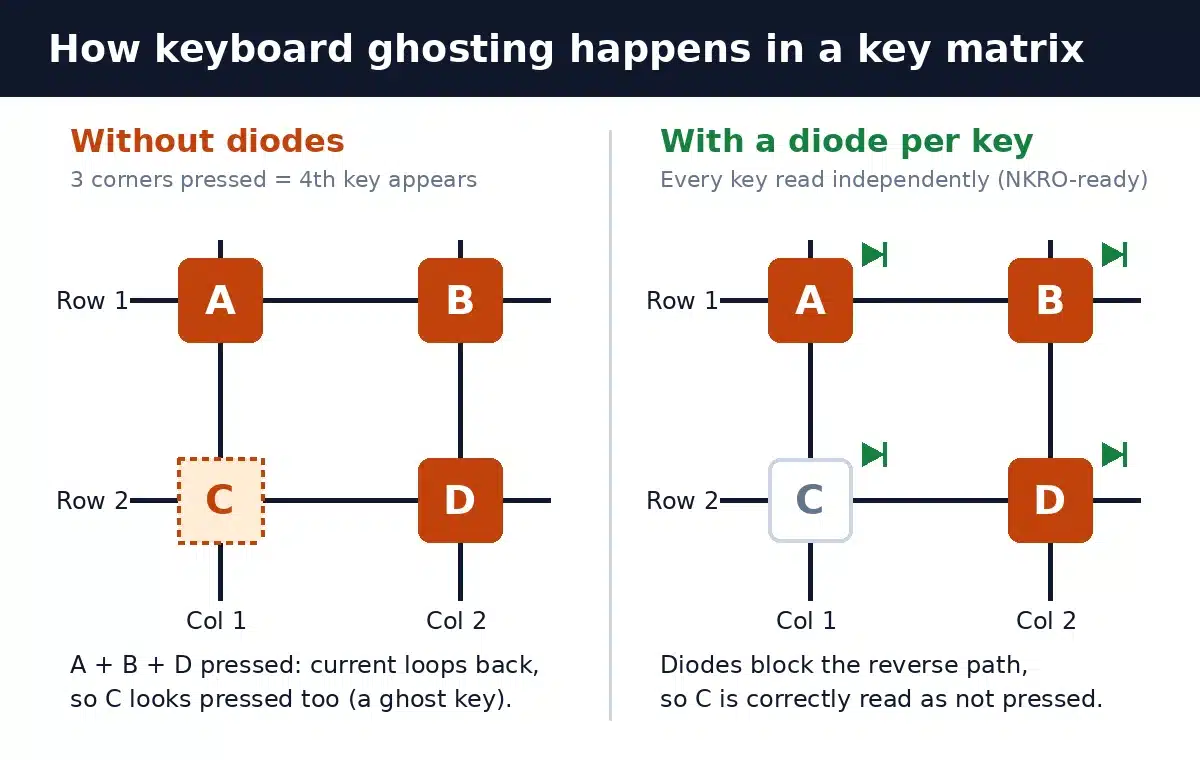
The trouble starts when you press three keys that form three corners of a rectangle in that grid—say A and B on one row and D below B. Current can flow from A’s column, through B, back down through D and into the second row. The controller sees a connection where key C sits, even though C is not pressed. As the QMK firmware documentation puts it, this behavior is called ghosting, and it can be much more common on a bigger keyboard.
The controller cannot tell a genuine four-key press from three keys plus a ghost, because it only checks whether a row and column are connected. So a typical keyboard refuses to report the new key at all. That is why a cheap keyboard can handle W + A but drop the third key in some combinations and not others: it depends on where those keys sit in the matrix.
The fix: one diode per key
The engineering solution is simple. Add a diode in series with every switch. A diode only lets current flow one way, so the sneaky return path through other pressed keys is blocked and the controller reads every key correctly. QMK’s documentation and classic matrix tutorials describe exactly this: a dioded matrix eliminates both ghosting and masking.
Most mechanical keyboards use per-key diodes on their circuit boards. Many budget membrane keyboards do not; instead, manufacturers arrange the matrix so the most common combinations (like WASD plus Shift) work, which simply moves the problem to other combinations. Microsoft’s own research paper on a pressure-sensitive keyboard notes that rearranging the matrix this way “moves the problem to some other combination of keys.” It is one of the practical differences covered in our mechanical vs membrane keyboard comparison.
What is key rollover (2KRO, 6KRO, NKRO)?
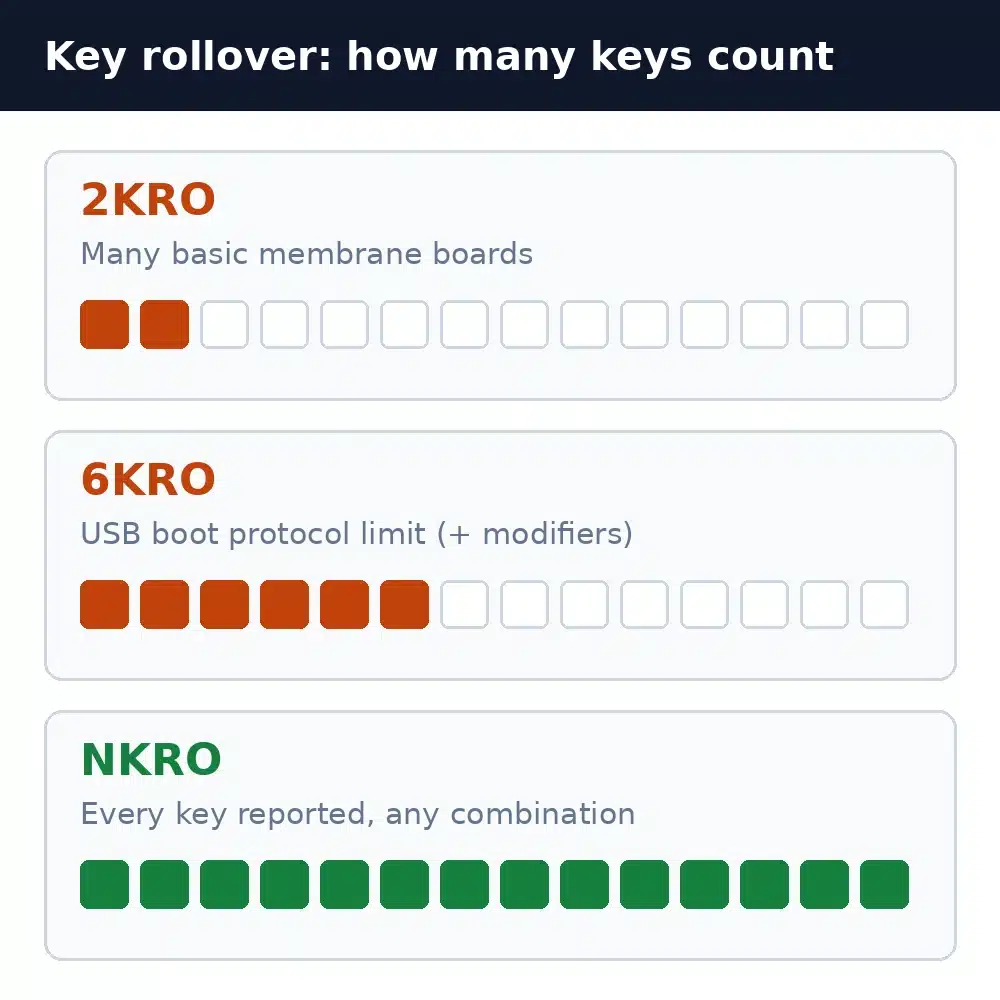
Key rollover is the number of keys a keyboard can correctly register when pressed at the same time. The number in front of “KRO” is that limit:
| Term | What it means | What you notice | Typical cause |
|---|---|---|---|
| Ghosting | A key registers that you never pressed | Phantom characters or actions | Diode-less matrix, three corners of a rectangle pressed |
| Blocking (jamming) | The keyboard ignores a key to avoid a ghost | A key in a combo does nothing | Controller protecting against ambiguous input |
| 2KRO | Two keys are always reported; some 3-key combos fail | Occasional dropped keys in games | Basic membrane and office keyboards |
| 6KRO | Six regular keys plus modifiers at once | Rarely limiting outside heavy gaming | USB boot protocol report, some Bluetooth modes |
| NKRO | Every key reported, in any combination | No dropped keys | Per-key diodes plus a larger USB report |
| “Anti-ghosting” | Marketing term; coverage varies | May still drop keys outside a gaming zone | Often only selected keys are protected |
Be careful with “anti-ghosting” on the box. Microsoft’s Applied Sciences team pointed out that many three-key combinations fail on most keyboards, “even some that are explicitly marketed as ‘Anti-Ghosting’.” Look for a stated rollover figure (6KRO, NKRO, or a specific number) instead.
Why USB keyboards are often limited to 6 keys
The “6” in 6KRO comes from the USB HID specification. To work in a PC’s BIOS or UEFI setup screen before an operating system loads, a keyboard supports a simple boot protocol. Its report is a fixed 8 bytes: one byte for the eight modifier keys (left and right Ctrl, Shift, Alt and Windows/Command), one reserved byte, and six slots for regular keys. Press a seventh regular key and the specification says the keyboard must report an error-rollover code in all six slots rather than a partial list.
That is a limit of the boot report, not of USB itself. Once the operating system loads its HID driver, a keyboard can use a larger report (for example a bitmap with one bit per key) and send every key at once. That is how NKRO works over USB. The catch: in a BIOS screen, or through a device that only understands the boot protocol, even an NKRO keyboard may fall back to 6KRO. Some older NKRO keyboards had compatibility problems on certain systems, which is why many still include an option to switch between NKRO and 6KRO.
Wireless and Bluetooth rollover
Rollover can also change with the connection. Keychron, for example, lists its original low-profile K Series as NKRO on a cable but 5/6-KRO over Bluetooth, while its K Pro Series supports NKRO in both modes. If NKRO matters to you, check the spec for the mode you will actually use. Our wired vs wireless keyboards guide covers the other trade-offs, and our explainer on keyboard polling rate shows why the wired connection is usually the faster one too.
Do you actually need N-key rollover?
- Office work and typing: 6KRO is more than enough. Even very fast typists rarely hold more than two or three keys at once, so rollover limits almost never cause missed letters. If letters vanish, check for a worn switch or key chatter first.
- Gaming: 6KRO covers most situations, but movement keys plus Shift, Ctrl, Space and an ability key can exceed what a cheap 2KRO board handles. NKRO removes the worry completely.
- Rhythm games and local multiplayer: two players on one keyboard, or chart-heavy rhythm games, can press many keys at once. NKRO is worth having.
- Stenography and music apps: steno software such as Plover reads chords of many keys pressed together, and virtual piano apps need full chords. NKRO is effectively required.
For context, Microsoft built its SideWinder X4 gaming keyboard with a multi-touch scanning design that reports any combination of up to 17 regular keys plus seven modifiers, a hot key and a macro key—26 keys in total. Very few people will ever press that many at once. If you are weighing a keyboard upgrade for games, see whether membrane keyboards are good for gaming.
How to test your keyboard for ghosting
You can check your keyboard in a few minutes with any browser-based keyboard tester (search for “keyboard ghosting test” or “key rollover test”):
- Click into the test area so the page has focus, then press each key once to confirm none are dead.
- Hold your real game combination—for example W + A + Shift—then add Space and another key. Every held key should stay highlighted.
- Try a full row: hold Q, W, E, R, T, Y, U and watch whether the seventh key appears. If it stops at six, your keyboard (or connection) is running 6KRO.
- Repeat each combination two or three times. A key that is missing every time points to blocking or a rollover limit; an extra key that you did not press is true ghosting.
Know the limits: a web page only sees what the keyboard and operating system pass along, and system shortcuts (like Windows-key or Command-key combinations) can be intercepted before the browser sees them. A pass in one test also does not prove full NKRO across the whole board.
How to fix keyboard ghosting
- Turn on NKRO. Many gaming and mechanical keyboards ship in 6KRO mode for compatibility and switch to NKRO through their software or an Fn shortcut. Check the manual for your model.
- Use the cable or the 2.4GHz dongle. If your keyboard supports NKRO only when wired, plug it in for gaming.
- Plug straight into the PC. USB hubs, docks and some KVM switches can emulate a basic keyboard and limit rollover. Test with a direct port.
- Rebind problem keys. On a keyboard without diodes, moving an action to a key elsewhere on the board (often a different row or column) can avoid the blocked combination.
- Update the firmware and software. Manufacturers sometimes fix rollover or compatibility problems in updates.
- Upgrade. If a budget membrane keyboard keeps dropping keys, a keyboard with a stated NKRO spec is the permanent fix.
If a single key drops or doubles even when pressed alone, that is not ghosting. It is more likely dirt, a failing switch or chatter; a careful clean is a good first step.
FAQ
Is keyboard ghosting the same as input lag?
No. Ghosting is about keys being missed or invented when several are held at once. Input lag is the delay between pressing a key and seeing the result. A keyboard can have low latency and still ghost, or vice versa.
Is 6KRO enough for gaming?
For most players, yes. Six regular keys plus all modifiers covers movement, sprint, crouch, jump and an ability key. NKRO is a nice extra for heavy combinations, rhythm games or two players on one keyboard.
Do all mechanical keyboards have N-key rollover?
Not all, but most current mechanical and gaming keyboards offer NKRO, at least in wired mode. Check the specification for the connection you plan to use, because some wireless modes are limited to 6KRO.
Why does my NKRO keyboard only register six keys?
It is probably in 6KRO mode, connected over Bluetooth, running through a hub or KVM switch, or being used in a BIOS screen that only understands the USB boot protocol. Enable NKRO in the keyboard’s software or Fn shortcut and connect it directly.
Can laptop keyboards ghost?
Yes. Many laptop keyboards use diode-less membrane matrices and are limited to a few simultaneous keys in some combinations. Gaming laptops more often advertise anti-ghosting or NKRO, but coverage varies by model.
Does anti-ghosting mean NKRO?
No. Anti-ghosting means the maker has taken some steps against ghosting, often only for a group of gaming keys. NKRO means every key is reported in any combination.
The bottom line
Keyboard ghosting comes from how keys are wired: in a matrix without diodes, some combinations look ambiguous, so the keyboard either invents a key or, far more often, blocks one. Per-key diodes plus an NKRO-capable USB report solve it completely. For typing, 6KRO is plenty; for gaming, check that your keyboard is set to NKRO and connected directly; and for steno, music or two-player setups, insist on true NKRO.
