
Keyboard Gear earns from qualifying purchases through Amazon links.
If you write code for a living, your keyboard is not a peripheral—it is a tool you lean on for thousands of keystrokes a day. The best keyboards for programming prioritize layout sanity (arrows and modifiers you can hit without looking), comfortable typing feel, programmability for shortcuts, and enough quiet that coworkers (or sleeping housemates) do not hate you.
This guide compares seven currently sold Amazon US options across premium QMK aluminum, quiet office boards, ergonomic splits, the classic HHKB, a true budget TKL, and an ultra-slim travel mechanical. We focus on what programmers actually notice: nav clusters, OS support (Mac/Windows/Linux), noise, and whether you can remap keys. For the broader “is mechanical worth buying?” question, see our deep dive on whether mechanical keyboards are worth it, and for switch construction basics see mechanical vs membrane.
Quick picks
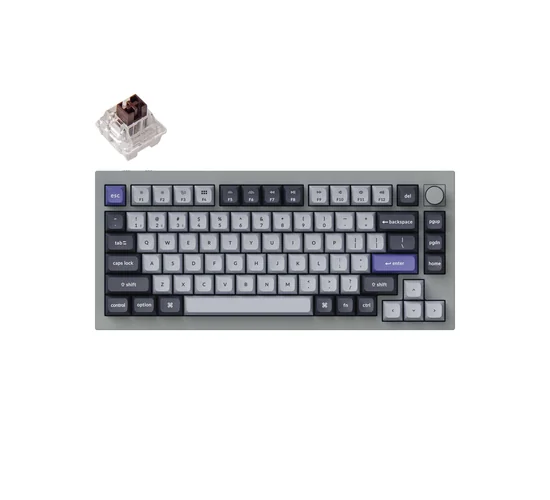
- Best overall: Keychron Q1 Pro — aluminum 75%, QMK/VIA, arrows included
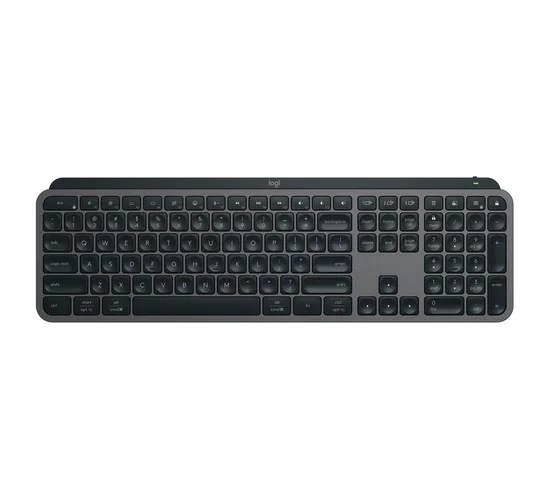
- Best quiet office: Logitech MX Keys S — full-size, near-silent, multi-device
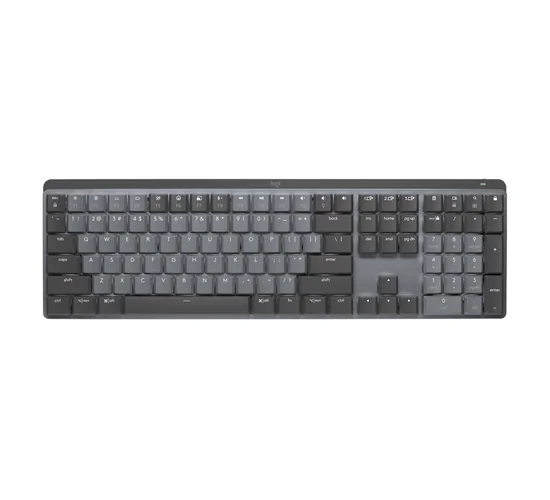
- Best quiet mechanical: Logitech MX Mechanical — low-profile tactile quiet
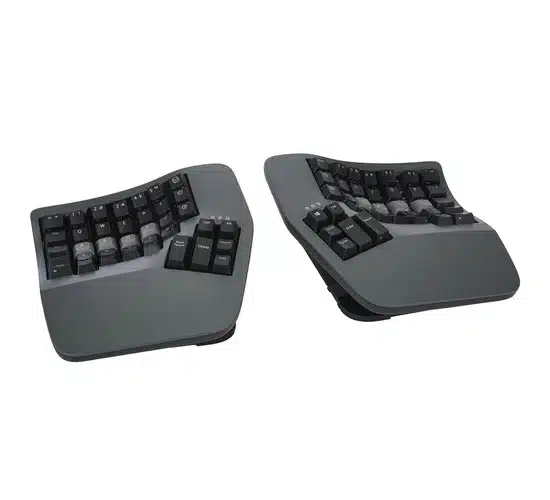
- Best ergonomic: Kinesis Advantage360 Professional — split, tented, programmable
- Best classic 60%: HHKB Professional Hybrid Type-S — silent capacitive, programmer layout
- Best budget: Keychron C3 Pro — wired TKL with QMK/VIA
- Best ultra-slim: Keychron K3 Pro — low-profile 75% for laptop bags
Quick comparison: best keyboards for programming
| Product | Best for | Switch/Type | Layout | Connectivity | Check price |
|---|---|---|---|---|---|
 Keychron Q1 Pro Keychron Q1 Pro |
Most programmers | K Pro Brown (hot-swap) | 75% | Bluetooth / USB-C | View on Amazon |
 Logitech MX Keys S Logitech MX Keys S |
Quiet office coding | Low-profile scissor (quiet) | Full-size | Bluetooth / Logi Bolt | View on Amazon |
 Logitech MX Mechanical Logitech MX Mechanical |
Quiet mechanical feel | Low-profile tactile quiet | Full-size | Bluetooth / Logi Bolt | View on Amazon |
 Kinesis Advantage360 Pro Kinesis Advantage360 Pro |
Ergonomic / RSI relief | Mechanical (e.g. Brown) | Split contoured | Bluetooth / USB-C | View on Amazon |
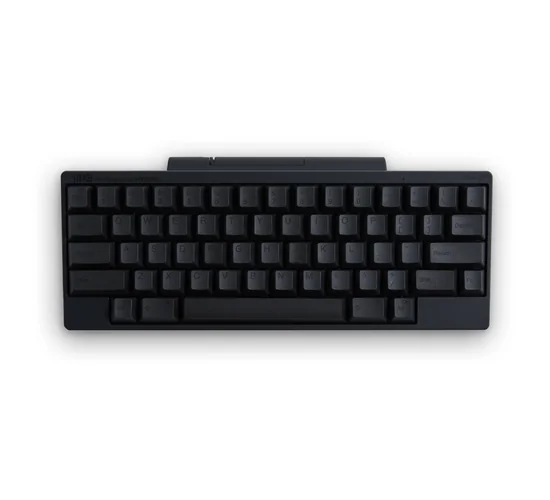 HHKB Hybrid Type-S HHKB Hybrid Type-S |
Classic 60% programmers | Topre capacitive (silent) | 60% HHKB | Bluetooth / USB-C | View on Amazon |
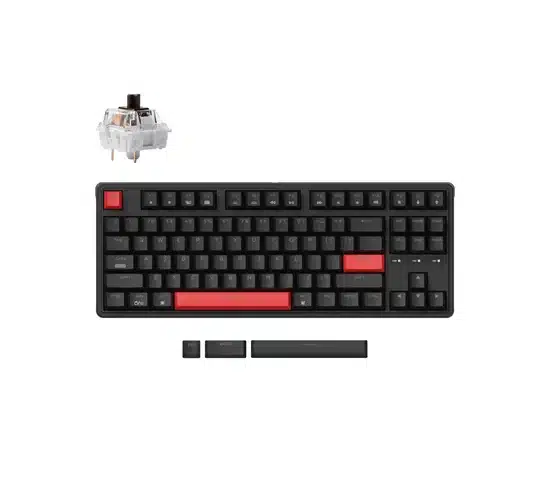 Keychron C3 Pro Keychron C3 Pro |
Best budget pick | Keychron Brown (wired) | TKL (87-key) | USB-C wired | View on Amazon |
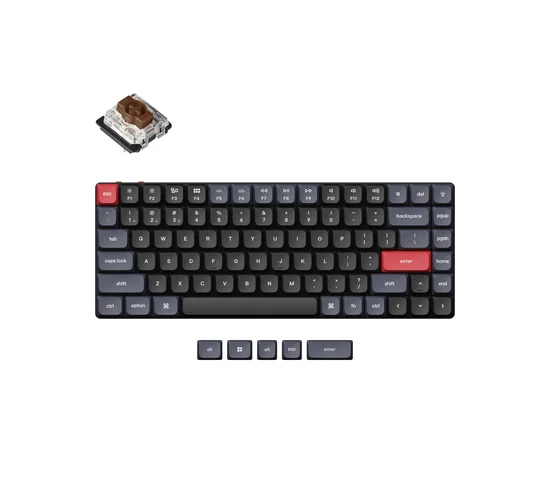 Keychron K3 Pro Keychron K3 Pro |
Ultra-slim / travel | Gateron LP Brown | 75% | Bluetooth / USB-C | View on Amazon |
1. Keychron Q1 Pro — best overall for programming
Who it’s for: Coders who want a serious QMK/VIA aluminum board with a dedicated arrow cluster, without going full custom DIY.
What programmers will like: Programmers get a real 75% deck: Escape, arrows, and page keys stay reachable for editors and terminals. VIA/QMK means macros for snippets, window management, or IDE shortcuts live on the board—not in OS remappers. The gasket aluminum feel is firm enough for long sessions without the hollow ping of cheap plastic shells. Hot-swap lets you try quieter or heavier switches later.
Key specs: 75% (knob) layout with arrows and a compact nav cluster; CNC aluminum body; double-gasket mount; QMK/VIA programmable; Bluetooth 5.1 (up to 3 devices) plus USB-C wired; hot-swappable MX-style sockets; pre-lubed Keychron K Pro switches (Brown on the ASIN we link); KSA double-shot PBT keycaps; south-facing RGB; ~4000 mAh battery (Keychron rates up to about 100 hours at lowest brightness); Mac/Windows keycap sets and OS toggle; Linux-friendly as a standard HID device with QMK tools.
Pros:
- QMK/VIA with deep remapping and macros
- 75% keeps arrows/nav without a full-size footprint
- Aluminum gasket build; hot-swap MX sockets
- Mac + Windows keycaps and Bluetooth multi-device
Cons:
- Premium price vs plastic TKL boards
- Wireless is Bluetooth/wired—no dedicated 2.4 GHz dongle
- Heavier than a travel board
Check the Keychron Q1 Pro on Amazon
2. Logitech MX Keys S — best quiet keyboard for office coding
Who it’s for: Developers in shared offices, libraries, or calls who need a full layout (including a number pad) and near-silent typing—not a clicky mechanical.
What programmers will like: Day-to-day coding is mostly typing, shortcuts, and the occasional numpad for data or calculators. MX Keys S is built for that: stable full layout, quiet scissor feel, and Easy-Switch across laptop + desktop. Options+ Smart Actions can collapse repetitive multi-step chores into one key. It will not feel like a mechanical board—and that is the point for open-plan silence.
Key specs: Full-size low-profile layout with number pad and navigation cluster; spherically dished keys; smart backlighting that responds to hand proximity; Bluetooth Low Energy or Logi Bolt USB receiver; pairs with up to 3 devices; USB-C rechargeable (Logitech claims up to about 10 days with backlight on, or up to about 5 months with backlight off); Logi Options+ for Smart Actions/macros on Windows and macOS; basic HID support on Linux/ChromeOS/iPad/Android; graphite ASIN linked.
Pros:
- Very quiet, fluid low-profile typing
- Full-size with numpad and a clear nav cluster
- Multi-device Bluetooth + Logi Bolt
- Strong Mac/Windows software story via Options+
Cons:
- Not mechanical—enthusiasts may miss switch feel
- No open QMK/VIA; remaps lean on Logi Options+
- Linux gets basic input, not full Options+ features
Check the Logitech MX Keys S on Amazon
3. Logitech MX Mechanical — best quiet mechanical for long coding days
Who it’s for: Programmers who want mechanical feedback without office-annoying noise, plus the same MX multi-device workflow as MX Keys.
What programmers will like: You keep arrows, Home/End/PgUp/PgDn, and a numpad for SQL-ish work or spreadsheets beside the IDE. Low-profile mechanical travel is closer to a laptop than a deep Cherry MX board, which many coders prefer for all-day comfort. Tactile Quiet aims at the “I want feedback, not a drum kit” niche.
Key specs: Full-size low-profile mechanical keyboard; Tactile Quiet switch option on the ASIN we link (Linear and Clicky variants also exist); backlit keys; Bluetooth or Logi Bolt; multi-device pairing; USB-C charging; metal plate feel in the MX lineage; Logi Options+ customization on Windows/macOS; works as a standard keyboard on Linux and mobile OSes for basic input.
Pros:
- Mechanical feedback in a quieter MX package
- Full layout with numpad and nav keys
- Multi-device MX ecosystem with Options+
- Low-profile height pairs well with modern mice
Cons:
- Not hot-swap or QMK—closed Logitech stack
- Pricier than many enthusiast plastic boards
- Switch choice is SKU-locked (buy the feel you want)
Check the Logitech MX Mechanical on Amazon
4. Kinesis Advantage360 Professional — best ergonomic split for programmers
Who it’s for: Developers chasing wrist/shoulder relief, thumb clusters, and a fully programmable contoured layout—even if it means a learning curve.
What programmers will like: Programming is hours of static posture. A true split with tenting and thumb modifiers can move chords off pinkies and reduce ulnar deviation. Deep programmability lets you put Esc, symbols, and layer toggles under thumbs—valuable in Vim/Emacs-heavy workflows. This is a specialized tool, not a “try it for an afternoon” impulse buy.
Key specs: Fully split contoured modules with adjustable tenting; integrated palm supports; orthogonal key wells; thumb key clusters; Professional model adds Bluetooth (multi-device) and USB-C, wireless linking between halves, Clique real-time programming, and backlighting; mechanical switches (Brown tactile on common Pro SKUs; quiet options exist on other ASINs); compact embedded-keypad style layout; bridge connector included for fixed spacing. Expect a multi-week adaptation period.
Pros:
- Serious ergonomic geometry (split, tent, wells, palms)
- Thumb clusters reduce awkward pinky stretches
- Pro model: Bluetooth multi-device + onboard programming
- Built for all-day professionals, not RGB flex
Cons:
- Steep price and steep learning curve
- No traditional staggered row layout or standard arrow cluster
- Overkill if you have no comfort issues on a normal board
Check the Kinesis Advantage360 Pro on Amazon
5. HHKB Professional Hybrid Type-S — best classic programmer 60%
Who it’s for: Coders who want the famous Happy Hacking layout, silent Topre-style capacitive feel, and a compact board that prioritizes home-row efficiency.
What programmers will like: The HHKB layout is a religion in some programming circles for a reason: Ctrl where Caps lives, tight Fn layers, and a board that stays out of the way of the mouse. Type-S keeps the capacitive tactility quieter for shared spaces. You give up dedicated arrows and a nav island—power users remap muscle memory onto layers.
Key specs: HHKB 60-key layout (Control on home row position, compact arrow/nav via Fn layers); silent Type-S capacitive (Topre-family) switches; Bluetooth multi-pairing (up to 4 devices) plus USB-C wired; DIP switches for OS modes; keymap settings stored on the keyboard; PBT keycaps with dye-sublimated legends on printed models; charcoal printed ASIN linked; designed around reducing finger travel for programming and prose.
Pros:
- Legendary programmer-centric layout and Ctrl placement
- Silent capacitive Type-S feel
- Bluetooth + USB-C with onboard keymaps
- Compact desk footprint; excellent PBT build quality
Cons:
- Expensive for 60 keys
- No dedicated arrow/nav cluster—layers required
- Not hot-swap MX; ecosystem is HHKB-specific
Check the HHKB Hybrid Type-S on Amazon
6. Keychron C3 Pro — best budget programming keyboard
Who it’s for: Students, juniors, or anyone who wants real QMK/VIA and a TKL layout without spending enthusiast money.
What programmers will like: TKL is a sweet spot for coding: you keep arrows and Delete/Home/End without shoving the mouse far away. QMK/VIA at this price is the headline—remap Caps to Esc/Ctrl, build a symbols layer, done. Wired-only is a fair trade for the budget tier and rock-solid latency.
Key specs: 87-key TKL layout (arrows + F-row + nav cluster, no numpad); wired USB-C only; gasket mount with sound-absorbing foam; QMK/VIA programmable; Keychron mechanical switches (Brown on linked ASIN); north-facing red LED backlight with multiple effects; double-shot ABS shine-through keycaps; Mac/Windows system toggle (Fn+Caps); ~1000 Hz polling; ABS case with steel plate; about 912 g per Keychron specs.
Pros:
- QMK/VIA at a budget price
- TKL keeps arrows and nav for editors
- Gasket + foam is nicer than bare plastic boards
- Mac/Windows toggle included
Cons:
- Wired only—no Bluetooth
- ABS keycaps (not PBT) on this SKU
- Red LED, not full RGB, on the non-hot-swap brown ASIN
Check the Keychron C3 Pro on Amazon
7. Keychron K3 Pro — best ultra-slim low-profile for programmers
Who it’s for: Laptop-first developers who want mechanical feedback in a slim 75% that throws into a bag and still offers QMK/VIA.
What programmers will like: If your “desk” is a café table or a couch, height and weight matter. K3 Pro keeps a 75% programmer-friendly cluster in a low-profile shell so the transition from MacBook keys is gentler than jumping to a tall MX board. VIA macros still travel with you across machines.
Key specs: 75% ultra-slim layout with arrows and compact nav; Gateron low-profile Brown (tactile) on the linked white-backlight ASIN; QMK/VIA programmable; Bluetooth 5.1 + USB-C wired; Mac/Windows compatible; designed as a low-travel mechanical alternative to laptop chiclet boards. Hot-swap low-profile variants exist as separate SKUs—confirm the listing if hot-swap matters to you.
Pros:
- Low-profile mechanical with QMK/VIA
- 75% arrows/nav in a portable footprint
- Bluetooth multi-device + wired USB-C
- Easier laptop-height transition than full-travel boards
Cons:
- Low-profile switch ecosystem is narrower than MX
- Typing feel differs from full-height mechanicals
- Battery life depends heavily on backlight use
Check the Keychron K3 Pro on Amazon
Buying guide: what programmers should prioritize
Marketing sheets talk about RGB and “gaming” polling rates. Coders should shop a different checklist.
Layout sizes that actually matter
Full-size keeps a number pad—handy for finance tools, Unity/Unreal numeric entry, or spreadsheet-adjacent work. TKL (tenkeyless) drops the numpad and usually improves mouse shoulder room. 75% packs arrows and a tight nav column into a smaller rectangle (great daily driver). 60%/HHKB maximize desk space but force arrows and F-keys onto layers. For a visual tour of percentages, read how to choose your keyboard size.
Switch types and noise
Tactile switches (browns and cousins) are the default coding recommendation: feedback without a loud click. Linears are smooth and fine if you like them. Clicky boards are fun at home and rude on Zoom. Low-profile mechanical and scissor boards trade depth for quieter, laptop-like motion. If you are undecided between mechanical and membrane for desk work, the mechanical vs membrane comparison lays out the tradeoffs without the hype.
Ergonomics and split boards
If your wrists, forearms, or neck complain after long sessions, a contoured split (like the Advantage360) or at least a negative tilt / tented setup can matter more than switch brand. Ortholinear and columnar layouts reduce lateral finger stretches for some people—see whether ortholinear keyboards are better—but expect a real adaptation period. Comfort gear is not a flex accessory; it is injury prevention.
Programmability (QMK, VIA, and vendor software)
Programmers benefit when Caps Lock becomes Esc or Ctrl, when a layer holds symbols under the home row, and when macros fire boilerplate. QMK/VIA (Keychron Q1 Pro, C3 Pro, K3 Pro) is the open standard many enthusiasts prefer. Logitech Options+ covers Smart Actions on MX boards. HHKB and Kinesis store maps onboard with their own tools. Pick the depth you will actually use.
Mac, Windows, and Linux support
Look for Mac/Windows keycap legends or a hardware OS toggle, and confirm Bluetooth pairing limits if you hop between a work PC and a personal MacBook. Linux almost always works for basic typing over USB or Bluetooth HID; fancy RGB/macros dashboards are often Windows/macOS-only. QMK boards are especially friendly on Linux because configuration can live in the firmware.
Wireless vs wired for coding
Coding is not esports: Bluetooth latency is usually fine. Wired still wins for “never think about batteries” desk setups and for flashing firmware. If you care about wireless gaming boards for after-hours play, our best wireless gaming keyboards guide covers 2.4 GHz options separately.
FAQ
What is the best keyboard size for programming?
Most programmers are happiest on TKL or 75%: you keep arrow keys and a nav cluster for editors, without a full-size slab pushing the mouse away. Choose full-size if you live in the number pad. Choose 60%/HHKB if you already think in layers.
Do programmers need mechanical keyboards?
No. Plenty of excellent coders use scissor boards like the MX Keys S. Mechanical helps when you want consistent feel, repairability/hot-swap, or open firmware. It is a preference and comfort choice, not a skill unlock.
Which switches are best for coding?
Tactile (brown-style) or quiet tactile/low-profile options suit most shared environments. Try before you commit if you can; otherwise buy hot-swap so you can change switches later.
Is the HHKB still worth it for programmers?
If you love the layout and capacitive feel, yes—it remains a focused writing/coding instrument. If you need dedicated arrows, a numpad, or MX hot-swap on a budget, a 75% QMK board is usually the more practical buy.
What about ergonomic keyboards for developers with wrist pain?
Consider a true split with tenting (Advantage360 class), improve chair/desk height, and take breaks. A keyboard alone will not fix a bad workstation. See a clinician for persistent pain.
Can I use these keyboards on Linux?
Yes for typing on every board listed. QMK/VIA boards are the easiest to deeply customize on Linux. Vendor apps (Logi Options+, some RGB suites) may be limited or unavailable—plan remaps in firmware or with OS-level tools if needed.
Final verdict
If you want one programming keyboard that covers almost every desk: get the Keychron Q1 Pro—aluminum 75%, QMK/VIA, and a real arrow/nav cluster. Need silence in an office? MX Keys S. Want mechanical feedback without the clack? MX Mechanical. Fighting discomfort? Invest time in the Advantage360 Professional. Craving the classic Happy Hacking ethos? HHKB Hybrid Type-S. On a budget? C3 Pro. Living out of a backpack? K3 Pro.
Match the board to your layout needs and noise constraints first; aesthetics second. Your future wrists—and your teammates on stand-up calls—will thank you.
