

Keyboard Gear earns from qualifying purchases through Amazon links.
Buying a wireless keyboard and mouse combo is the simplest way to clean up a desk: one box, matching batteries or charging, and (usually) one receiver instead of two. The catch is that “combo” covers everything from a basic dongle set for a family PC to a rechargeable, backlit, three-device setup for a full-time professional. This guide compares seven of the best wireless keyboard and mouse combos on Amazon US for work and home, from Logitech’s MX Keys S Combo and Signature Slim MK955 to the ergonomic Wave Keys MK670, Dell’s dual-mode KM720, the budget MK540 and silent MK295, and the compact POP ICON Combo.
We checked each Amazon US product page for availability on November 25, 2026 (Asia/Karachi) and cross-checked specifications against Logitech and Dell product pages, datasheets and support documents. Prices change often, so use the Check Price buttons for live figures. Every pick here is a work-and-home set; if you game, our gaming keyboard and mouse combos guide covers a different set of priorities.
| Product | Best for | Key specs | Price |
|---|---|---|---|
1 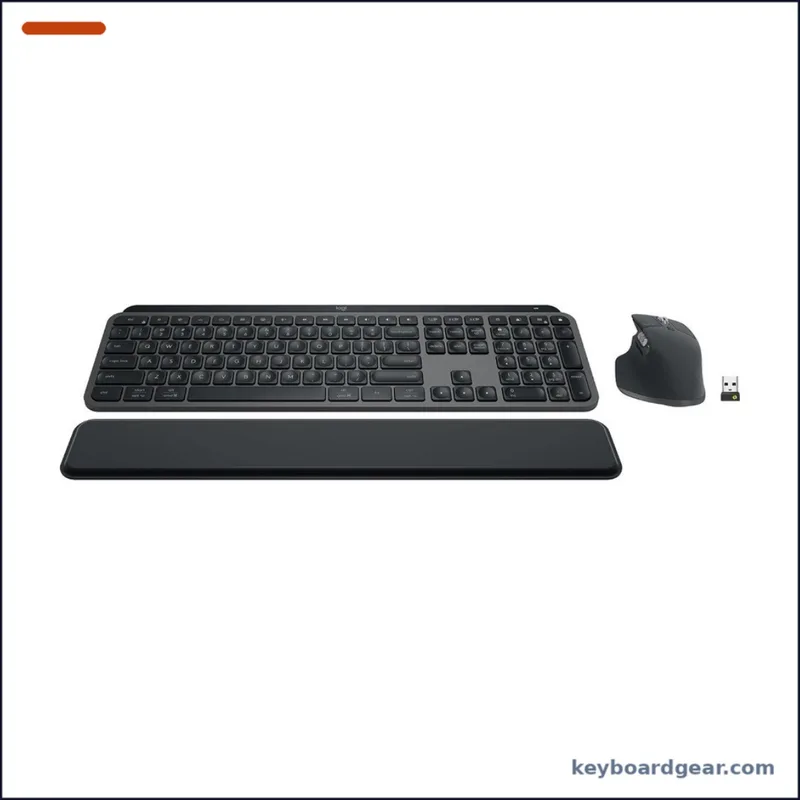 Logitech MX Keys S Combo |
Best overall |
|
Check Price |
2 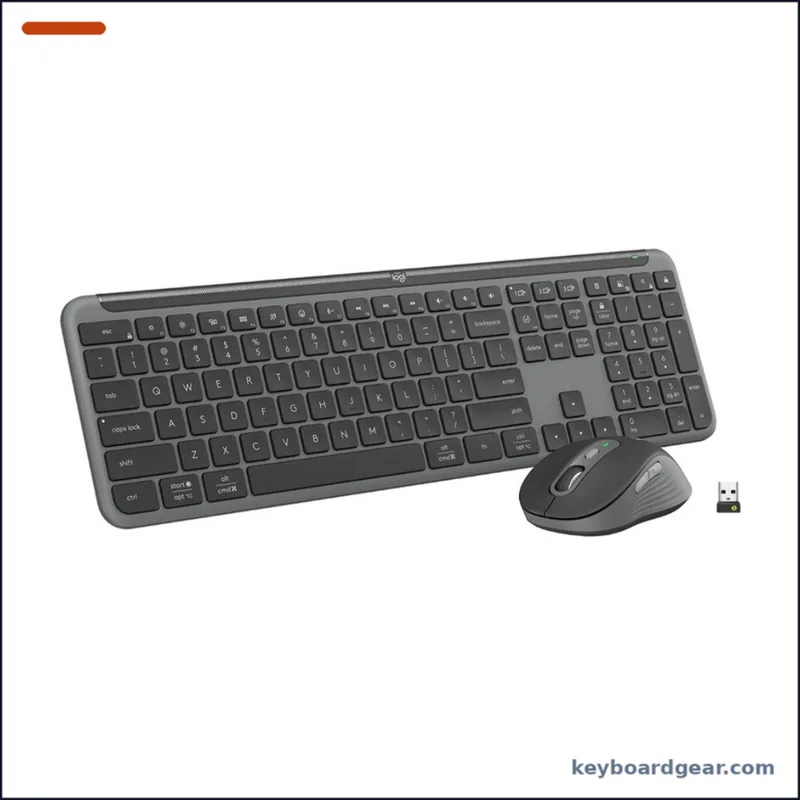 Logitech Signature Slim Combo MK955 |
Best mid-range |
|
Check Price |
3 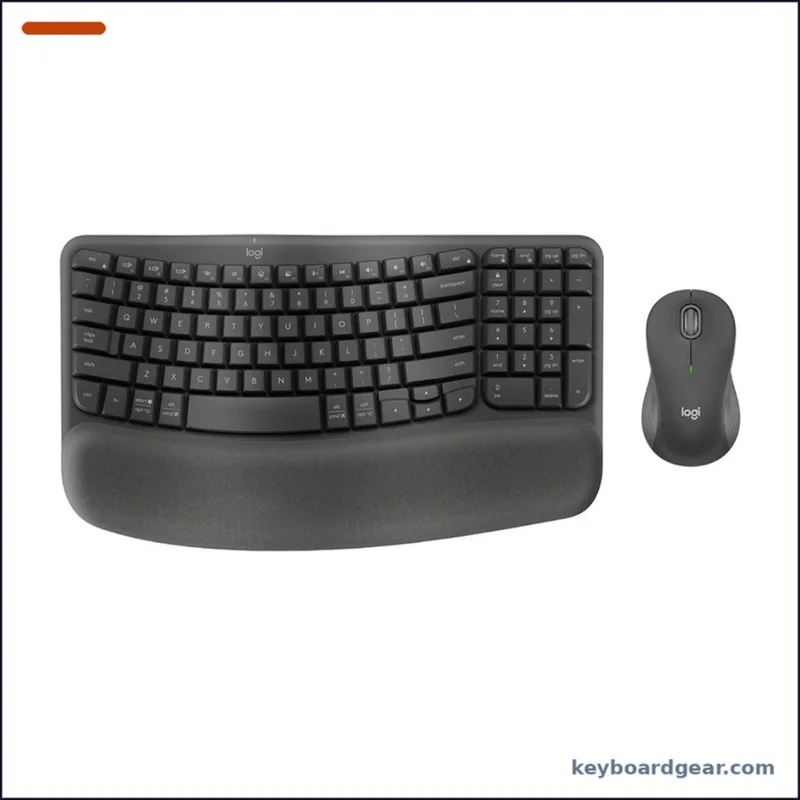 Logitech Wave Keys MK670 Combo |
Best ergonomic |
|
Check Price |
4 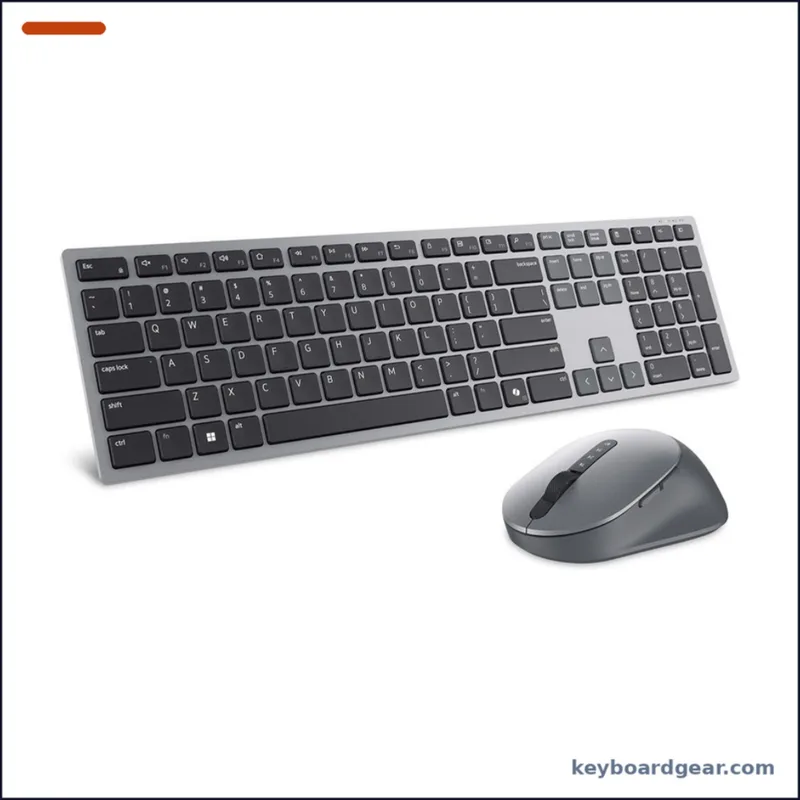 Dell Premium Wireless Keyboard and Mouse KM720 |
Best for Windows offices |
|
Check Price |
5 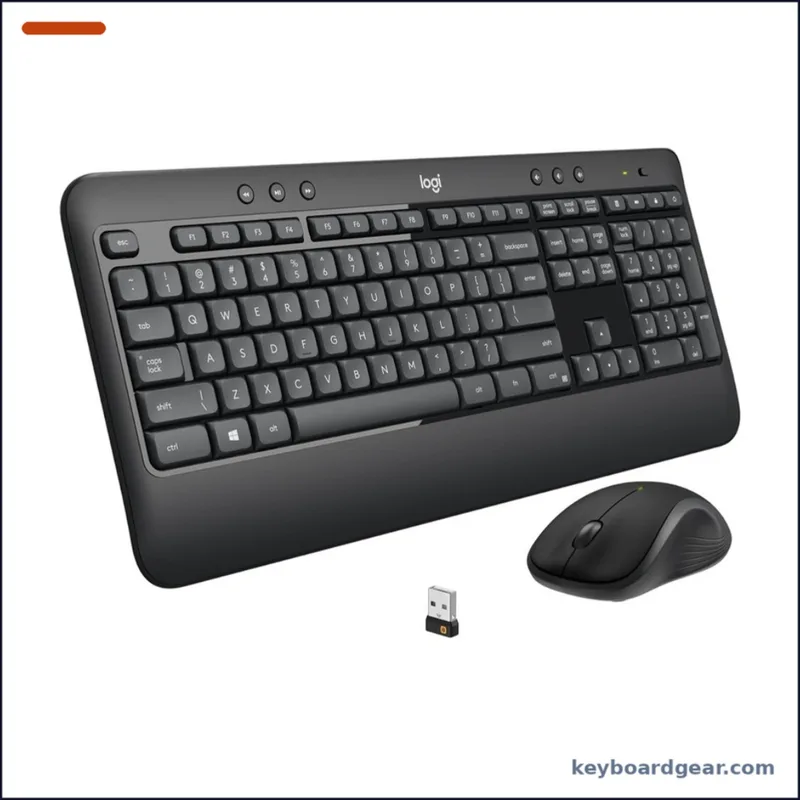 Logitech MK540 Advanced Combo |
Best value full-size |
|
Check Price |
6 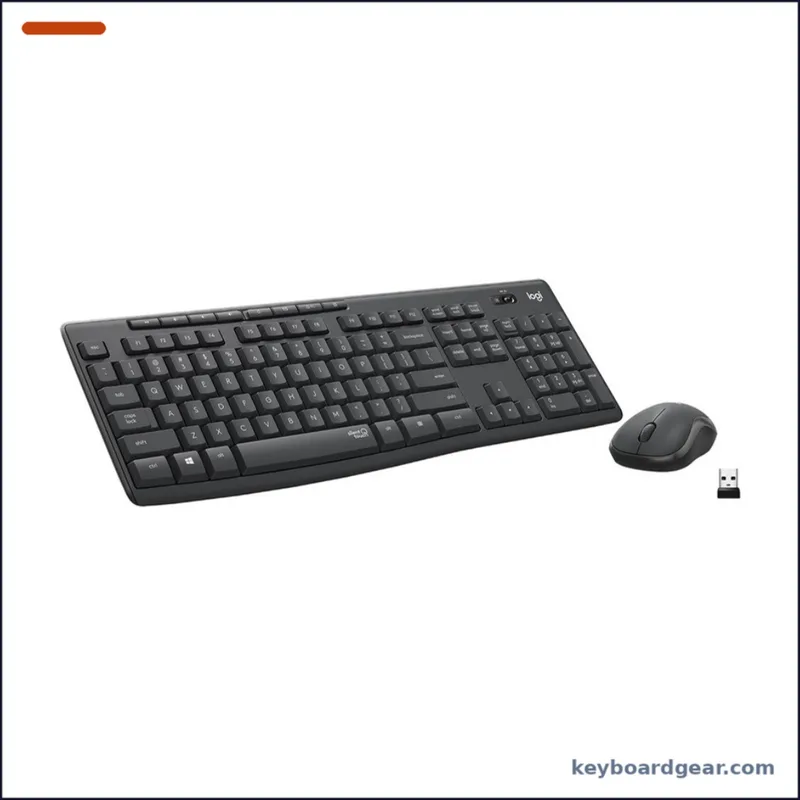 Logitech MK295 Silent Wireless Combo |
Best budget quiet |
|
Check Price |
7  Logitech POP ICON Combo |
Best compact Bluetooth |
|
Check Price |
Quick picks
- Best overall: Logitech MX Keys S Combo — backlit rechargeable keyboard, MX Master 3S mouse and palm rest, with three-device switching.
- Best mid-range: Logitech Signature Slim Combo MK955 — slim full-size typing, a quiet M750 L mouse and years of rated battery life.
- Best ergonomic: Logitech Wave Keys MK670 — a wave key bed and memory-foam palm rest without a split-keyboard learning curve.
- Best for Windows offices: Dell KM720 — 2.4 GHz plus Bluetooth 5.0, a seven-button mouse and programmable F-keys.
- Best value full-size: Logitech MK540 Advanced — built-in palm rest, tilt legs and media keys on one small receiver.
- Best budget quiet: Logitech MK295 Silent — SilentTouch keys and clicks on a full-size set for very little money.
- Best compact Bluetooth: Logitech POP ICON Combo — colourful, quiet and three-device capable for Mac, iPad and laptops.
How to choose a wireless keyboard and mouse combo
The right combo depends far more on your devices, desk and hands than on a spec sheet. Work through these questions and the shortlist gets short quickly.
Receiver, Bluetooth, or both
A USB receiver (Logitech Unifying, Logi Bolt or a maker’s own dongle) is the most plug-and-play option for desktop PCs and usually works before the operating system loads, which helps with BIOS menus and pre-boot password screens. Bluetooth leaves the USB port free and is the only way to connect most tablets and phones. Sets that do both — the MX Keys S Combo, MK955, Wave Keys MK670 and Dell KM720 — are the most flexible. Note that Logi Bolt and the older Unifying receivers are different systems, so a Bolt device will not pair to a Unifying dongle or the other way round. The POP ICON Combo is Bluetooth-only out of the box, while the MK540 and MK295 are receiver-only.
One computer or several
If you switch between a work laptop and a home desktop, look for Easy-Switch or a device button. Three devices is typical. Read the small print, though: on the MK955 and Wave Keys MK670 the keyboard switches between three devices but the mouse does not, while on the MX Keys S Combo and POP ICON Combo both pieces can. Dell says the KM720 connects up to three devices across its receiver and Bluetooth modes.
Full-size, compact or ergonomic layout
A full-size keyboard with a number pad is still the best choice for spreadsheets and data entry, but it pushes the mouse further from your body. Compact layouts such as the POP ICON keep the mouse closer and fit small desks; the Wave Keys keeps a number pad in a narrower body. Our tenkeyless keyboards explainer covers the trade-offs of dropping the number pad. If you already have wrist or forearm discomfort, a wave or split shape and a padded rest matter more than any other feature — see our keyboard wrist rest picks if your favourite board lacks one.
Key feel and noise
Slim scissor keys (MX Keys S, K950 in the MK955) feel like a good laptop keyboard: short, stable and quiet. Membrane “plunger” keys (Wave Keys, MK540, MK295) have more travel and a softer bottom-out. For calls and open-plan offices, look for quiet-click mice (SilentTouch on Logitech’s Signature and MK295 sets) and a quiet keyboard. If you want a mechanical feel instead, none of these combos are mechanical; start with our best wireless mechanical keyboards and add a separate mouse.
Batteries versus recharging
Most combos run on AA and AAA alkaline cells and are rated for one to three years — genuinely set-and-forget. The MX Keys S Combo is rechargeable over USB-C; that gives you backlighting and a premium mouse, but you will plug the keyboard in every week or two if you keep the backlight on. Battery ratings are manufacturer estimates and depend on how much you type and whether you use features like backlighting.
Mouse size, shape and software
The mouse is where combos usually cut corners. The MX Master 3S, M750 L and M550 L are full-size mice for medium to large hands; the MK540, MK295 and POP Mouse are smaller and simpler. Our mouse grip styles guide explains why palm-grip users prefer bigger shells. Customisation runs through Logi Options+ (Windows and macOS) or Dell Peripheral Manager (Windows only); basic typing and pointing work without either.
Operating system and security
Check official support before you buy. The MX, Signature, Wave Keys and POP ICON sets list Windows, macOS and more; the MK540 and MK295 are officially Windows and ChromeOS sets, and Dell’s software is Windows-only. If you handle sensitive work, prefer modern encrypted connections such as Logi Bolt or Bluetooth Low Energy — our wireless keyboard security guide explains why, and our wired vs wireless keyboards comparison covers latency and reliability.
1. Logitech MX Keys S Combo — best premium wireless keyboard and mouse combo
Who it’s for: Professionals, developers and anyone who spends all day at a desk and wants the most capable keyboard-and-mouse set Logitech sells, with backlighting and multi-device switching.
The MX Keys S Combo is Logitech’s “Performance Combo”: a full-size MX Keys S keyboard, an MX Master 3S mouse and the MX Palm Rest in one box, together with a Logi Bolt USB receiver and a USB-A to USB-C charging cable. It is the only set in this guide that is rechargeable on both sides and the only one with backlit keys, and it is the one we would buy for a main work desk if the budget allows.
The keyboard uses low-profile scissor keys with spherically dished keycaps, which Logitech says reduces mistypes and keeps the board quieter. Smart backlighting wakes as your hands approach and adapts to room light; Logitech’s support specification rates the 1,500 mAh battery at up to 10 days with backlighting on or about five months with it off. Easy-Switch keys move between up to three paired devices, and Smart Actions in Logi Options+ let you chain several steps (open an app, mute, start a timer) to one key. Logitech lists the keyboard at 430.2 × 131.63 × 20.5 mm and 810 g, so it stays put on the desk.
The MX Master 3S is still one of the most complete work mice around: an 8,000 DPI Darkfield sensor that tracks even on glass, a MagSpeed electromagnetic wheel that Logitech rates at 1,000 lines per second, a side thumb wheel and quiet clicks. It has a 500 mAh rechargeable battery that Logitech rates for up to 70 days. It is a large right-handed mouse (124.9 × 84.3 × 51 mm, 141 g), which is the main reason not to buy this set if you are left-handed or have small hands. Logitech has since launched the MX Master 4 as a standalone mouse, but this combo still ships with the 3S — which is fine, because the 3S was never the weak link. If you mainly want the mouse, see our best wireless mouse guide.
Key specs: Full-size backlit MX Keys S (1,500 mAh, USB-C); MX Master 3S (8K DPI Darkfield, MagSpeed, up to 70 days); Bluetooth or Logi Bolt; 3 devices; palm rest and USB-A to USB-C cable included.
- Backlit, rechargeable keyboard with Smart Actions
- MX Master 3S mouse tracks on glass
- Palm rest and Logi Bolt receiver in the box
- Three-device switching on both pieces
- The most expensive set in this guide
- Large right-handed mouse only
- Backlighting cuts battery life to days, not months
2. Logitech Signature Slim Combo MK955 — best mid-range combo for multi-device desks
Who it’s for: People who want laptop-style typing on a full-size board, a comfortable mouse for larger hands and a keyboard that hops between a work laptop, a home PC and a tablet — without paying MX money.
The Signature Slim Combo MK955 pairs the Signature Slim K950 keyboard with the Signature Plus M750 L mouse. The keyboard is a full-size, 108-key (US) design with a number pad and slim scissor keys, and its Easy-Switch keys let you jump between up to three paired devices. It connects through the included Logi Bolt receiver or Bluetooth Low Energy 5.1, so you can keep the receiver in a desktop and use Bluetooth for a laptop or iPad. Tilt legs give a 4° or 8° typing angle.
There is no backlighting, but the trade-off is battery life: Logitech rates the keyboard at up to 36 months on two AAA cells and the mouse at up to 24 months on one AA, all included. The M750 L is the larger version of the Signature M750, sized for big hands (Logitech lists it at 118.7 × 66.2 × 42 mm and about 115 g), with SilentTouch switches that Logitech says cut click noise by 90%, a SmartWheel that switches between line-by-line and free-spinning scroll, and a 400–4,000 DPI sensor. It is a right-handed shape.
One thing to know: the keyboard handles three devices, but the mouse is a single-connection design (Bolt or Bluetooth), so it is best left on your main computer. Logi Options+ on Windows and macOS lets you remap keys and buttons. Logitech lists the K950 at 433.8 × 134.8 × 23.1 mm and 685 g. If you want backlighting, step up to the MX Keys S Combo; if you mostly want quiet and long battery life, this is the sweet spot.
Key specs: Full-size K950 (108 keys, scissor, no backlight, 2× AAA up to 36 months); M750 L (SilentTouch, 400–4,000 DPI, 1× AA up to 24 months); Logi Bolt and Bluetooth 5.1; keyboard switches 3 devices.
- Slim, quiet full-size keyboard with number pad
- Keyboard switches between three devices
- Years of rated battery life on AA/AAA cells
- Bolt receiver and Bluetooth both supported
- No backlighting
- Mouse has no three-device switching
- Right-handed mouse sized for larger hands
3. Logitech Wave Keys MK670 Combo — best ergonomic wireless keyboard and mouse combo
Who it’s for: Anyone who feels wrist or forearm strain on a flat keyboard but does not want the learning curve of a fully split board.
The Wave Keys MK670 combines the Wave Keys keyboard with a Signature M550 L mouse. The keyboard’s gentle wave-shaped key bed and built-in cushioned palm rest with memory foam are designed to put your hands and wrists in a more natural position, and Logitech says the keyboard is certified ergonomic by United States Ergonomics. It keeps a number pad, but its overall footprint (375.9 × 218.9 mm) is narrower than a standard full-size keyboard, so the mouse sits closer to your body.
The keys are a deeper “plunger” (membrane) type with 2.5 mm of travel and a 50 g actuation force, so this feels more like a classic desktop keyboard than the slim MX and Signature boards. The keyboard uses Logi Bolt or Bluetooth Low Energy and Easy-Switch keys to toggle between a PC, a tablet and a phone; Logitech notes that Easy-Switch does not apply to the M550 L mouse. Two AAA batteries are rated for up to 36 months.
The Signature M550 L is a full-size, ambidextrous mouse sized for medium to large hands, with SilentTouch technology (90% less click noise, per Logitech), rubber side grips, SmartWheel scrolling and a 400–4,000 DPI sensor. Its single AA battery is rated for up to 24 months on the receiver and about 20 months over Bluetooth. If your pain is mainly in the mouse hand, consider pairing a regular keyboard with a vertical mouse instead; if it is in the wrists while typing, this combo is the easiest step into ergonomic gear. For split and tented boards, see our best ergonomic keyboards guide.
Key specs: Wave Keys with memory-foam palm rest and number pad (2× AAA up to 36 months, 750 g); ambidextrous M550 L (SilentTouch, 400–4,000 DPI, 1× AA up to 24 months); Logi Bolt and Bluetooth.
- Wave shape and memory-foam palm rest built in
- Number pad kept in a narrower body
- Quiet, ambidextrous M550 L mouse
- Long rated battery life on both pieces
- Deeper membrane keys feel softer than scissor boards
- Mouse cannot use Easy-Switch
- Palm rest makes it bulkier to move
4. Dell Premium Wireless Keyboard and Mouse KM720 — best combo for Dell and Windows offices
Who it’s for: Windows users — especially people on Dell laptops and docks — who want a slim, quiet full-size set with both a receiver and Bluetooth and a few programmable keys.
Dell’s KM720 is a slim, full-size keyboard with a number pad and a titan-gray finish, paired with a sculpted seven-button mouse. Its headline is dual-mode connectivity: a 2.4 GHz USB receiver plus Bluetooth 5.0, with a connection-mode key on the keyboard and a button on the mouse. Dell’s product imagery says the set can connect up to three devices, which makes it a direct rival to Logitech’s multi-device combos.
Dell Peripheral Manager (Windows only) lets you program the F1–F12 keys and switch the mouse between preset 1,000, 1,600 (default), 2,400 and 4,000 DPI levels. Dell describes the keyboard as quiet, and rates battery life at up to 36 months, based on its own usage model. The Amazon listing includes the batteries and a year of Dell’s Advanced Exchange Service.
This is a newer listing with far fewer customer ratings than the Logitech sets, and Dell’s software and published specifications are much thinner than Logitech’s: there is no published Mac software, no backlighting and no official weight on the listing, so we have not guessed at one. If you work on a Mac or iPad, pick the Logitech MK955 or POP ICON instead. If your office already standardises on Dell hardware, though, the KM720 is a tidy, low-maintenance fit.
Key specs: Full-size slim keyboard with 12 programmable F-keys; seven-button mouse with 1,000–4,000 DPI presets (Windows software); 2.4 GHz receiver and Bluetooth 5.0; up to 3 devices; up to 36 months battery (Dell estimate).
- Receiver and Bluetooth in one set
- Seven-button mouse with DPI presets
- Programmable F-keys in Dell Peripheral Manager
- Rated up to 36 months on batteries
- Software is Windows-only
- Few published specs and fewer reviews than Logitech
- No backlighting
5. Logitech MK540 Advanced Combo — best value full-size wireless combo
Who it’s for: Home offices and family PCs that want a traditional full-size keyboard with a built-in palm rest and media keys, at a mid-budget price.
The MK540 Advanced is the classic “plug in the dongle and forget it” Logitech set. The full-size keyboard has a number pad, an integrated palm rest, adjustable tilt legs (Logitech lists natural, 4° and 8° angles), a spill-resistant design and a row of hotkeys for media, calculator and a battery check. The ambidextrous mouse has soft rubber side grips and a standard wheel.
Both pieces share a single small USB-A receiver with a rated range of up to 10 m (33 ft). Logitech rates the keyboard for up to 36 months on two AA batteries and the mouse for up to 18 months on one AA. Logitech lists the keyboard at 457.3 × 193.5 × 24 mm and 805 g — a bigger, heavier board than the slim sets above, which is what gives it the wrist rest and stability.
This is a receiver-only combo: there is no Bluetooth and no multi-device switching, and Logitech’s official compatibility list is Windows and ChromeOS. The mouse is basic (Logitech’s datasheet lists 1,000 DPI), so it suits office work rather than design or gaming. If you want the same idea with quieter keys and lower cost, the MK295 below is the alternative; if you need Bluetooth or three devices, move up to the MK955.
Key specs: Full-size keyboard with palm rest, tilt legs and hotkeys (2× AA up to 36 months); ambidextrous 1,000 DPI mouse (1× AA up to 18 months); one USB-A receiver, 10 m range; Windows and ChromeOS.
- Built-in palm rest and tilt legs
- One small receiver for both pieces
- Spill-resistant, with media hotkeys
- Long rated battery life
- No Bluetooth or multi-device switching
- Basic 1,000 DPI mouse
- Large footprint on small desks
6. Logitech MK295 Silent Wireless Combo — best budget quiet wireless keyboard and mouse
Who it’s for: Students, shared offices and budget buyers who want a full-size keyboard and mouse that stay quiet on calls.
The MK295 is the budget pick we would actually recommend for a shared room. Logitech’s SilentTouch technology is rated to cut typing and clicking noise by 90% while keeping a normal key feel, and it applies to both the keyboard and the mouse. You still get a full number pad and eight shortcut keys for play/pause, volume, mute and the web, plus a spill-resistant design and adjustable tilt legs.
Connection is a tiny plug-and-play 2.4 GHz USB receiver with a rated 10 m range, and both pieces have on/off switches. Logitech rates the keyboard at up to 36 months and the mouse at up to 18 months; per Logitech’s support specifications, the keyboard runs on two AAA batteries and the mouse on one AA. The keyboard is light (about 495 g with batteries) and the compact mouse is about 74 g. The graphite version uses certified recycled plastic: 71% for the keyboard and 49% for the mouse, according to Logitech.
Like the MK540, it is receiver-only and officially supports Windows and ChromeOS. The small, symmetrical mouse is comfortable for short sessions but not as supportive as the M550 L or M750 L. If you want the cheapest Logitech set and don’t need quiet keys, the long-running MK270 is the usual alternative; we prefer the MK295 for its silent switches.
Key specs: Full-size SilentTouch keyboard with number pad and 8 shortcuts (2× AAA up to 36 months); compact SilentTouch mouse (1× AA up to 18 months); 2.4 GHz USB receiver, 10 m range; Windows and ChromeOS.
- SilentTouch keys and clicks for shared spaces
- Full number pad and media shortcuts
- Low price for a quiet full-size set
- Spill-resistant with tilt legs
- Receiver only — no Bluetooth
- Small, basic mouse
- Officially Windows and ChromeOS only
7. Logitech POP ICON Combo — best compact Bluetooth combo for Mac, iPad and laptops
Who it’s for: Mac, iPad and laptop users with a small desk who want a colourful, quiet set that switches between devices over Bluetooth.
The POP ICON Combo pairs a compact POP Icon keyboard with a matching POP Mouse, and it is the most fun-looking set here (this link is the Lilac version). Instead of the round typewriter keys of the older POP Keys, the POP Icon uses low-profile, contoured chiclet keys, which are quieter and more conventional to type on. The compact layout drops the number pad and adds four customisable Action Keys on the right edge that you can map in Logi Options+ — for example to switch between work and break modes or open AI tools.
Both the keyboard and the mouse have their own Easy-Switch buttons and pair with up to three devices over Bluetooth Low Energy, across Windows, macOS, iPadOS, iOS, ChromeOS, Android and Linux, and the keyboard has a dual-printed Windows/Mac layout. Logitech notes the set is Logi Bolt compatible, but no receiver is included. Batteries are included and rated for up to 36 months in the keyboard (two AAA) and up to 24 months in the mouse (one AA).
The POP Mouse has silent clicks (Logitech says over 90% quieter than its M185), a SmartWheel and a customisable top button under the wheel, with tracking up to 4,000 DPI. Logitech lists the keyboard at 324.51 × 136.96 × 22 mm and 530 g, and the mouse at 81.4 g. The keyboard uses a fixed wedge angle with no tilt feet, and the small, low mouse is better for travel and light work than for long design sessions. If you are on a Mac, also see our best keyboards for Mac.
Key specs: Compact POP Icon keyboard with 4 Action Keys (2× AAA up to 36 months, 530 g); POP Mouse with silent clicks and SmartWheel (1× AA up to 24 months, 81.4 g); Bluetooth, 3 devices each; Bolt receiver not included.
- Compact, colourful and quiet
- Both pieces switch between three devices
- Action Keys for shortcuts in Logi Options+
- Works across Mac, iPad, Windows and more
- No number pad
- No USB receiver in the box
- No tilt adjustment; small mouse
Wireless keyboard and mouse combo comparison
| Combo | Best for | Connection | Keyboard | Mouse | Power |
|---|---|---|---|---|---|
| Logitech MX Keys S Combo | Overall | Bluetooth + Logi Bolt, 3 devices | Full-size, backlit scissor keys | MX Master 3S, 8K Darkfield, right-handed | Rechargeable USB-C (10 days backlit / ~5 months unlit; mouse up to 70 days) |
| Logitech Signature Slim MK955 | Mid-range | Bluetooth + Logi Bolt, keyboard 3 devices | Full-size slim scissor keys | M750 L, 400–4,000 DPI, right-handed | 2× AAA up to 36 mo; 1× AA up to 24 mo |
| Logitech Wave Keys MK670 | Ergonomic | Bluetooth + Logi Bolt, keyboard 3 devices | Wave layout, palm rest, number pad | M550 L, 400–4,000 DPI, ambidextrous | 2× AAA up to 36 mo; 1× AA up to 24 mo |
| Dell KM720 | Windows offices | 2.4 GHz + Bluetooth 5.0, up to 3 devices | Full-size slim, 12 programmable F-keys | 7 buttons, 1,000–4,000 DPI | Up to 36 months (Dell estimate) |
| Logitech MK540 Advanced | Value full-size | USB-A receiver only | Full-size, palm rest, spill-resistant | Ambidextrous, 1,000 DPI | 2× AA up to 36 mo; 1× AA up to 18 mo |
| Logitech MK295 Silent | Budget quiet | USB receiver only | Full-size, SilentTouch, spill-resistant | Compact, SilentTouch | Keyboard up to 36 mo; mouse up to 18 mo |
| Logitech POP ICON Combo | Compact Bluetooth | Bluetooth, 3 devices each (Bolt optional) | Compact, 4 Action Keys | POP Mouse, up to 4,000 DPI, silent | 2× AAA up to 36 mo; 1× AA up to 24 mo |
FAQ
What is the best wireless keyboard and mouse combo?
For most people at a main work desk, the Logitech MX Keys S Combo is the most complete: a backlit rechargeable keyboard, the MX Master 3S mouse, a palm rest and three-device switching. If you would rather not recharge anything, the Signature Slim Combo MK955 is the best balance of comfort, quiet and battery life. On a tight budget, the MK295 Silent is our pick.
Are wireless keyboard and mouse combos worth it over buying separately?
Usually, yes, if you want matching connectivity and one receiver. Buying separately makes sense when you want a specific mouse — a vertical, trackball or flagship model — or a mechanical keyboard, because combos rarely include those. Our best wireless mouse and quiet mechanical keyboard guides are good starting points for a mix-and-match setup.
Do these combos work with a Mac?
The MX Keys S Combo, MK955, Wave Keys MK670 and POP ICON Combo list macOS support, and the POP ICON has a dual Windows/Mac layout. The MK540 and MK295 are officially Windows and ChromeOS products; basic typing may work on a Mac, but Mac-specific keys and support are not promised. Dell’s KM720 software is Windows-only.
Can one combo work with several computers?
Yes, with the right model. The MX Keys S Combo and POP ICON Combo switch both keyboard and mouse between up to three devices. The MK955 and Wave Keys MK670 keyboards switch between three devices while their mice stay on one connection. Dell says the KM720 connects up to three devices. The MK540 and MK295 work with one computer via their receiver.
Can I use a Logi Bolt combo with a Unifying receiver?
No. Logi Bolt and Unifying are separate wireless systems, so Bolt devices pair only with Bolt receivers (or Bluetooth), and Unifying devices pair only with Unifying receivers. Keep the receiver that came with your combo, or use Bluetooth where supported.
How long do the batteries last?
Logitech rates most of its AA/AAA combos at up to 36 months for the keyboard and 18–24 months for the mouse, and Dell rates the KM720 at up to 36 months. The rechargeable MX Keys S lasts up to 10 days with backlighting on or about five months with it off, and the MX Master 3S up to 70 days per charge. Real-world results vary with use.
Why is my wireless keyboard lagging or typing the wrong characters?
Lag is usually distance, interference or low batteries: move the receiver closer (a USB extension helps with rear desktop ports) and replace the cells. Wrong characters are more often a layout or language setting than a hardware fault — our keyboard typing wrong characters guide walks through the fixes.
How do I keep a keyboard and mouse combo clean?
Power both pieces off, remove loose debris, then wipe keys and the mouse shell with a lightly dampened microfibre cloth. Spill-resistant does not mean waterproof. Our keyboard cleaning guide has step-by-step instructions.
Final verdict
Buy the Logitech MX Keys S Combo if you want the best all-round wireless keyboard and mouse combo for a main desk and are happy to recharge. Choose the Signature Slim Combo MK955 for quiet, slim typing and multi-year battery life, the Wave Keys MK670 if wrist comfort is the priority, and the Dell KM720 if you run a Windows or Dell-based office and want both a receiver and Bluetooth. For simple single-PC setups, the MK540 Advanced gives you a palm rest and media keys, the MK295 Silent keeps things quiet on a budget, and the POP ICON Combo is the compact, colourful Bluetooth pick for Mac, iPad and small desks.

Experience is what matters at the end!!
Hi! This is Jacob Jay – founder of Keyboardgear.com! From childhood to adulthood, I’ve always remained passionate about IT, and the revolution in this industry, especially gaming on the PC can’t go out of my way. Since I’m an enthusiastic gamer, and I love to experience various gaming accessories, particularly mechanical keyboards, that really boost my gaming adventure manifolds. So, my nerve cells hit me to transfer my experiences into word form and share with others to identify the ideal keyboards perfectly fit for their gaming modes.
I know very well how hard it is to find the high-quality items available on the internet that ought to be exactly the same as seen as on the screen. But the counterfeiters have ruined the user’s trust. As I have passed all such situations, I’m obliged to deliver the genuinity and express the same as what I am saying.
So, now, I’m working on the mission to provide very helpful and frankly but trustworthy reviews and guides about various mechanical keyboards, mouses, and other gaming accessories as per my personal experiences and sound knowledge.