
Keyboard Gear earns from qualifying purchases through Amazon links.
If your wrist aches after a long day at the computer, a vertical mouse is one of the simplest changes you can make. By turning your hand into a handshake position, it stops your forearm from twisting flat against the desk. This guide compares the seven best vertical mice on Amazon US, from a budget Anker to Razer’s high-end Pro Click V2 Vertical.
We checked each Amazon product page for stock on November 14, 2026 (Asia/Karachi) and cross-checked specs against the listings and manufacturer pages. Prices change often, so use the Check Price buttons for live figures. Already comparing ergonomic gear? See our types of ergonomic keyboards and are ergonomic keyboards better guides.
Quick picks
- Best overall: Logitech MX Vertical
- Best for small hands: Logitech Lift
- Best budget: Anker 2.4G Wireless Vertical Ergonomic Mouse
- Best performance: Razer Pro Click V2 Vertical Edition
- Best gentle angle: Kensington Pro Fit Ergo Vertical Wireless Mouse
- Best sized fit: Evoluent VerticalMouse D Medium Wireless
- Best small budget: DELUX M618 Mini Vertical Mouse
At a glance: best vertical mice compared
| Product | Best for | Key specs | Price |
|---|---|---|---|
1 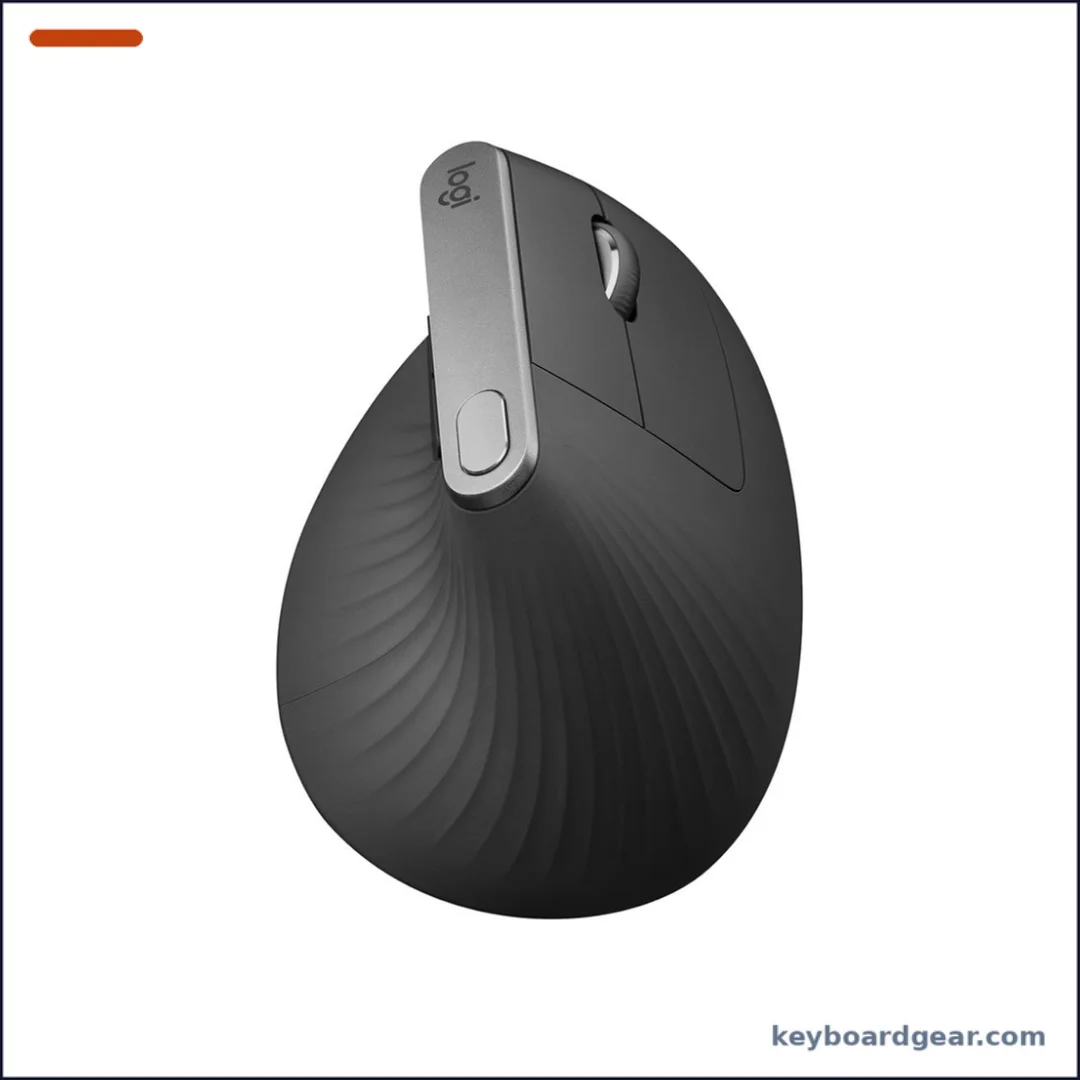 Logitech MX Vertical |
Best overall |
|
Check Price |
2 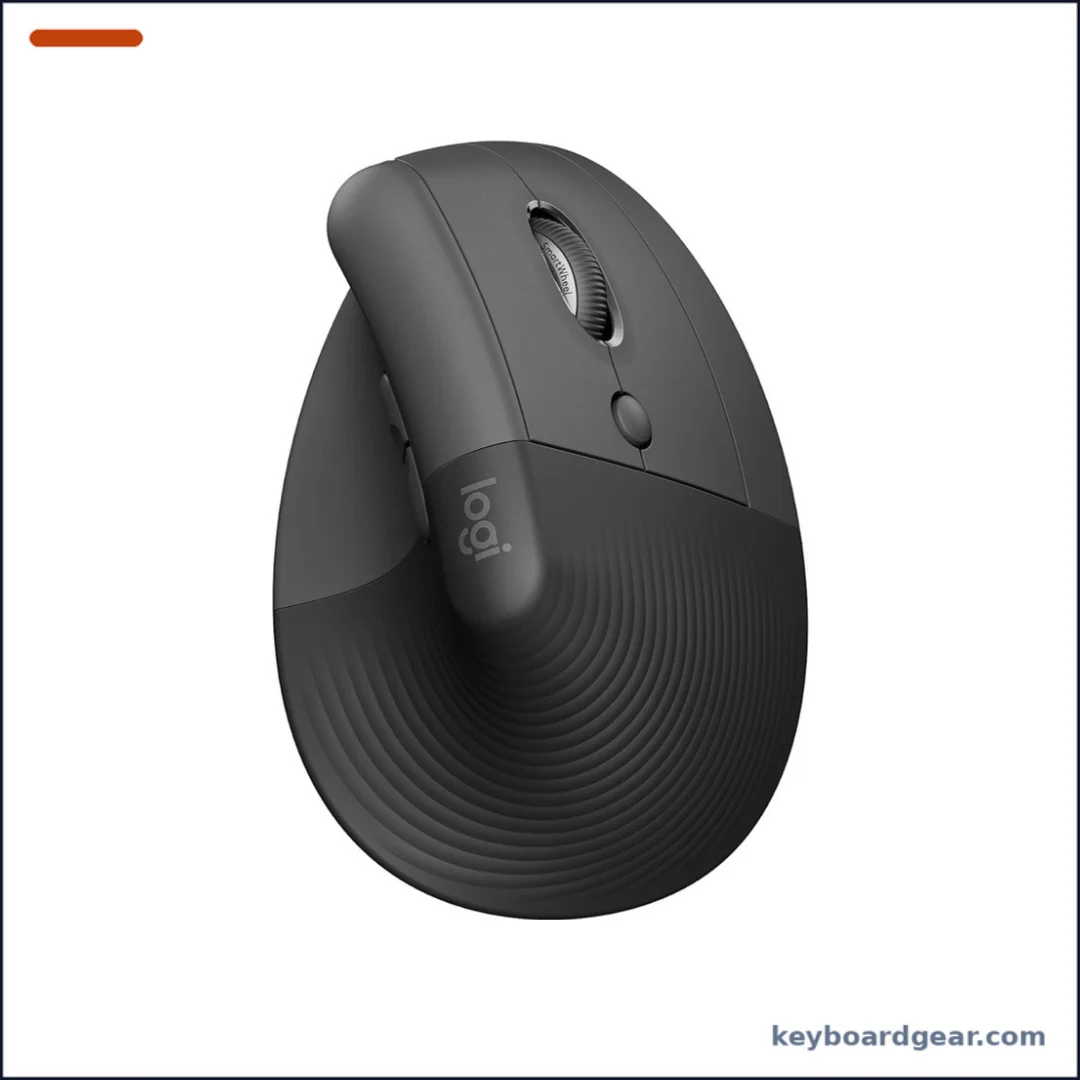 Logitech Lift |
Best for small hands |
|
Check Price |
3 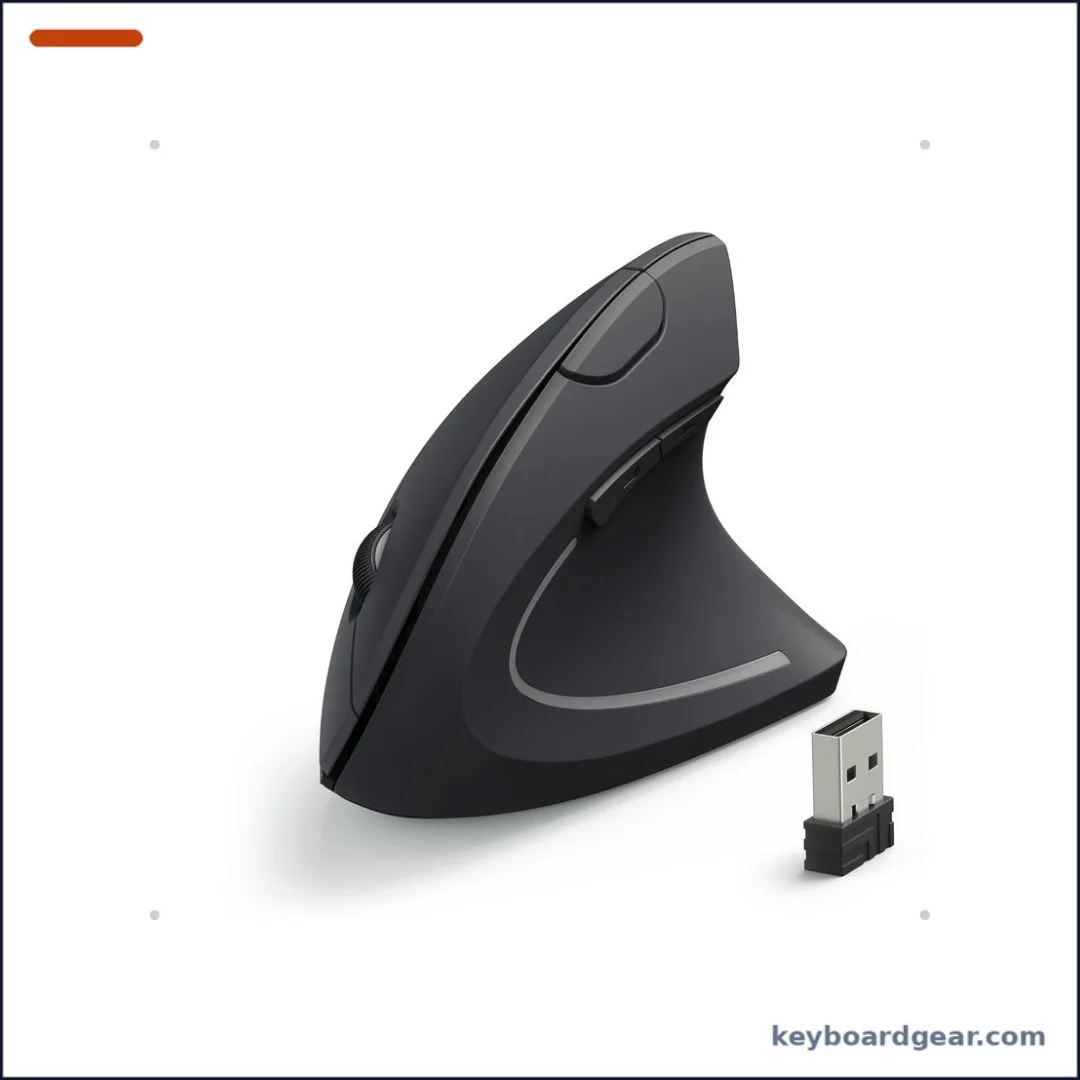 Anker 2.4G Wireless Vertical Ergonomic Mouse |
Best budget |
|
Check Price |
4 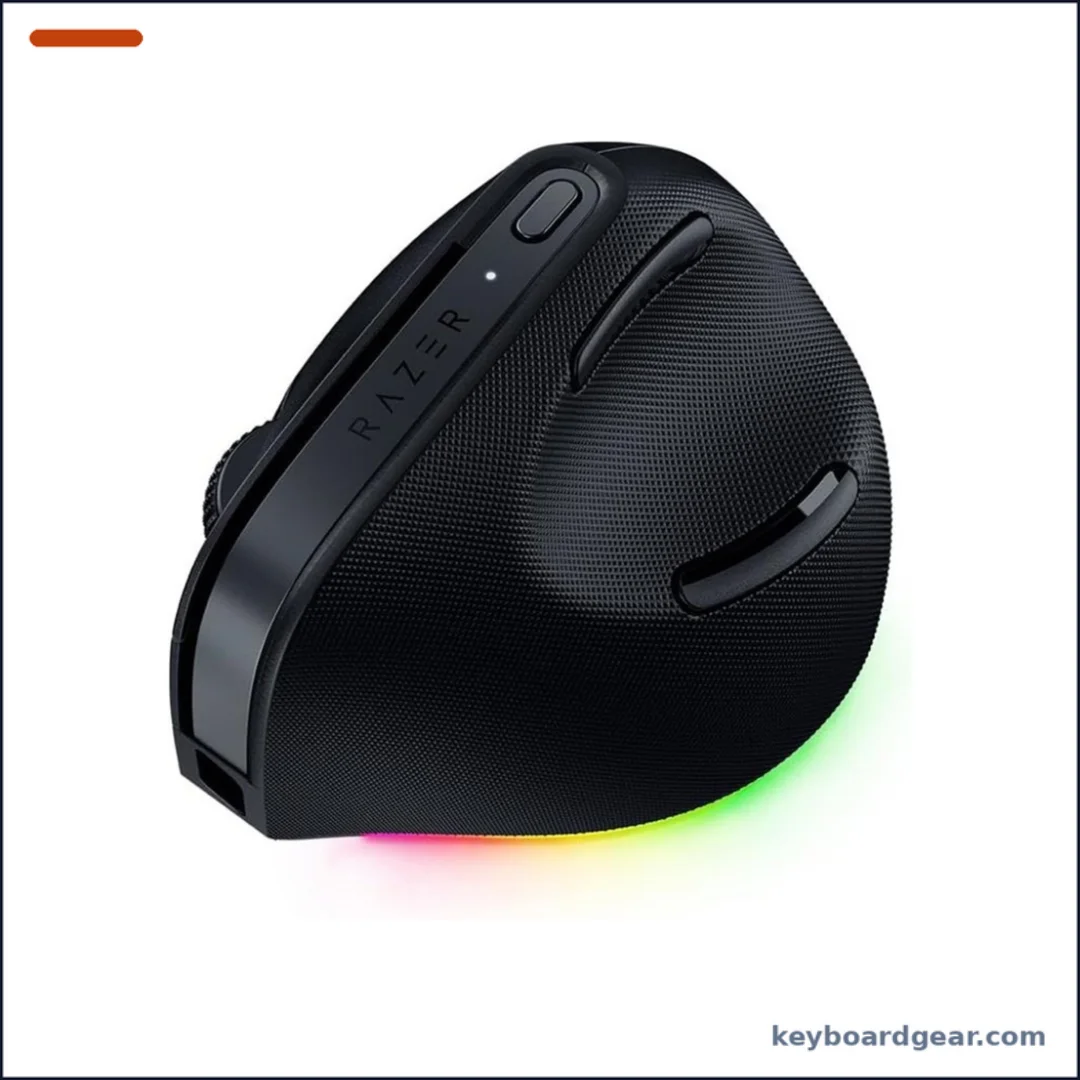 Razer Pro Click V2 Vertical Edition |
Best performance |
|
Check Price |
5 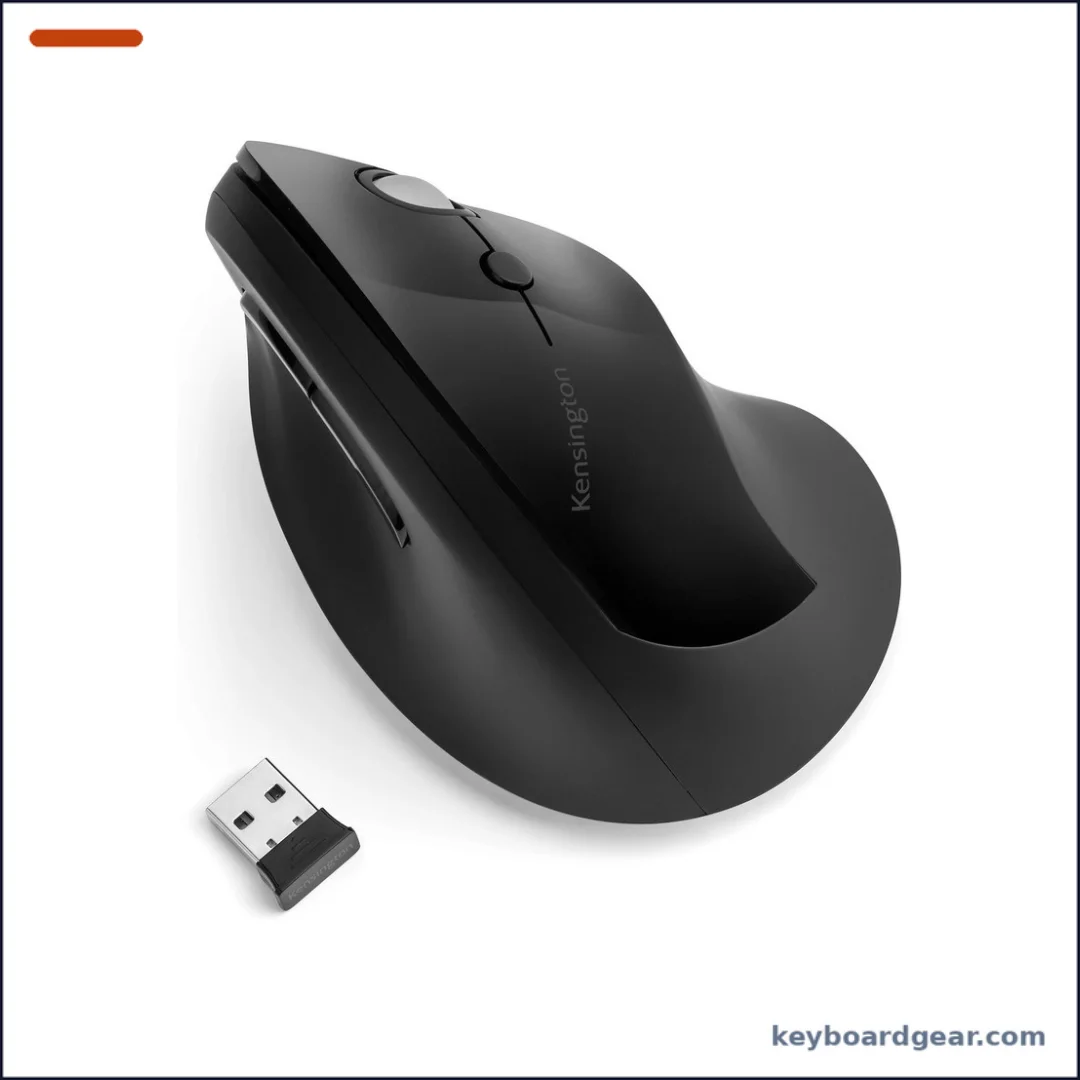 Kensington Pro Fit Ergo Vertical Wireless Mouse |
Best gentle angle |
|
Check Price |
6 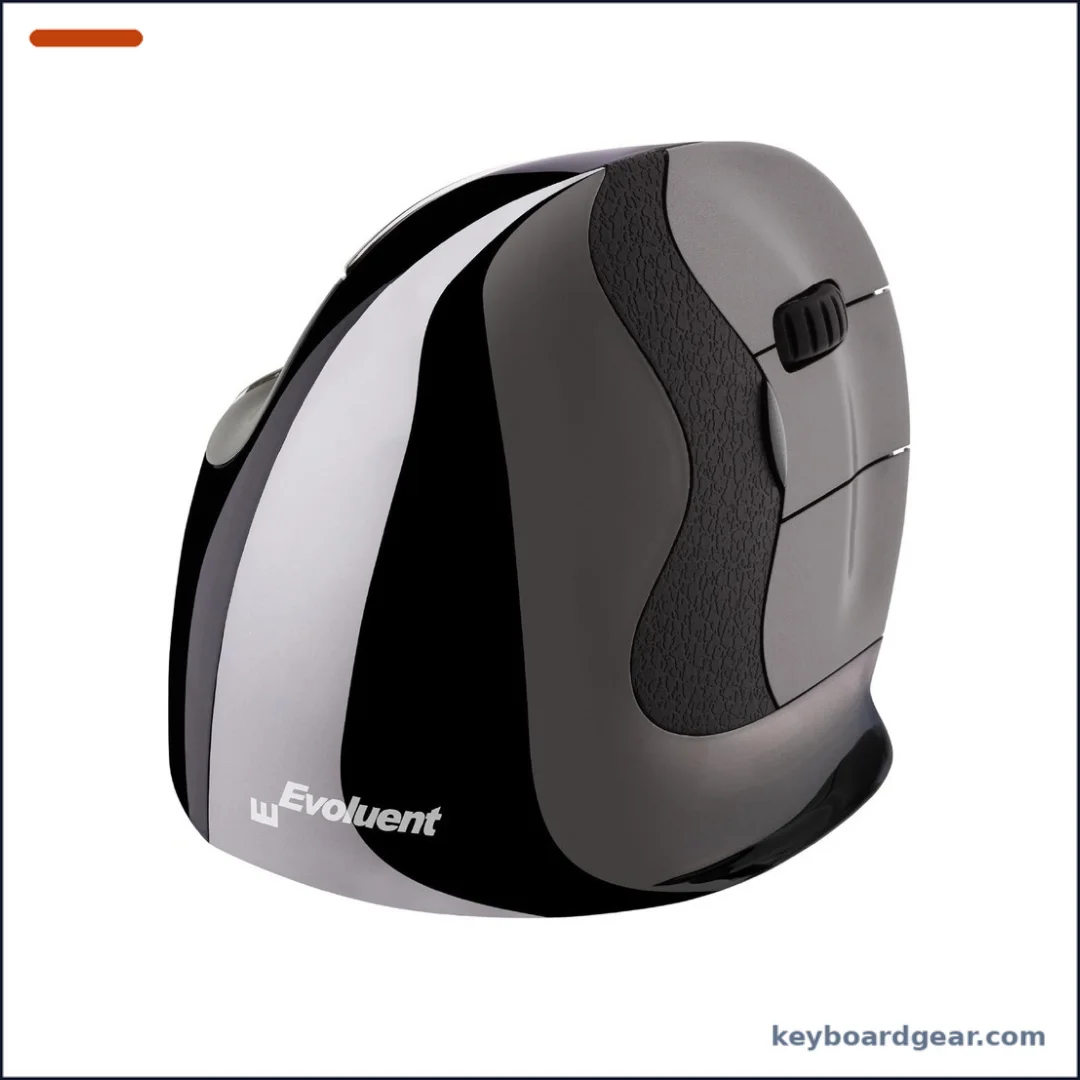 Evoluent VerticalMouse D Medium Wireless |
Best sized fit |
|
Check Price |
7 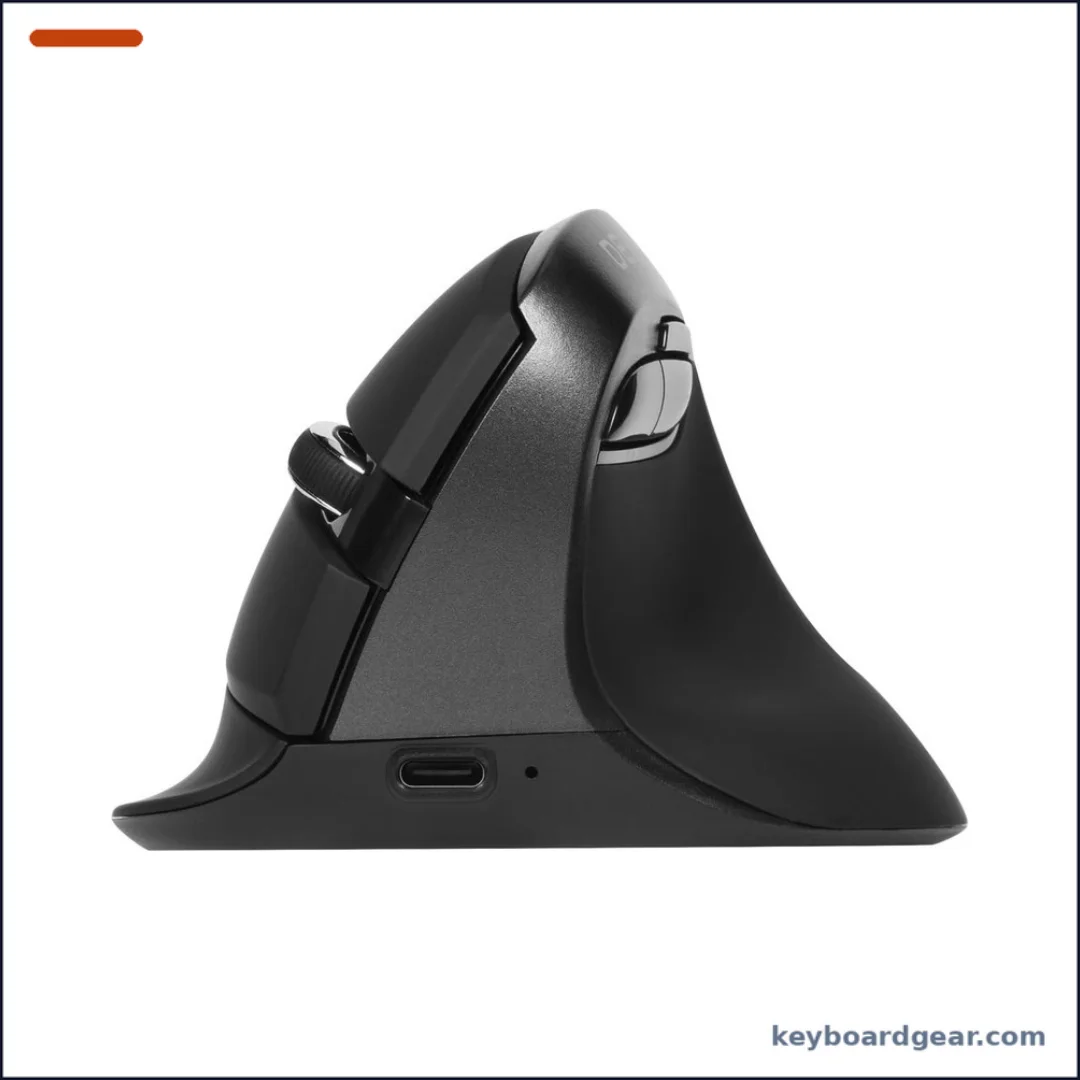 DELUX M618 Mini Vertical Mouse |
Best small budget |
|
Check Price |
1. Logitech MX Vertical — best overall vertical mouse
Who it’s for: Office workers with medium to large hands who want a proven, rechargeable vertical mouse that switches between computers.
The MX Vertical sets your hand at a 57° angle, close to a relaxed handshake, so your forearm is no longer twisted flat against the desk. Logitech says the design reduces muscle activity by 10% compared with a standard mouse. The shell is fairly tall and long (around 135 g), which suits medium and large hands best.
Its high-precision sensor goes up to 4000 DPI, and a cursor speed switch on top lets you change speed instantly—handy on high-resolution or multi-monitor setups. You can connect over Bluetooth or the included Unifying receiver, pair up to three devices and use Logitech Flow to move the cursor (and copy files) between computers.
The internal battery is rated for up to four months per full charge, and a one-minute quick charge gives about three hours of use. It is a few years old now, but it is still the most balanced vertical mouse for most desks. If you are new to ergonomic gear, our guide to whether ergonomic gear is worth it sets realistic expectations.
Key specs: 57° vertical angle; up to 4000 DPI with cursor speed switch; rechargeable battery up to 4 months (1-minute charge = 3 hours); Bluetooth or Unifying receiver plus USB-C cable; up to 3 devices with Easy-Switch and Logitech Flow.
- Natural 57° handshake angle
- Rechargeable via USB-C with quick charge
- Three-device switching and Flow
- Cursor speed switch on top
- Too big for small hands
- Uses the older Unifying receiver, not Logi Bolt
- Premium price for an older design
2. Logitech Lift — best for small to medium hands
Who it’s for: People with small to medium hands, and anyone who wants a quieter, lighter vertical mouse for long work sessions.
The Lift is Logitech’s smaller vertical mouse. It keeps the same 57° angle as the MX Vertical but shrinks the body to 108 × 70 × 71 mm and 125 g, so smaller hands can wrap around it without stretching. A soft thumb rest and quiet clicks make it pleasant in shared offices.
It connects over Bluetooth Low Energy or the Logi Bolt receiver and pairs with up to three devices via Easy-Switch. The SmartWheel scrolls line-by-line or spins freely, and four buttons can be customized in Logi Options+. A single AA battery is rated for up to 24 months, so there is nothing to charge. Left-handed users can buy a dedicated left-hand version (ASIN B09J1SYX5B).
If your hands are on the small side, also see our ergonomic mice for small hands roundup.
Key specs: 57° angle; 108 × 70 × 71 mm, 125 g; up to 4000 DPI; Bluetooth LE or Logi Bolt; 3 devices with Easy-Switch; SmartWheel; 4 customizable buttons; quiet clicks; 1× AA up to 24 months; left-hand version available.
- Compact shape for small and medium hands
- Quiet clicks
- Up to 24 months on one AA battery
- Left-hand version available
- Not rechargeable
- Cramped for large hands
- Logi Bolt receiver does not pair with old Unifying dongles
3. Anker 2.4G Wireless Vertical Ergonomic Mouse — best budget vertical mouse
Who it’s for: Anyone who wants to try a vertical mouse without spending much, especially on a single desktop or laptop.
Anker’s vertical mouse has been an Amazon staple for years because it gets the basics right for little money. You get a comfortable upright shape with a thumb groove, three DPI steps (800, 1200 and 1600), five buttons including forward and back, and a plug-and-play 2.4G USB receiver.
There is no Bluetooth, so you need a free USB-A port (or an adapter). It runs on two AAA batteries, which are not included, and goes to sleep after eight minutes of inactivity to save power. The body measures about 120 × 62.8 × 74.8 mm and weighs 3.4 oz. Anker backs it with an 18-month warranty.
It is not as refined as the Logitech models, but it is the cheapest way to find out whether a vertical grip suits you.
Key specs: 2.4G USB receiver (no Bluetooth); 800/1200/1600 DPI; 5 buttons including forward/back; 2× AAA batteries (not included); sleeps after 8 minutes idle; about 120 × 62.8 × 74.8 mm, 3.4 oz; 18-month warranty.
- Very low price
- Forward and back buttons
- Simple plug-and-play receiver
- 18-month warranty
- No Bluetooth
- Batteries not included
- Plasticky build and louder clicks
4. Razer Pro Click V2 Vertical Edition — best high-performance vertical mouse
Who it’s for: Power users and gamers who want a steep vertical grip without giving up a top-tier sensor and fast wireless.
Razer’s vertical mouse is the steepest here at 71.7°, which puts your hand almost fully upright. Inside is the Focus Pro 30K optical sensor, which can even track on glass, plus 60-million-click mechanical switches and 18-zone RGB underglow.
Connectivity is excellent: HyperSpeed 2.4 GHz wireless, Bluetooth to three hosts, or a wired connection, for up to five devices in total. Razer rates the battery for up to six months under its standard test conditions, and a five-minute charge is quoted at three working days. A dedicated AI prompt button can launch an AI assistant through Razer Synapse 4.
At about 150 g it is heavier than the Logitech options, and it costs more. For grip advice, read our mouse grip styles guide and DPI vs sensitivity explainer.
Key specs: 71.7° angle; Focus Pro 30K optical sensor (tracks on glass); HyperSpeed 2.4 GHz, Bluetooth (3 hosts) and wired, up to 5 devices; up to 6 months battery (Razer test conditions), 5-minute charge for 3 working days; 60M-click mechanical switches; 18-zone RGB; AI prompt button via Synapse 4.
- Steepest, most upright grip
- Flagship 30K sensor that tracks on glass
- Up to five devices across three connection types
- Long battery life with quick charge
- Expensive
- Heavy at about 150 g
- RGB and AI features need Synapse
5. Kensington Pro Fit Ergo Vertical Wireless Mouse — best for a gentler angle
Who it’s for: People who find fully upright mice awkward and want a more moderate tilt at a low price.
Kensington’s Pro Fit Ergo uses a less extreme slope (listed at 46.7°) than the Logitech and Razer options. That makes it an easier transition from a flat mouse while still taking pressure off the wrist and forearm.
It has four DPI settings (800, 1000, 1200 and 1600), forward and back buttons, and a nano receiver with a quoted range of up to 20 m. One AA battery is rated for up to a year. KensingtonWorks software lets you reassign buttons, though Kensington notes it does not support Windows on ARM.
It is a sensible pick for shared or hot-desk offices where you want something comfortable and inexpensive.
Key specs: Listed 46.7° slope; 800/1000/1200/1600 DPI; forward/back buttons; wireless nano receiver up to 20 m; 1× AA up to a year; KensingtonWorks software (no Windows on ARM support).
- Gentler angle is easy to adapt to
- Low price
- Long AA battery life
- Four DPI steps
- Receiver only in the listing we checked
- Software does not support Windows on ARM
- Less premium feel
6. Evoluent VerticalMouse D Medium Wireless — best sized-to-fit vertical mouse
Who it’s for: People with wrist or forearm discomfort who want a vertical mouse sized to their hand, and who use Windows.
Evoluent was one of the first vertical mouse brands, and the VerticalMouse D series comes in small, medium and large shells so you can match your hand size instead of compromising. This is the medium wireless right-hand model (VMDMW).
A lip along the bottom keeps your pinky finger off the desk, and six buttons can be programmed in Evoluent Mouse Manager on Windows. Four pointer speeds are shown by indicator lights, so you always know which setting you are on. It connects through a USB receiver.
It is expensive and the software is Windows-focused, but the sizing choice is unique among the picks here. Pair it with one of our best ergonomic keyboards for a complete setup.
Key specs: Medium right-hand wireless model (small and large also sold); USB receiver; 6 buttons programmable in Evoluent Mouse Manager (Windows); 4 pointer speeds with indicator lights; pinky lip.
- Choice of three hand sizes
- Pinky lip supports the outer hand
- Six programmable buttons
- Clear speed indicator lights
- Expensive
- Button software is Windows only
- No Bluetooth on this model
7. DELUX M618 Mini Vertical Mouse — best small rechargeable budget pick
Who it’s for: People with small hands who want a cheap rechargeable vertical mouse with both a receiver and Bluetooth.
The DELUX M618 Mini is a compact vertical mouse aimed at small hands. Unusually for the price, it has a rechargeable 500 mAh battery with USB-C charging: about two hours of charging gives roughly two weeks of use, or around a month with sleep mode helping.
It connects with both a 2.4G receiver and Bluetooth 5.2 (Bluetooth requires Windows 8 or later on PCs). Five DPI steps run from 800 to 4000, and the clicks are silent. Note the forward/back buttons do not work on Mac, and the buttons cannot be customized.
It is the budget alternative to the Logitech Lift if you want dual connectivity and rechargeability.
Key specs: Small-hand vertical design; 500 mAh rechargeable via USB-C (2-hour charge for about 2 weeks); 2.4G receiver plus Bluetooth 5.2 (Windows 8+ for Bluetooth); 800/1200/1600/2400/4000 DPI; silent clicks; forward/back buttons not supported on Mac; no button customization.
- Rechargeable via USB-C
- 2.4G and Bluetooth at a budget price
- Silent clicks
- Fits small hands
- Forward/back buttons don’t work on Mac
- No customization software
- Too small for large hands
Vertical mice compared
| Mouse | Angle | Connection | Power | Best for |
|---|---|---|---|---|
| Logitech MX Vertical | 57° | Bluetooth / Unifying | Rechargeable | Medium–large hands |
| Logitech Lift | 57° | Bluetooth / Logi Bolt | 1× AA | Small–medium hands |
| Anker Vertical | Not listed | 2.4G receiver | 2× AAA | Budget |
| Razer Pro Click V2 Vertical | 71.7° | 2.4 GHz / BT / wired | Rechargeable | Performance |
| Kensington Pro Fit Ergo | 46.7° (listed) | Nano receiver | 1× AA | Gentler angle |
| Evoluent VerticalMouse D | Not listed | USB receiver | See listing | Sized fit |
| DELUX M618 Mini | Not listed | 2.4G / BT 5.2 | Rechargeable | Small hands, budget |
How to choose a vertical mouse
1. Pick the right angle
Most vertical mice sit between about 45° and 72°. A steeper angle (like the Razer’s 71.7°) removes more forearm twist, but takes longer to get used to. A moderate angle (like the Kensington) is an easier first step. Logitech’s 57° is a good middle ground for most people.
2. Match the mouse to your hand size
Size matters more on a vertical mouse than a flat one, because your fingers wrap around the side. Small hands suit the Logitech Lift or DELUX M618 Mini. Medium to large hands suit the MX Vertical or Razer. Evoluent sells small, medium and large shells. Measure from your wrist crease to the tip of your middle finger and compare with each product’s dimensions.
3. Decide on connection and power
Bluetooth is great for laptops and tablets because it frees a USB port. A receiver usually gives a more stable connection on desktops. Multi-device mice (Logitech, Razer) let you switch between computers. Rechargeable models avoid buying batteries, while AA models like the Lift can run for over a year. For background, read how wireless peripherals work.
4. Check the buttons and software
Forward and back buttons speed up browsing. If you want to remap them, check which software the mouse uses and whether it supports your operating system—Evoluent’s software is Windows-only, and DELUX’s buttons are fixed.
5. Give yourself time to adapt
Expect a week or two before a vertical mouse feels natural. Start with lower pointer speed, keep your elbow supported and move from the arm rather than flicking the wrist. A vertical mouse helps posture, but it is not a medical treatment. If you have ongoing pain, see a doctor or physiotherapist.
Are vertical mice good for gaming?
Most vertical mice are built for comfort, not fast aim. The Razer Pro Click V2 Vertical is the exception, with a 30K sensor and low-latency HyperSpeed wireless. It is fine for casual gaming, but competitive players usually still prefer a light, flat mouse. Our best gaming mouse and gaming mouse buying guide cover those options.
FAQ
What is the best vertical mouse overall?
The Logitech MX Vertical is the best vertical mouse for most people. It has a 57° angle, a rechargeable battery and three-device switching. If your hands are small, choose the Logitech Lift instead.
Do vertical mice really help with wrist pain?
A vertical mouse keeps your forearm in a more neutral, handshake position, which reduces twisting. Many users find it more comfortable, and Logitech says the MX Vertical reduces muscle activity by 10% compared with a standard mouse. It is not a cure for injuries, so see a professional if pain continues.
How long does it take to get used to a vertical mouse?
Most people adapt within one to two weeks. Accuracy may feel worse for the first few days. Lowering the pointer speed and moving from the elbow helps.
Is there a vertical mouse for left-handed users?
Yes. Logitech sells a left-hand version of the Lift (ASIN B09J1SYX5B). Most other picks here are right-handed only.
What is the best cheap vertical mouse?
The Anker 2.4G Wireless Vertical Ergonomic Mouse is the best budget pick. If you want rechargeable and Bluetooth at a low price, consider the DELUX M618 Mini.
Do vertical mice work with Mac?
The Logitech and Razer mice support macOS with their own software. The DELUX M618 Mini works on Mac, but its forward/back buttons do not. Evoluent’s button software is Windows only.
Final verdict
Buy the Logitech MX Vertical for the best all-round vertical mouse if you have medium to large hands. Choose the Logitech Lift for small to medium hands, the Anker Vertical to try the style for little money, the Razer Pro Click V2 Vertical Edition for top performance, the Kensington Pro Fit Ergo for a gentler angle, the Evoluent VerticalMouse D for a sized fit, and the DELUX M618 Mini for a cheap rechargeable option for small hands. Complete your setup with one of our best ergonomic keyboards.
