
Pick up your mouse and look at your hand. Is your whole palm resting on it? Is only the base of your palm touching the back while your fingers arch over the buttons? Or are you steering it with just your fingertips, with daylight showing under your palm? That is your mouse grip style, and it affects which mouse shapes feel comfortable, how you aim and how tired your hand gets after a long day.
There are three main grips: palm, claw and fingertip. None of them is “correct”. Each one suits different hand sizes, mouse shapes and tasks. This guide explains how each grip works, the pros and cons of each, how to find out which one you use, and how to match a mouse to it.
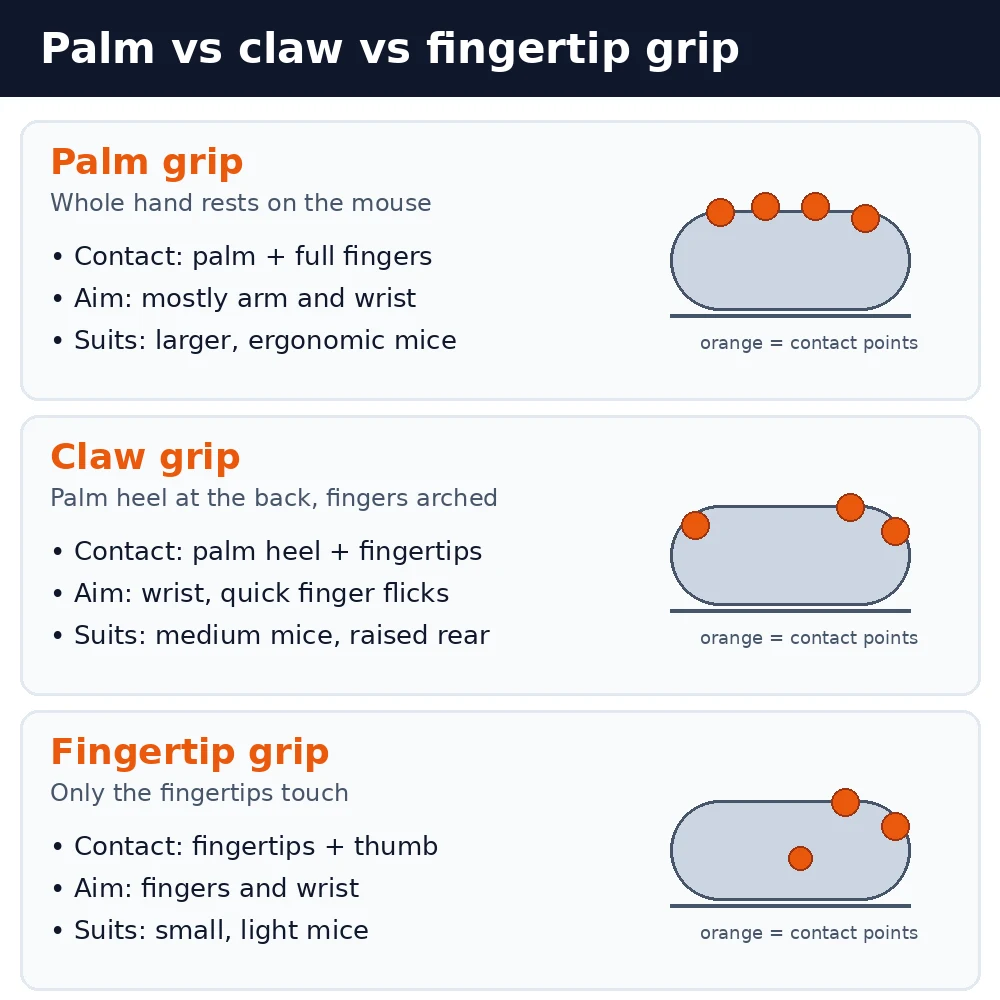
Mouse grip styles at a glance
| Grip | Hand contact | Aiming style | Best mouse shape |
|---|---|---|---|
| Palm | Whole palm and fingers | Arm and wrist, smooth | Large, tall, ergonomic |
| Claw | Palm heel and arched fingertips | Wrist plus quick finger flicks | Medium, raised rear hump |
| Fingertip | Fingertips and thumb only | Fingers and wrist, very agile | Small, short, lightweight |
| Hybrid | Varies (e.g. relaxed claw) | Mix of the above | Medium, safe ambidextrous |
Palm grip
In a palm grip your whole hand rests on the mouse. The palm sits on the back of the shell, your fingers lie flat along the buttons and the mouse effectively becomes an extension of your hand. Most people who never think about how they hold a mouse use some form of palm grip, because it is the most relaxed position.
Because the hand doesn’t move independently of the mouse, you steer mostly with your arm and wrist. That makes movements smooth and steady, which suits long work sessions, tracking moving targets in games and precise tasks like photo editing.
Pros of palm grip
- Most comfortable for long sessions. The hand is supported, so the finger and hand muscles do less work.
- Steady, controlled movement. Good for tracking and for smooth, sweeping cursor movements.
- Works with ergonomic shapes. Right-handed ergonomic mice are designed around a palm grip.
Cons of palm grip
- Slower micro-adjustments. Small corrections come from the wrist or arm rather than the fingers.
- Needs the right size. A mouse that is too short leaves your palm hanging off the back, which undoes the main benefit.
- Can mean more desk space. Players who aim with the arm often use lower sensitivity and a larger mouse pad.
Best for: office work, long gaming sessions, larger hands and anyone who wants maximum comfort.
Claw grip
In a claw grip the base of your palm rests on the back of the mouse, but your fingers are arched so that only the fingertips touch the buttons, a bit like a claw. Your knuckles are raised and there is a gap between your palm and the middle of the mouse.
Claw grip is a middle ground. The palm contact gives stability, while the arched fingers can click quickly and nudge the mouse for small corrections. Many gamers who play fast shooters use a claw grip or a softer version called a relaxed claw, where the fingers are only slightly bent.
Pros of claw grip
- Fast clicks. Arched fingers press straight down on the buttons, which helps with quick repeated clicks.
- Good balance of control and speed. Palm contact keeps the mouse stable, fingers handle fine adjustments.
- Flexible on mouse size. A claw grip works on a wider range of mouse lengths than palm grip.
Cons of claw grip
- More tension in the fingers. Keeping fingers arched for hours can tire the hand, especially if you grip hard.
- Shape matters. It works best with a pronounced hump towards the back of the mouse that fills the palm.
Best for: competitive gaming, people who switch between fast flicks and steady aim, and medium hands.
Fingertip grip
In a fingertip grip only your fingertips and thumb touch the mouse. Your palm hovers above it, so you can move the mouse with small finger movements without moving your wrist or arm at all.
This gives the most agility of the three grips. Tiny adjustments are easy, and a light mouse can be flicked quickly. The trade-off is stability and comfort: with nothing supporting the hand, the fingers and small hand muscles do all the work.
Pros of fingertip grip
- Most precise small movements. Fingers can make finer adjustments than the wrist or arm.
- Very fast changes of direction. Especially with a lightweight mouse.
- Works with small mice. Good if you prefer compact or travel-sized mice.
Cons of fingertip grip
- Least stable. Large, smooth movements and steady tracking are harder.
- Can be tiring. The hand is unsupported, which some people find uncomfortable over long periods.
- Weight matters more. A heavy mouse is hard to control with fingertips alone.
Best for: people with small mice or larger hands who like a compact mouse, and gamers who value agility over stability.
Hybrid grips
Most people don’t use a textbook grip. Common hybrids include:
- Relaxed claw (palm-claw). More palm contact than a true claw, with the fingers only slightly arched. Many find it the most natural position on a medium-sized mouse.
- Claw-fingertip. The palm barely touches the very back of the mouse while the fingertips do most of the work.
- Switching grips. Some gamers palm grip while browsing or tracking and tighten into a claw for quick flicks.
If you see yourself in more than one description, that is normal. Choose a mouse for the grip you use most of the time.
How to find out which grip you use
Your natural grip is the one you fall into without thinking, so test it when you’re relaxed:
- Use your mouse normally for a few minutes, then freeze and look at your hand from the side.
- Check the palm. Fully resting on the mouse means palm. Only the heel of the palm touching the back means claw. No palm contact at all means fingertip.
- Check the fingers. Flat fingers point to palm grip. Arched fingers with raised knuckles point to claw.
- Watch how you aim. Moving from the elbow or shoulder goes with palm grip. Lots of finger movement goes with fingertip.
Repeat the check during the task you care about most. Many people hold a mouse differently in a game than when they’re writing email.
How to choose a mouse for your grip
1. Measure your hand
Measure your hand length from the crease at the base of your palm to the tip of your middle finger, and your hand width across the knuckles, not including the thumb. Mouse makers use these numbers in their sizing guides. As a rough rule of thumb, hands under about 17 cm long are usually considered small, about 17 to 19 cm medium and over 19 cm large, but always check the guide for the specific mouse you want.
2. Match length and shape to your grip
- Palm grip: a longer mouse that fills your whole hand, often with an ergonomic, right-hand shape and a high back.
- Claw grip: a medium-length mouse with its highest point towards the rear, so the palm heel has something to rest on.
- Fingertip grip: a shorter, lower and lighter mouse that your fingers can move without the back bumping your palm.
If you have smaller hands, our guide to the best ergonomic mice for small hands covers shapes that won’t overwhelm you.
3. Consider weight
Weight matters most for claw and fingertip users, who move the mouse with their fingers. Lighter mice are easier to flick and stop. Palm grip users can usually handle a heavier mouse, and some prefer the extra weight for steady tracking.
4. Check side grips and button placement
Make sure the side buttons fall under your thumb in your grip. Fingertip users sit further back on the mouse than palm users, so side buttons placed far forward can be awkward to reach. Textured or rubberised sides help claw and fingertip users who rely on pinching the mouse.
5. Set your sensitivity to match
Grip and sensitivity go together. Palm grip users who aim with the arm often prefer lower sensitivity, while fingertip users may like it a little higher because their movements are smaller. Our guide to mouse DPI vs sensitivity explains how to find a setting that suits you.
For a full buying checklist, see how to choose the perfect gaming mouse, or jump to our picks for the best gaming mouse.
Which grip is best for gaming?
You’ll find all three grips among competitive players, so there is no single best grip for gaming. As a general guide:
| Game style | Grip that often suits it | Why |
|---|---|---|
| Tracking (e.g. Apex, Overwatch) | Palm or relaxed claw | Steady, smooth arm movement |
| Flick aiming (e.g. Valorant, CS2) | Claw or fingertip | Quick micro-adjustments |
| MOBA and RTS | Claw or palm | Fast clicks, comfort for long games |
| MMO | Palm | Comfort and access to many side buttons |
These are tendencies, not rules. The best gaming grip is the one you can hold comfortably and consistently for hours, because consistency is what builds muscle memory. If you’re building a whole setup, our list of the best gaming keyboard and mouse combos is a good starting point.
Which grip is best for comfort and wrist health?
Palm grip is usually the most relaxed, because the hand is supported and the muscles don’t have to hold a fixed shape. But no grip is pain-free if the rest of your setup is wrong. A few general habits help whatever grip you use:
- Hold the mouse lightly. Squeezing the mouse is a common source of tension, especially in claw grip.
- Keep your wrist straight rather than bent up, down or to the side.
- Move from the elbow and shoulder for big movements instead of pivoting only at the wrist.
- Keep the mouse close to the keyboard so you aren’t reaching. A compact keyboard can help; see our keyboard sizes guide.
- Take short breaks and change position now and then.
A vertical mouse holds your hand in a handshake position, which reduces the twisting of the forearm that a flat mouse needs. Some people with wrist discomfort find it helps. If you’re already in pain, speak to a doctor or physiotherapist rather than relying on a new mouse. For the keyboard side of your desk, read are ergonomic keyboards worth it and our list of the best ergonomic keyboards.
Should you change your grip?
Usually not. If your current grip is comfortable and you’re happy with your aim, there is no reason to change. Consider trying a different grip if:
- your hand or fingers ache after normal use,
- your mouse feels too big or too small and you don’t want to replace it yet, or
- you play a game that rewards a different style of aiming.
Changing grip takes time. Expect your aim to feel worse for a week or two while your muscle memory adjusts. Change one thing at a time (grip, mouse or sensitivity) so you can tell what actually helps.
FAQ
What is the most common mouse grip?
Palm grip is generally the most common, especially for everyday computer use, because it is the most relaxed way to hold a mouse. Among gamers, claw and relaxed claw grips are also very popular.
Is claw grip bad for your hand?
Not in itself, but holding your fingers arched and tense for hours can cause fatigue. Keep the grip light, choose a mouse with a rear hump that supports your palm, and take breaks.
Is fingertip grip better for aiming?
Fingertip grip makes small, fast adjustments easier, but it is less stable for smooth tracking. Whether it improves your aim depends on the game and how comfortable you are with it.
What mouse size do I need for palm grip?
Palm grip needs a mouse long enough that your palm rests on the back while your fingertips reach the ends of the buttons. That usually means a medium-to-large mouse. Measure your hand and check the maker’s size guide.
Can I use any grip with a vertical mouse?
Vertical mice are designed for a palm-style handshake grip, with the whole hand resting on the side of the mouse. They don’t really suit claw or fingertip grips.
The bottom line
Palm grip is the most comfortable and steady, claw grip balances stability with fast clicks, and fingertip grip gives the most agility with small, light mice. Work out which grip you naturally use, measure your hand and choose a mouse whose length, shape and weight suit that grip. Comfort and consistency matter more than following any one style.
