
Keyboard Gear earns from qualifying purchases through Amazon links.
Mechanical keyboards feel great, but the clatter can annoy roommates, partners asleep in the next room and everyone on your video calls. The good news is that you don’t have to go back to a mushy membrane board. The best quiet mechanical keyboards combine silent or quiet switches with foam, gaskets and well-tuned stabilizers, so you keep the crisp mechanical feel without the noise.
We compared seven quiet and silent mechanical keyboards currently sold on Amazon US, from a $60 Cherry office board to Logitech’s MX Mechanical and Razer’s Pro Type Ultra. Specs come from manufacturers’ listings and spec sheets, and we checked every Amazon page for availability. If you want to know why mechanical boards are noisy in the first place, read are mechanical keyboards loud? and are mechanical keyboards quiet?.
Quick picks
- Best overall: Logitech MX Mechanical (Tactile Quiet)
- Best silent linear: Razer Pro Type Ultra
- Best for enthusiasts: Ducky One 3 TKL (Cherry MX Silent Red)
- Best compact: Logitech MX Mechanical Mini (Tactile Quiet)
- Best full-size wired: Cherry MX 3.0S (MX2A Silent Red)
- Best budget wireless: AULA F99 Silent Version
- Best budget wired: Cherry KC 200 MX (MX2A Silent Red)
At a glance: best quiet mechanical keyboards compared
| Product | Best for | Key specs | Price |
|---|---|---|---|
1 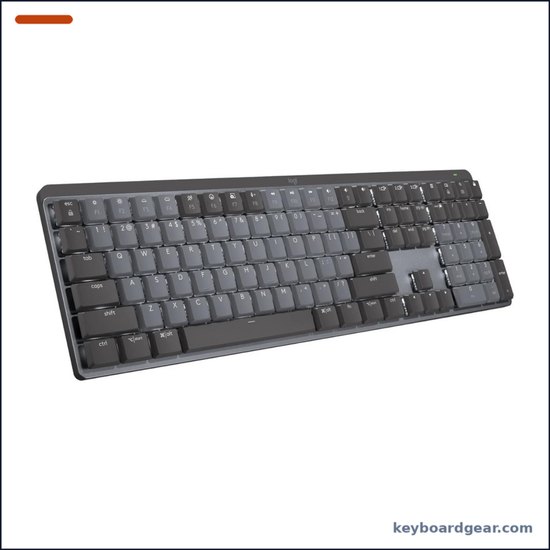 Logitech MX Mechanical (Tactile Quiet) Logitech MX Mechanical (Tactile Quiet) |
Best overall |
|
Check price |
2 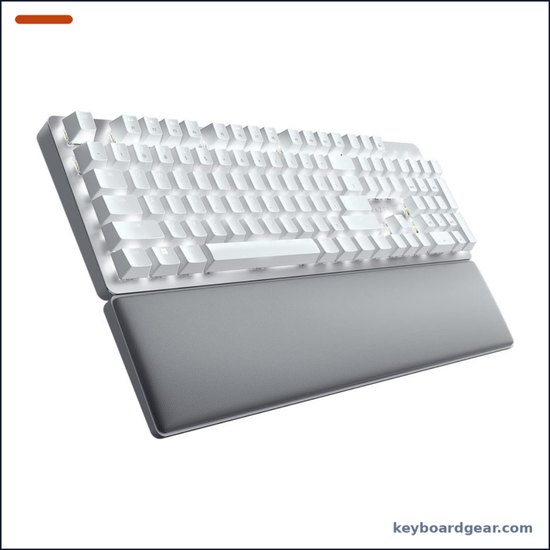 Razer Pro Type Ultra Razer Pro Type Ultra |
Best silent linear |
|
Check price |
3 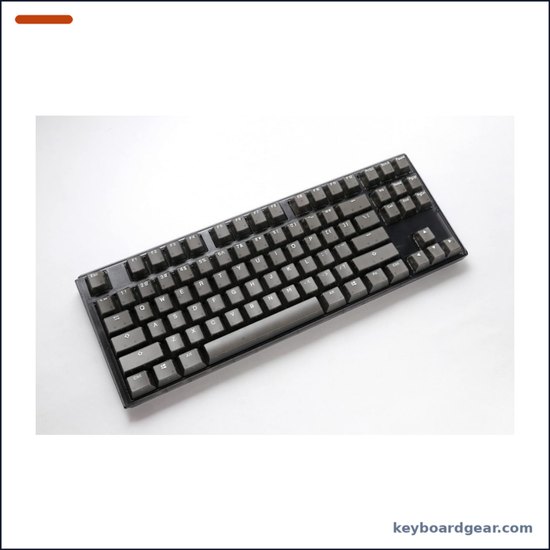 Ducky One 3 TKL (Cherry MX Silent Red) Ducky One 3 TKL (Cherry MX Silent Red) |
Best for enthusiasts |
|
Check price |
4 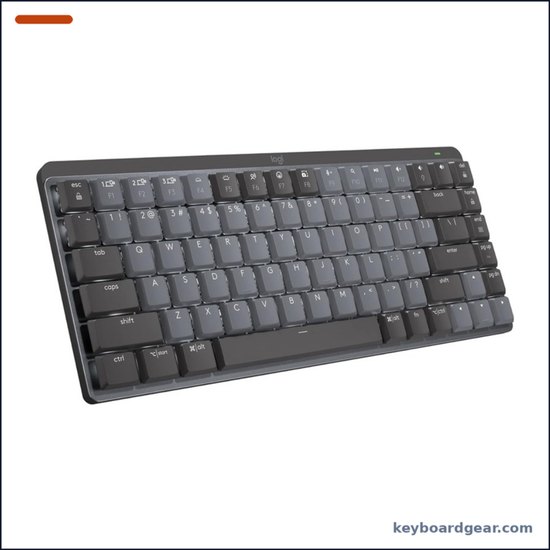 Logitech MX Mechanical Mini (Tactile Quiet) Logitech MX Mechanical Mini (Tactile Quiet) |
Best compact |
|
Check price |
5 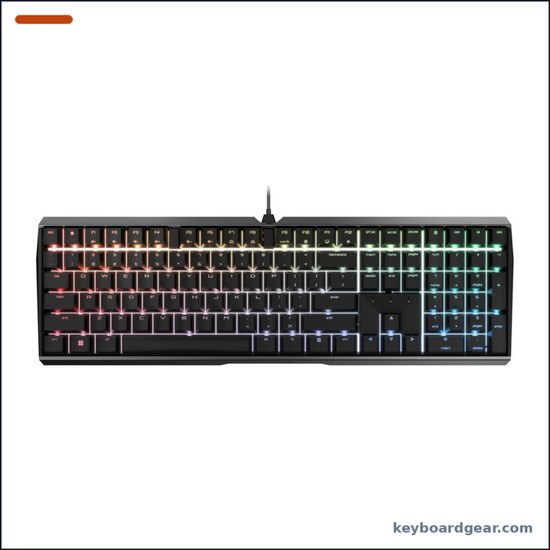 Cherry MX 3.0S (MX2A Silent Red) Cherry MX 3.0S (MX2A Silent Red) |
Best full-size wired |
|
Check price |
6 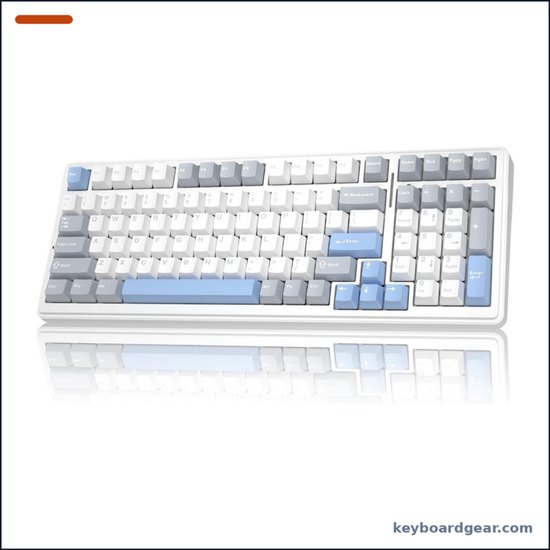 AULA F99 Silent Version AULA F99 Silent Version |
Best budget wireless |
|
Check price |
7 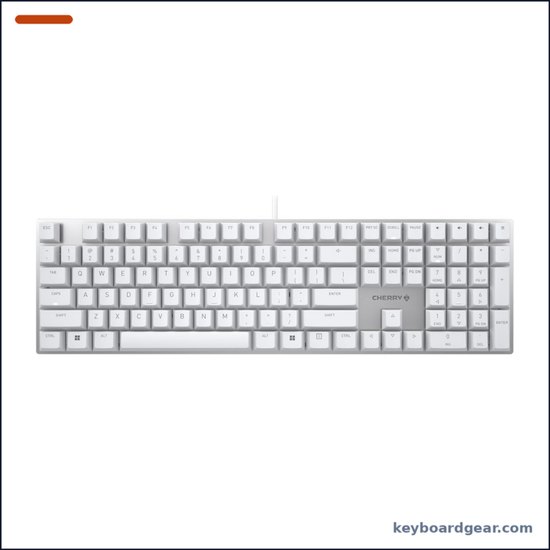 Cherry KC 200 MX (MX2A Silent Red) Cherry KC 200 MX (MX2A Silent Red) |
Best budget wired |
|
Check price |
1. Logitech MX Mechanical (Tactile Quiet) — best quiet keyboard for the office
Who it’s for: Office workers, hybrid workers and anyone who types all day near other people and wants a polished wireless keyboard that just works on Windows and macOS.
Why we picked it: The MX Mechanical is the easiest quiet mechanical keyboard to recommend. Logitech sells it with three switch types, and the Tactile Quiet version we picked gives you a gentle bump with no click, so it is much less noticeable on calls than a typical clicky or even standard tactile board. The low-profile switches actuate at 1.3 mm with 3.2 mm of total travel and are rated for 50 million keypresses, and the shallow keys reduce how far your fingers drop and how hard they hit the bottom. You can pair up to three devices and switch with the Easy-Switch keys, connect over Bluetooth LE or the included Logi Bolt receiver, and customise keys in Logi Options+. The smart white backlight turns on as your hands approach and adjusts to room light.
Key specs: Full-size; Logitech low-profile Tactile Quiet switches (1.3 mm actuation, 3.2 mm total travel, 50M keypresses); smart white backlight; Logi Bolt + Bluetooth LE; 3 devices; USB-C charging; up to 15 days with backlight or up to 10 months without; 828 g; Logi Options+.
- Quiet tactile feel that suits shared offices
- Excellent multi-device wireless with Logi Bolt
- Very long battery life with the backlight off
- Low profile is comfortable without a wrist rest
- Switches are soldered, not hot-swappable
- Low-profile keycaps limit customisation
- White backlight only
- Not as deep or cushioned as a gasket board
2. Razer Pro Type Ultra — best silent wireless keyboard with a wrist rest
Who it’s for: People who prefer smooth linear keys and want a quiet, full-size wireless keyboard with a comfortable wrist rest in the box.
Why we picked it: Razer built the Pro Type Ultra for offices and home workspaces, and it shows. It uses Razer Yellow linear switches (1.2 mm actuation, 3.5 mm total travel, about 45 g) combined with sound-dampening foam inside the case, which takes the hollow ring out of each keystroke. The switches are rated for 80 million keystrokes, and the soft-touch coated keycaps feel pleasant under the fingers. You can connect up to four devices over Razer HyperSpeed 2.4 GHz (the Productivity Dongle can also run a compatible Razer mouse), Bluetooth or the USB-C cable. With the white backlight off, Razer rates the battery at up to about 214 hours on Bluetooth, and a plush leatherette wrist rest is included.
Key specs: Full-size; Razer Yellow silent linear switches (1.2 mm actuation, 3.5 mm travel, 80M keystrokes); sound-dampening foam; ABS keycaps with soft-touch coating; white backlight; HyperSpeed 2.4 GHz, Bluetooth, USB-C; up to 4 devices; up to ~214 h (Bluetooth, backlight off); programmable keys; leatherette wrist rest.
- Silent linear switches plus internal foam
- Wrist rest included
- Up to four paired devices
- Long battery life with backlight off
- Battery drops to about 13 h at full brightness
- ABS keycaps can shine over time
- Not hot-swappable
- Only one switch option
3. Ducky One 3 TKL (Cherry MX Silent Red) — best quiet hot-swappable keyboard
Who it’s for: Keyboard fans who want a quiet tenkeyless board today and the freedom to swap switches later.
Why we picked it: Ducky’s One 3 is one of the most respected prebuilt mechanical keyboards, and this TKL version ships with Cherry MX Silent Red switches. Cherry’s silent switches use built-in damping to soften both the bottom-out and the return stroke, and they are light and linear (45 cN actuation, 1.9 mm pre-travel, 3.7 mm total travel). Ducky adds its QUACK Mechanics dampening, with dual-layer silicone and EVA foam, to tame case noise, plus tuned V2 stabilizers so the big keys don’t rattle. The Kailh hot-swap sockets mean you can try other switches without soldering, and thick double-shot PBT keycaps, per-key RGB, three-level feet and a detachable USB-C cable round it out.
Key specs: Tenkeyless (TKL); Cherry MX Silent Red linear; Kailh hot-swap sockets; QUACK Mechanics dual-layer silicone + EVA foam; V2 stabilizers; thick double-shot PBT keycaps; per-key RGB; NKRO; 3-level feet; detachable USB-C; wired.
- Genuine Cherry MX Silent Red switches
- Hot-swap sockets for future upgrades
- Thick double-shot PBT keycaps
- Dampening foam and tuned stabilizers
- Wired only
- No dedicated software suite
- No number pad
- Pricier than budget silent boards
4. Logitech MX Mechanical Mini (Tactile Quiet) — best compact quiet keyboard
Who it’s for: Laptop users and minimalists who want the MX Mechanical’s quiet typing in a smaller footprint that leaves more room for the mouse.
Why we picked it: The MX Mechanical Mini has the same Tactile Quiet switches, smart backlighting, Easy-Switch multi-device pairing and Logi Options+ support as the full-size model, but drops the number pad and the navigation cluster. It is 312.6 mm wide and weighs 612 g, compared with 433.85 mm and 828 g for the full-size version, so it slides into a laptop bag easily. Battery life is the same: up to 15 days with the backlight on, or up to 10 months with it off. It’s a great match for a quiet home office or a shared desk.
Key specs: Compact layout (no number pad); Logitech low-profile Tactile Quiet switches; smart white backlight; Logi Bolt + Bluetooth LE; 3 devices; USB-C; up to 15 days, or 10 months with backlight off; 312.6 mm wide; 612 g.
- Small and light enough to travel
- Same quiet tactile switches as the full-size MX
- Easy multi-device switching
- Works well on both Mac and Windows
- No number pad or dedicated navigation keys
- Not hot-swappable
- Limited stock on our listing at the time of writing
- Premium price for a compact board
5. Cherry MX 3.0S (MX2A Silent Red) — best quiet full-size wired keyboard
Who it’s for: Desk users who want a sturdy, wired, full-size keyboard with genuine Cherry silent switches and a number pad.
Why we picked it: The MX 3.0S comes straight from Cherry, the company that invented the MX switch. This version uses MX2A Silent Red switches: factory-lubricated, linear and damped, rated for more than 50 million keystrokes. The housing is screw-free extruded aluminium, which keeps it rigid and minimalist, and per-key RGB lighting can be adjusted with CHERRY UTILITY software. It has full NKRO and anti-ghosting, a Windows key lock, and a detachable cable. With a number pad and standard layout, it suits spreadsheets and data entry in quiet offices.
Key specs: Full-size; Cherry MX2A Silent Red linear (45 cN, 1.9 mm pre-travel, 3.7 mm travel, 50M+ keystrokes); screw-free extruded aluminium housing; RGB (CHERRY UTILITY); NKRO and anti-ghosting; Windows lock; detachable cable; wired.
- Genuine MX2A Silent Red switches
- Rigid aluminium housing
- Full-size layout with number pad
- RGB with Cherry’s own software
- Wired only
- Uses a micro-USB connection on the keyboard
- No hot-swap sockets listed
- Limited stock on our listing at the time of writing
6. AULA F99 Silent Version — best budget silent wireless keyboard
Who it’s for: Budget buyers who want a quiet, wireless board with a number pad, hot-swap sockets and a gasket mount for well under $100.
Why we picked it: The AULA F99 Silent Version packs a surprising amount of sound dampening into a low-cost board. It uses pre-lubed silent linear switches on a gasket structure with a silicone pad and a PCB slotted around each key, plus five dampening layers, which gives it a soft, muted sound rather than a clack. The 99-key (96%) layout keeps the number pad in a smaller footprint than full-size. It connects over Bluetooth 5.0, 2.4 GHz or USB-C to up to five devices, and its large 8000 mAh battery means you won’t charge it often. Double-shot PBT keycaps, RGB, NKRO and macro support are included, and the 3/5-pin hot-swap sockets let you change switches later.
Key specs: 99 keys (96%); pre-lubed silent linear switches; 3/5-pin hot-swap; gasket structure with silicone pad and single-key PCB slotting; 5 dampening layers; double-shot PBT; RGB; NKRO; macros; Bluetooth 5.0, 2.4 GHz, USB-C; up to 5 devices; 8000 mAh.
- Very low price for a silent gasket board
- Hot-swap sockets for 3- and 5-pin switches
- Large 8000 mAh battery
- Number pad in a compact 96% layout
- Plastic case
- Software is less polished than Logitech or Razer
- 96% layout moves some keys
- Brand-specific switch names, less documented
7. Cherry KC 200 MX (MX2A Silent Red) — best budget quiet mechanical keyboard
Who it’s for: Anyone who wants the quietest genuine Cherry switches for the lowest price and doesn’t need wireless.
Why we picked it: The KC 200 MX is a no-frills office keyboard with real Cherry MX2A Silent Red switches, rated for more than 50 million actuations. An anodised metal plate gives it a solid base, laser-etched keycaps won’t wear off, and white LEDs light the legends. Four extra keys above the number pad give one-touch access to the calculator and volume controls, and NKRO plus anti-ghosting means fast typists won’t drop letters. Two fold-out feet let you choose the typing angle. It’s wired only, but at around $60 it’s one of the cheapest ways to get a quiet keyboard from Cherry itself.
Key specs: Full-size; Cherry MX2A Silent Red linear (50M+ actuations); anodised metal plate; laser-etched keycaps; white LED backlight; 4 extra keys (calculator, volume); NKRO and anti-ghosting; 2 fold-out feet; wired USB.
- Genuine Cherry silent switches at a budget price
- Metal plate feels solid
- Handy calculator and volume keys
- White backlight for dim rooms
- Wired only
- No RGB or software customisation
- No hot-swap sockets listed
- Plain office styling
Quiet keyboards compared
| Keyboard | Switch | Layout and connection |
|---|---|---|
| Logitech MX Mechanical | Tactile Quiet | Full-size, wireless |
| Razer Pro Type Ultra | Silent linear | Full-size, wireless |
| Ducky One 3 TKL | MX Silent Red | TKL, wired, hot-swap |
| MX Mechanical Mini | Tactile Quiet | Compact, wireless |
| Cherry MX 3.0S | MX2A Silent Red | Full-size, wired |
| AULA F99 Silent | Silent linear | 96%, wireless, hot-swap |
| Cherry KC 200 MX | MX2A Silent Red | Full-size, wired |
How to choose a quiet mechanical keyboard
1. Pick a silent switch, never a clicky one
The switch matters more than anything else. Clicky switches such as Cherry MX Blue add a deliberate click on every press, so avoid them for shared spaces. Standard linear and tactile switches are quieter, but most of their noise comes from the stem hitting the bottom of the housing and snapping back to the top. Silent switches, like Cherry MX Silent Red, MX2A Silent Red and the silent linears in the Razer and AULA boards, add dampers inside the switch to cushion both of those impacts. Cherry describes its silent technology as patented damping that reliably minimises operating noise. Learn the differences in our Cherry MX switches guide.
2. Linear or tactile?
Silent linear switches feel smooth from top to bottom, and they’re usually the quietest choice. If you prefer a little feedback, quiet tactile switches like Logitech’s Tactile Quiet give you a bump without a click. Either way, a lighter switch (around 45 g, like MX Silent Red or Razer Yellow) encourages a softer touch, which means less bottoming out and less noise.
3. Look for foam, gaskets and good stabilizers
Even with silent switches, a keyboard can sound hollow or rattly. Foam inside the case, like the dampening foam in the Razer Pro Type Ultra and Ducky’s QUACK silicone and EVA layers, absorbs echo. A gasket mount, like the AULA F99’s, isolates the plate from the case for a softer sound. Large keys such as the space bar, Enter and Shift use stabilizers, and poorly tuned stabilizers are a major source of rattle, so look for boards that advertise tuned or lubed stabilizers.
4. Low profile vs full height
Low-profile switches like those in the Logitech MX Mechanical travel only 3.2 mm, compared with about 4 mm for a typical full-height switch. Shorter travel means smaller, quieter impacts and a typing feel closer to a laptop. Full-height silent switches give you more keycap choices and a deeper feel. Compare more slim options in our best low-profile mechanical keyboards roundup.
5. Keycaps and hot-swap
Thick PBT keycaps, like the Ducky’s and AULA’s, usually sound deeper and less clacky than thin ABS keycaps. Read PBT vs ABS keycaps for the details. If you buy a hot-swappable board (Ducky, AULA), you can later try other silent switches without soldering. Browse more in our best hot-swappable keyboards list.
6. Wireless or wired
Wireless boards (Logitech, Razer and AULA) remove cable clutter and can switch between several computers. Wired boards (Ducky and both Cherry models) never need charging and are often cheaper. See wired vs wireless keyboards if you’re undecided.
Already own a loud board? O-rings, a desk mat, lubed stabilizers and silent switches all help. We cover each step in how to make a keyboard quieter and how to lube keyboard switches.
FAQ
What is the quietest mechanical keyboard switch?
Silent linear switches are generally the quietest mechanical switches, because they have no tactile bump or click and use dampers to cushion bottom-out and return. Cherry MX Silent Red and MX2A Silent Red are the best-known examples.
Are silent switches good for gaming?
Yes. Silent linear switches like Cherry MX Silent Red are light (45 cN) and smooth, which suits gaming. Their dampers slightly shorten total travel (3.7 mm instead of about 4 mm), which most players won’t notice.
Is the Logitech MX Mechanical quiet?
The Tactile Quiet version is one of the quieter mechanical keyboards for offices. It has no click, and its low-profile switches have short travel. Avoid the Clicky version if noise matters.
Are quiet mechanical keyboards good for typing?
Yes. They keep the consistent actuation, durability and key feel of mechanical switches. Many writers and programmers prefer them for long sessions. See our best keyboards for programming and best ergonomic keyboards too.
Final verdict
For most people, the Logitech MX Mechanical (Tactile Quiet) is the best quiet mechanical keyboard: subtle tactile feel, no click, excellent multi-device wireless and very long battery life. Choose the Razer Pro Type Ultra for silent linear switches and a wrist rest, the Ducky One 3 TKL for genuine Cherry MX Silent Reds with hot-swap sockets, the MX Mechanical Mini for a compact travel board, the Cherry MX 3.0S for a rigid full-size wired board, the AULA F99 Silent for a budget wireless gasket keyboard, and the Cherry KC 200 MX for the cheapest route to Cherry’s silent switches. Mac user? Check our best keyboards for Mac as well.
