
If you have shopped for a gaming keyboard lately, you have seen the same phrases everywhere: Hall effect, magnetic switches, adjustable actuation and Rapid Trigger. They promise faster inputs in games like Valorant and Counter-Strike 2, but the marketing rarely explains what is actually happening under the keycap.
This guide explains it in plain English: how a Hall effect switch measures key position with a magnet, what Rapid Trigger does differently from a normal mechanical switch, which features (like Snap Tap) are allowed in competitive games, and whether you actually need one. Short version: Rapid Trigger resets a key the instant it starts moving up, instead of waiting for a fixed reset point, so you can stop and re-press faster. It only works on keyboards that can sense how far each key is pressed, which in practice usually means magnetic (Hall effect) switches.
What is Rapid Trigger?
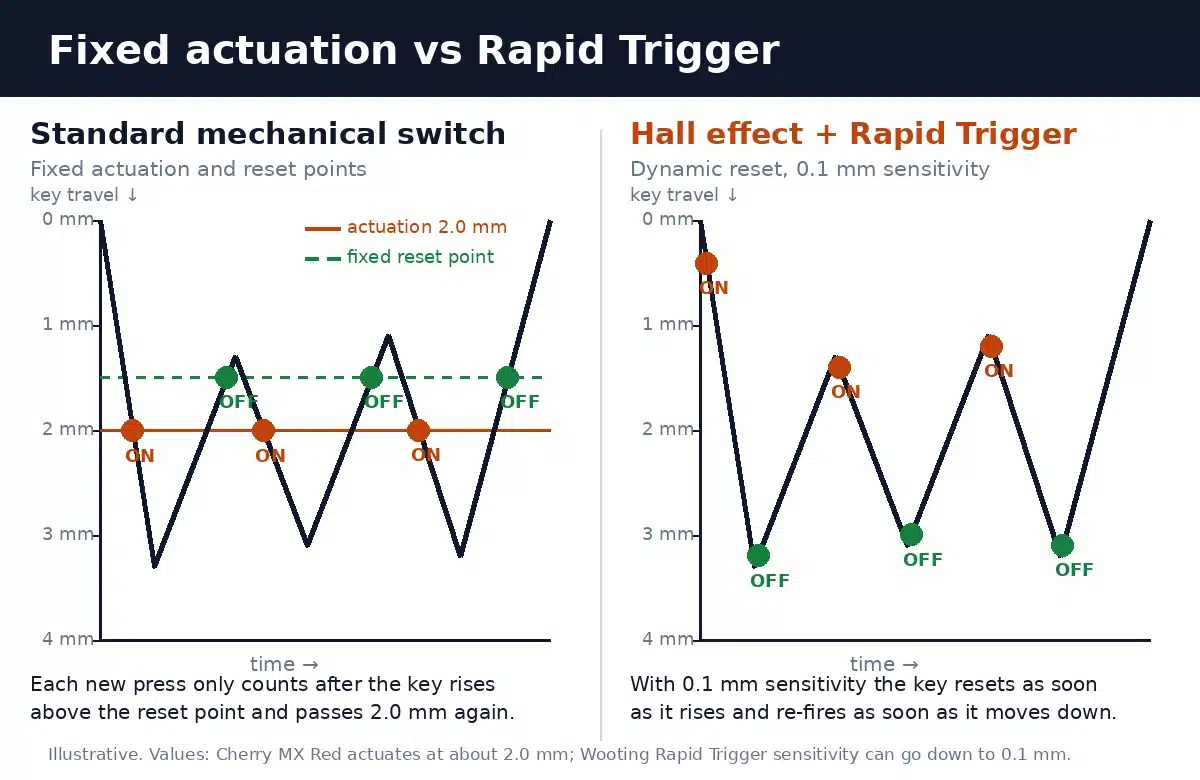
Rapid Trigger is a keyboard feature that makes the actuation and reset points dynamic. Instead of a key turning on at one fixed depth and off at another fixed depth, the keyboard tracks which direction the key is moving. As soon as the key travels upward by a small amount, it is treated as released. As soon as it moves back down by that amount, it is pressed again, wherever it happens to be in its travel.
Wooting, the Dutch keyboard maker that popularised the feature and describes it as its own invention, lets the sensitivity go as low as 0.1 mm. In other words, lifting your finger just a tenth of a millimetre is enough to stop an input. Wooting also offers a Continuous Rapid Trigger mode, where the dynamic behaviour stays active until the key is fully released rather than only below a set depth.
The reason gamers care is movement. In tactical shooters you stop your character by releasing a movement key (or tapping the opposite one). With Rapid Trigger, that release registers almost the moment your finger starts lifting, so stops, strafes and counter-strafes feel tighter. It also helps in rhythm games and anything that involves rapid repeated taps of the same key.
How a normal mechanical switch works
To see why Rapid Trigger is different, start with a standard mechanical switch. Inside, a metal contact closes at one specific depth, called the actuation point. A Cherry MX Red, for example, actuates at about 2.0 mm out of 4.0 mm total travel. The key is then only treated as released when it rises back past a reset point that is fixed by the switch’s physical design. If you want the full picture of contacts, stems and springs, read our guide to how mechanical keyboards work and our overview of Cherry MX switches.
That design is reliable and has worked for decades, but it has two built-in limits. First, the actuation point cannot change: a 2.0 mm switch is always a 2.0 mm switch. Second, the keyboard only knows “pressed” or “not pressed”. It has no idea whether the key is at 1 mm or 3.5 mm, so it cannot react to small movements in between.
How Hall effect (magnetic) switches work
A Hall effect switch removes the metal contact entirely. A small magnet sits in the switch stem, and a Hall effect sensor on the circuit board measures the strength of the magnetic field. As you press the key, the magnet gets closer to the sensor and the field gets stronger. Wooting explains it simply: the switch has a magnet, the PCB has a Hall effect sensor, and together they measure the distance between them, giving the keyboard a continuous reading of the key’s position.
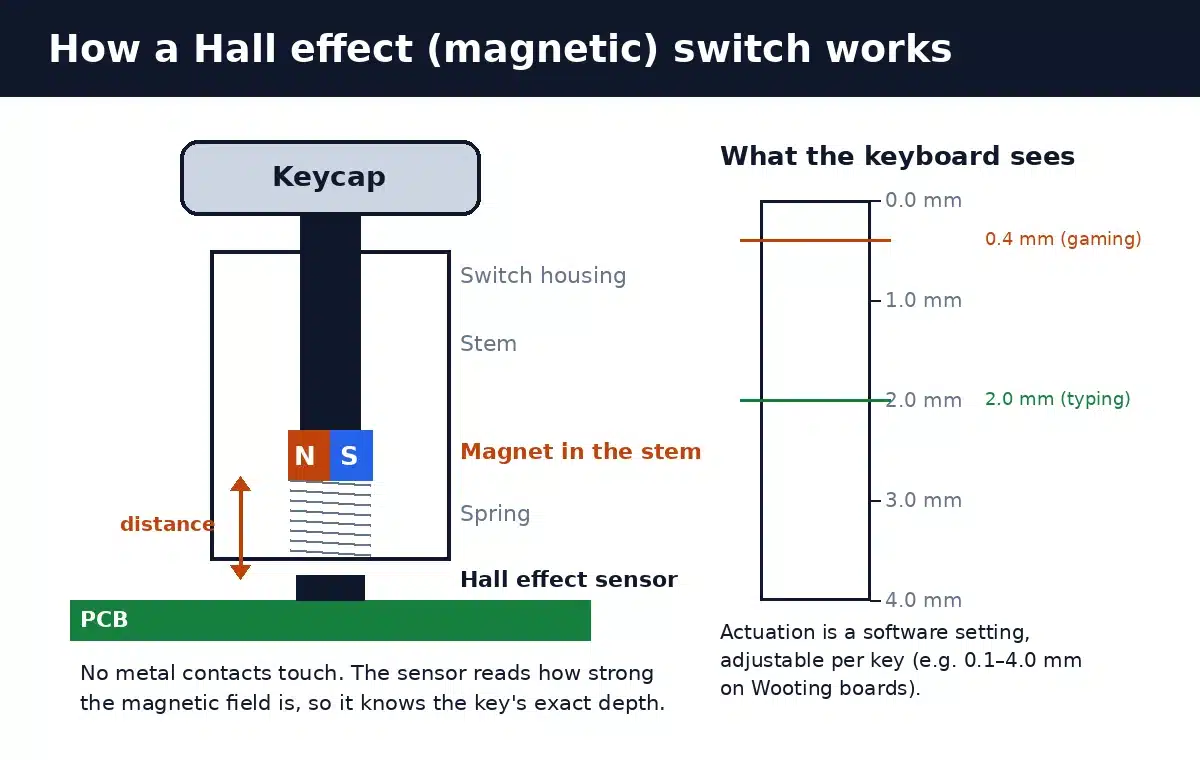
Because the keyboard knows exactly how far each key is pressed, the actuation point becomes a software setting rather than a physical one. On Wooting keyboards it can be adjusted from 0.1 mm to 4.0 mm, per key. Wooting’s own Lekker switch, for instance, has 4 mm of travel, a 65 cN spring and an actuation range of 0.1 to 3.8 mm. You could set WASD to a hair-trigger 0.4 mm for gaming and leave the rest of the keyboard at a deeper 2.0 mm to avoid typos.
Continuous position sensing also enables analog input. Like a controller’s thumbstick, pressing W halfway can make your character walk and pressing it fully can make them run, in games that support analog input. That is a separate feature from Rapid Trigger, but it relies on the same hardware.
Other analog switch types
Hall effect is the most common way to get analog key sensing, but it is not the only one. Razer’s Huntsman V3 Pro uses analog optical switches, which measure key depth with light instead of magnetism, and also offers adjustable actuation and a Rapid Trigger mode. Some newer boards use TMR (tunnel magnetoresistance) sensors, another magnetic approach. Whatever the sensor, the key requirement is the same: the keyboard must measure position continuously, not just detect a closed contact.
Mechanical vs Hall effect vs analog optical: comparison
| Feature | Standard mechanical | Hall effect (magnetic) | Analog optical |
|---|---|---|---|
| How a press is detected | Metal contacts touch | Magnet and Hall sensor measure distance | Light beam measures stem position |
| Actuation point | Fixed by the switch (e.g. ~2.0 mm) | Adjustable in software, often per key | Adjustable in software |
| Reset point | Fixed | Fixed or dynamic (Rapid Trigger) | Fixed or dynamic (Rapid Trigger) |
| Rapid Trigger | Not possible | Yes, on supported boards | Yes, on supported boards |
| Analog (gamepad-style) input | No | Often yes | Often yes |
| Contact wear | Metal contacts can wear or chatter | No physical contact to wear | No physical contact to wear |
| Switch choice | Huge range, many hot-swap options | Must use magnetic switches made for the board | Usually brand-specific switches |
| Typical price | Budget to premium | Mid-range to premium | Premium |
Rapid Trigger vs Snap Tap (SOCD): what is the difference?
These two features are often confused because they launched around the same time and both target movement in shooters. They do different things.
- Rapid Trigger affects a single key. It changes when that key counts as pressed or released, based on movement. You still press and release every key yourself.
- Snap Tap (Razer’s name, introduced on the Huntsman V3 Pro) and similar features such as Wooting’s Snappy Tappy handle two opposing keys, like A and D. If you hold A and then press D, the keyboard automatically treats A as released and only sends D. Engineers call this SOCD (simultaneous opposing cardinal direction) handling.
That second behaviour effectively automates the counter-strafe, and game developers took notice. On 19 August 2024, Valve updated Counter-Strike 2 so that official servers detect hardware-assisted counter-strafing (Snap Tap-style input automation) and kick players who use it; it is a kick, not a ban. The same update requires cl_allow_multi_input_binds 1 for multi-input binds. Rapid Trigger on its own is not targeted, because each key press is still a real, single human action. Rules differ between games and tournaments, so check the current policy for the games you play before enabling any SOCD feature.
Does Rapid Trigger actually make you better?
Rapid Trigger removes a small physical delay; it does not aim for you. The benefit is real but narrow:
- Tactical shooters (CS2, Valorant): the biggest gain. Accurate shooting depends on being stationary, and Rapid Trigger stops movement as soon as your finger lifts.
- Rhythm and osu!-style games: very fast repeated taps of the same key register reliably even when you do not lift your finger fully.
- Fighting games and platformers: helpful for quick taps, though game-specific input rules matter.
- Typing and office work: little or no benefit. A very shallow actuation point can actually cause more typos, so most people set typing keys deeper.
Keep the rest of your setup in perspective too. A keyboard’s polling rate decides how often it reports to your PC, and N-key rollover makes sure no keys are dropped when you press many at once. Rapid Trigger complements those specs rather than replacing them. If you are still deciding whether a mechanical board is worth it for games, start with are mechanical keyboards better for gaming.
How to set up Rapid Trigger
Every brand uses its own software, but the steps are similar:
- Install the keyboard’s configurator. Wooting uses Wootility (web-based), Razer uses Synapse, and many other magnetic boards use a web or desktop app.
- Select the keys you want. Most players enable it only on movement keys (WASD) and perhaps a few ability keys.
- Set the actuation point. Start around 1.0–1.5 mm and lower it gradually. Too shallow and you will trigger keys just by resting your fingers on them.
- Set Rapid Trigger sensitivity. Try 0.2–0.3 mm first, then move towards 0.1 mm if it feels controlled. Very low values can register tiny finger tremors.
- Test in practice mode before ranked matches, and keep typing keys at a deeper, standard actuation.
Downsides and things to check before buying
- Switch compatibility: magnetic boards need magnetic switches. You cannot drop in ordinary MX-style mechanical switches, and the choice of switches is smaller.
- Calibration: analog switches sometimes need calibrating in software, especially after swapping switches.
- Price: Hall effect keyboards have become much cheaper, but the best implementations still sit in the mid-to-premium range.
- Wireless trade-offs: continuous sensing uses power, so many Rapid Trigger keyboards are wired or have shorter battery life. Our wired vs wireless keyboards guide covers the trade-offs, and our best wireless gaming keyboards list shows the wireless options.
- Software quality: the feature is only as good as the firmware. Look for reviews that mention consistent actuation and easy configuration.
FAQ
Is Rapid Trigger the same as Hall effect?
No. Hall effect is the sensor technology that measures key position with a magnet. Rapid Trigger is a software feature that uses that position data to reset keys dynamically. You need analog sensing (Hall effect, TMR or analog optical) for Rapid Trigger, but not every Hall effect keyboard has to use it.
Can a normal mechanical keyboard get Rapid Trigger?
No. A standard mechanical switch only reports pressed or not pressed, with fixed actuation and reset points. Rapid Trigger needs a keyboard that measures how far each key is pressed.
Is Rapid Trigger allowed in CS2 and Valorant?
Rapid Trigger by itself is widely used in competitive play. What Valve targeted in Counter-Strike 2 (August 2024) was hardware-assisted counter-strafing such as Snap Tap/SOCD, which official servers detect and kick. Policies can change, so check each game’s and tournament’s current rules.
What is a good Rapid Trigger sensitivity?
Most players start around 0.2–0.3 mm and adjust from there. Lower values such as 0.1 mm feel the most responsive but can register accidental movements if your fingers rest heavily on the keys.
Do Hall effect switches last longer?
They have no metal contacts that rub together, so there is no contact wear or contact chatter, a common cause of double-typing on worn mechanical switches. The springs, stems and keycaps still wear like any other switch.
Are Hall effect keyboards good for typing?
Yes, as long as you set a sensible actuation point. Because the depth is adjustable, you can make typing keys feel similar to a standard 2.0 mm switch while keeping gaming keys shallow.
The bottom line
Rapid Trigger is the most meaningful change to gaming keyboards in years, but it is a refinement rather than magic. It works because Hall effect and other analog switches measure every key’s exact depth, letting the keyboard release a key the moment your finger lifts. Competitive shooter and rhythm game players will feel the difference; typists and casual players can safely skip it. If you do buy one, check switch compatibility, software quality and your game’s rules on SOCD features like Snap Tap before you start tweaking.
