

Quick answer
A keycap set fits your keyboard if five things match: the stem type (most mechanical keyboards use the cross-shaped MX stem), the layout (ANSI or ISO), the bottom row sizes, any odd-sized keys such as a short right Shift, and a profile that works on your rows. Check your keyboard’s layout and key sizes, then compare them with the kit’s contents before you buy.
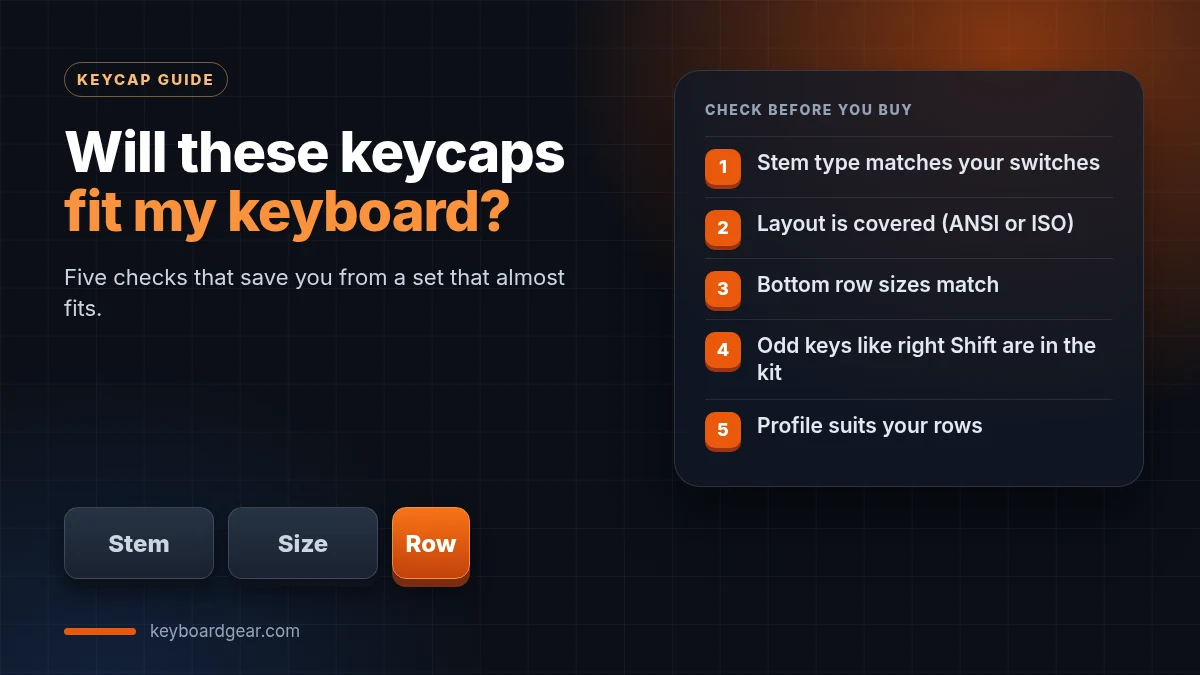
Buying new keycaps is one of the easiest ways to change how a keyboard looks and feels. It’s also easy to get wrong. A set can look perfect in photos and still leave you without a right Shift that fits, or with a spacebar that’s too long.
Here’s what to check, in the order that matters most.
1. Stem type: will the keycaps attach?
The stem is the part of the switch the keycap pushes onto. Keycaps only fit switches with a matching stem.
| Stem type | Found on | Fits standard keycap sets? |
|---|---|---|
| MX-style cross stem | Most mechanical keyboards, including Cherry, Gateron, Kailh box and most optical and Hall effect switches | Yes |
| Alps stem | Some vintage boards and Matias switches | No, needs Alps-mount keycaps |
| Topre stem | Topre boards such as many Realforce and HHKB models | Usually no, unless the board uses MX-compatible sliders |
| Low-profile stems | Many laptop-style and low-profile mechanical boards | Often no; Kailh Choc v1, for example, needs Choc keycaps |
| Proprietary stems | Some gaming boards with in-house switches | Check the maker’s specs |
If you’re not sure, pull one keycap off and look. A plus-shaped (+) stem is MX-style. Our guide to removing keyboard keys shows how to do it safely.
Membrane and laptop keyboards generally don’t take aftermarket mechanical keycap sets. Check whether your board is mechanical before shopping.
2. Layout: ANSI or ISO?
Most keycap sets are made for the ANSI layout common in the US, with a wide horizontal Enter key and a 2.25u left Shift. The ISO layout used in the UK and much of Europe has a tall Enter key, a shorter 1.25u left Shift and an extra key beside it.
An ANSI-only set won’t fully cover an ISO keyboard, and the reverse. Many larger sets include an ISO add-on kit, but check before you buy. Language-specific legends, such as German or Nordic, may need a separate kit.
3. Bottom row: the most common problem
Sets often fall short on the bottom row because keyboards don’t all use the same key sizes there. Keys are measured in units (u), where 1u is a standard letter key.
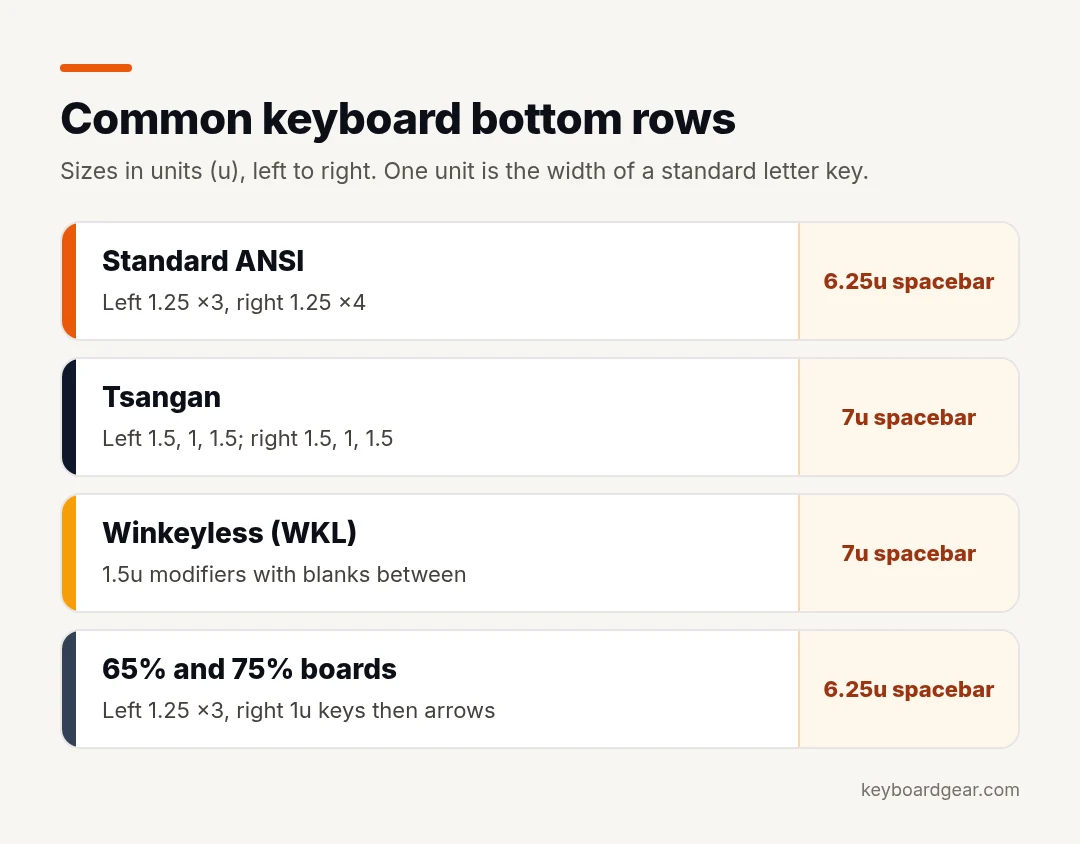
A standard ANSI bottom row uses 1.25u modifiers and a 6.25u spacebar. Many custom keyboards use a Tsangan or winkeyless row with 1.5u modifiers and a 7u spacebar. Some gaming keyboards from big brands use non-standard sizes, such as a 6u or 6.5u spacebar or unusual modifier widths. If your board has a non-standard bottom row, choose a set that lists it, or plan to keep your original bottom row.
Spacebars also have stabilizer mounting points in fixed places. A spacebar of the right length will usually line up with the board’s keyboard stabilizers, but unusual sizes may not.
4. Odd-sized keys and compact layouts
Compact keyboards save space by shrinking or moving keys, so check these against the kit’s contents:
- Right Shift. A full-size or TKL board uses 2.75u, but many 65% and 75% boards use a 1.75u right Shift next to the arrow keys.
- Right-side modifiers. On 65% and 75% boards, the keys right of the spacebar are often 1u to make room for arrows.
- Extra 1u keys. Compact boards may need more 1u keys for the arrow cluster, navigation keys and function row.
- Numpad keys. Full-size boards need a 2u 0 key and 2u tall plus and Enter keys, which smaller kits sometimes leave out.
- Split and ergonomic boards. These often need two shorter spacebars or extra 1u and 1.25u keys.
Our keycap sizes guide covers every common size, and our roundup of the best 60% keyboards shows how compact layouts differ.
5. Profile and row position
Keycap profile is the shape and height of the keys. Sculpted profiles, such as Cherry, OEM and SA, have a different shape for each row (often labelled R1 to R4). Put a top-row key in the bottom row and it will look and feel wrong. Uniform profiles, such as DSA and XDA, are the same height on every row, so any key fits anywhere.
That matters if your board has an unusual layout, such as an ortholinear grid or a split keyboard, where a sculpted set may not have the right key in the right row. A uniform profile is usually the safest choice. See our keycap profiles guide for the differences.
Also check: switch orientation and backlighting
Most switches can be mounted with their LED slot facing north (towards the back of the board) or south (towards you). On some south-facing boards, a few tall Cherry-profile keycaps can touch the switch housing so the key catches or doesn’t fully return. Most modern keycap sets are fine, but if your keyboard is south-facing, check reviews of that set with your board.
If you want backlighting to show through the legends, you’ll need shine-through keycaps. Most premium sets have solid legends that don’t let light through. Material affects feel and wear too; our PBT vs ABS keycaps guide explains the trade-offs.
Five-minute compatibility checklist
- Pull a key and check the stem. A plus shape means MX-style.
- Identify your layout: ANSI or ISO, and your size (full, TKL, 75%, 65%, 60% or other).
- Measure your bottom row: count modifier widths and the spacebar length.
- List your odd keys: right Shift size, any extra 1u keys, and numpad keys.
- Compare with the kit’s contents or its compatibility list before you buy. Many sellers show which boards a set covers.
Keycap sets are often sold as several kits (base, modifiers, spacebars, novelties). The base kit alone may not cover your board. Check what you’re actually buying.
FAQ
Are all mechanical keycaps universal?
No. Most keycaps fit MX-style stems, but compatibility also depends on layout, bottom row and key sizes. Alps, Topre and many low-profile switches need different keycaps.
Will Cherry MX keycaps fit Gateron switches?
Yes. Gateron and most other MX-style switches use the same cross stem.
Do keycaps fit 60% keyboards?
Most full keycap sets include enough keys for a standard 60% layout. Check the right Shift and bottom row if your board isn’t standard.
Why doesn’t my spacebar fit?
Your keyboard probably uses a different spacebar length, such as 7u or 6u instead of 6.25u. Match the length and stabilizer spacing.
Can I mix keycap sets?
Yes, but heights and colours may not match. Mixing works best within the same profile.
Final thoughts
Most keycap fit problems come from three things: the stem, the layout and the bottom row. Spend five minutes checking those against the kit’s contents and you’ll avoid a set that almost fits. If your keyboard has an unusual layout, a uniform-profile set with plenty of extra keys is the safest bet.

Experience is what matters at the end!!
Hi! This is Jacob Jay – founder of Keyboardgear.com! From childhood to adulthood, I’ve always remained passionate about IT, and the revolution in this industry, especially gaming on the PC can’t go out of my way. Since I’m an enthusiastic gamer, and I love to experience various gaming accessories, particularly mechanical keyboards, that really boost my gaming adventure manifolds. So, my nerve cells hit me to transfer my experiences into word form and share with others to identify the ideal keyboards perfectly fit for their gaming modes.
I know very well how hard it is to find the high-quality items available on the internet that ought to be exactly the same as seen as on the screen. But the counterfeiters have ruined the user’s trust. As I have passed all such situations, I’m obliged to deliver the genuinity and express the same as what I am saying.
So, now, I’m working on the mission to provide very helpful and frankly but trustworthy reviews and guides about various mechanical keyboards, mouses, and other gaming accessories as per my personal experiences and sound knowledge.