
Two keyboards can use the same switches and still feel completely different under your fingers. A big part of that difference is the keycap profile: the height, angle and shape of the keycaps on each row. Some profiles are low and flat, some are tall and bowl-shaped, and some change height from row to row to follow the curve of your fingers.
This guide explains the keycap profiles you’ll see most often (Cherry, OEM, SA, DSA, XDA, MT3, KAT, OSA and low profile), how they compare, and how to pick one for typing, gaming or a custom build.
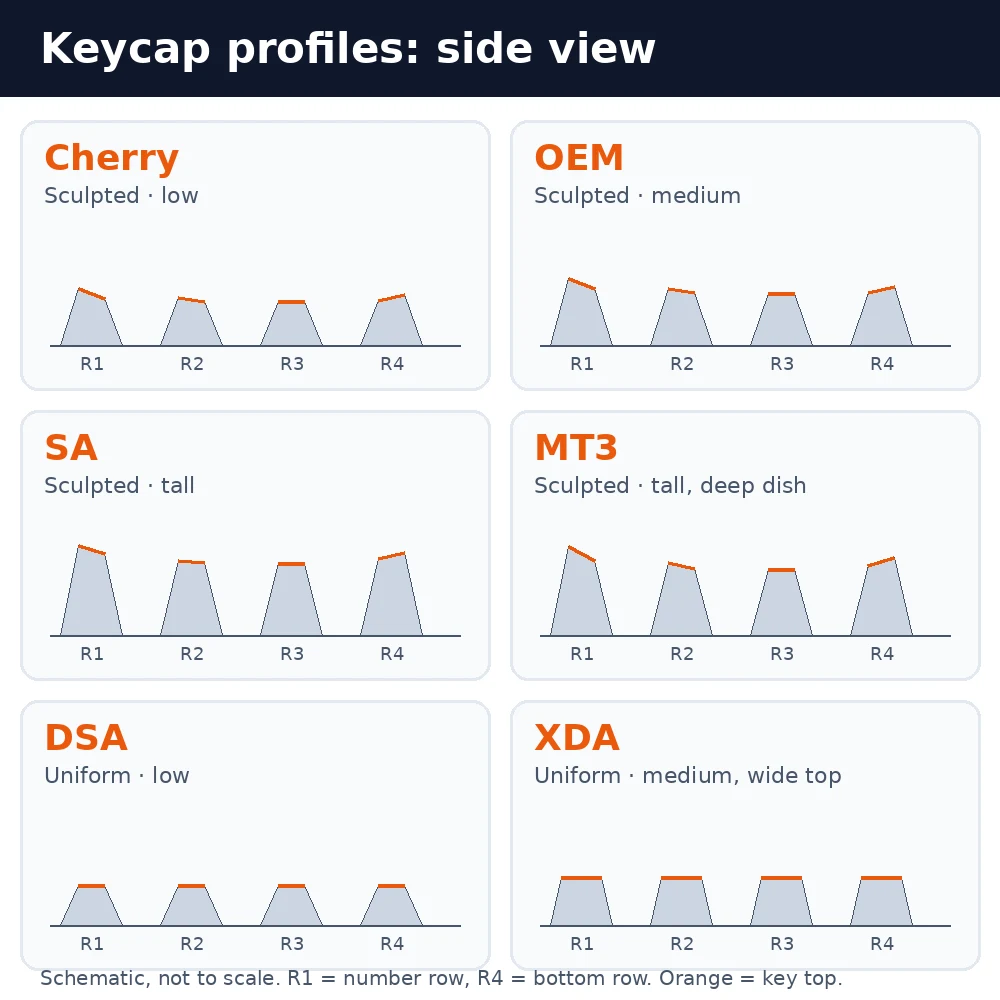
What is a keycap profile?
A keycap profile is the overall shape of a set of keycaps seen from the side. It describes three things:
- Height: how tall each keycap is, from low profiles around 7–8 mm to tall profiles well over 14 mm on the highest row.
- Sculpting: whether each row has its own height and angle, or every key uses the same shape.
- Top shape: whether the top surface is cylindrical (scooped left to right, like a shallow trough) or spherical (dished in both directions, like a shallow bowl).
Profile is separate from keycap material. A Cherry-profile set can be ABS or PBT, and so can an SA set. If you want to know how materials compare, read our guide to PBT vs ABS keycaps.
Sculpted vs uniform profiles
Every profile falls into one of two families.
Sculpted profiles
In a sculpted profile, each row has its own height and tilt. The top rows are usually taller and angled towards you, and the rows step down towards the home row. Together they form a gentle curve that follows the arc of your fingers, so you reach the number row with less stretching. Cherry, OEM, SA, MT3, KAT and OSA are all sculpted.
Sculpted keycaps are made for specific rows, often labelled R1 (number row) to R4 (bottom row). That means you can’t freely swap keys between rows without the board looking and feeling uneven.
Uniform profiles
In a uniform profile every key has the same height and angle. The keyboard feels flat from front to back, and any keycap can go in any position. That makes uniform sets popular for ortholinear and split keyboards, unusual layouts and anyone who likes to rearrange keys. DSA and XDA are the best-known uniform profiles.
Keycap profiles compared
| Profile | Type | Height | Top shape | Feel and best for |
|---|---|---|---|---|
| Cherry | Sculpted | Low–medium | Cylindrical | Low, comfortable typing; the enthusiast default |
| OEM | Sculpted | Medium | Cylindrical | Stock caps on most prebuilt boards |
| SA | Sculpted | Tall (~16.5 mm top row) | Spherical | Retro look, deep sound; wrist rest advised |
| MT3 | Sculpted | Tall | Spherical, deep dish | Typewriter-style sculpt that cradles fingertips |
| KAT | Sculpted | Medium–tall | Spherical | Between Cherry and SA |
| OSA | Sculpted | Medium (OEM-like) | Spherical | OEM height with an SA-style curve |
| DSA | Uniform | Low (~7.6 mm) | Spherical | Ortholinear and custom layouts |
| XDA | Uniform | Medium (~9.1 mm) | Spherical, wide and shallow | Large flat-feeling tops, easy to rearrange |
| Low profile | Uniform | Very low | Flat or slightly dished | Low-profile switches, laptop-like feel |
Heights are approximate and vary between manufacturers, so check the maker’s own drawings if exact sizes matter to you.
The main keycap profiles explained
OEM profile
OEM is the profile most people have already used. It ships on the majority of prebuilt mechanical keyboards, including many gaming boards. It is sculpted, with cylindrical tops, and sits at a medium height, slightly taller than Cherry.
OEM is comfortable and familiar, and replacement OEM sets are cheap and easy to find. Many enthusiasts eventually move to Cherry profile because it is a little lower, but there’s nothing wrong with OEM if you like how it feels.
Cherry profile
Cherry profile was originally designed by Cherry, the German switch maker, and is now made by many keycap manufacturers. It is sculpted with cylindrical tops, like OEM, but lower and with a slightly more pronounced angle on the top rows.
The lower height means your fingers don’t have to travel as far up and down, which many people find more comfortable for long typing sessions, even without a wrist rest. That’s why Cherry profile is the most common choice for enthusiast keycap sets. If you’re shopping for one, see our picks for the best custom keycaps.
SA profile
SA is a tall, sculpted profile with spherical tops, originally made by Signature Plastics. Its top row is one of the tallest of any common profile, at roughly 16.5 mm. The rounded, bowl-shaped keys and tall stance give keyboards a retro, typewriter-like look.
SA has a distinctive deep, clacky sound because of its tall walls. The downside is height: most people need a wrist rest to type on SA comfortably, and it can take time to get used to. Some SA sets are also made in a uniform version, using the same row 3 shape on every key.
DSA profile
DSA is a low, uniform profile with spherical tops, also from Signature Plastics. Every key is the same height (about 7.6 mm), so the keyboard feels flat from front to back. The dished tops help centre your fingertips even though the rows don’t change height.
DSA is a common choice for ortholinear keyboards and custom layouts because every cap fits every position. Some people find the flat feel takes a little getting used to after a sculpted profile.
XDA profile
XDA is another uniform profile, a little taller than DSA at about 9.1 mm, with wider, flatter key tops. The larger top surface gives a big target for each finger, and the very shallow dish makes the keyboard look clean and modern.
XDA is popular on budget and mid-range aftermarket sets, especially dye-sublimated PBT sets with colourful designs. Because it’s uniform, you can move keys anywhere.
MT3 profile
MT3 was designed by Matt3o and is sold by Drop. It is tall and sculpted with a deep spherical dish, inspired by vintage terminal keyboards. The rows have a strong, curved sculpt, and the deep dish cradles your fingertips.
Fans say MT3 feels very natural for typing, but like SA it is tall, so a wrist rest helps. It’s a good choice if you love the vintage look and want a more pronounced sculpt than SA.
KAT profile
KAT is a sculpted profile with spherical tops that sits between Cherry and SA in height. It aims to give you some of SA’s rounded feel without its full height, which makes it an easier introduction to spherical keycaps.
OSA profile
OSA combines the height of OEM with the spherical, SA-style curve. It is a medium-height sculpted profile with slightly larger key tops. Think of it as a middle ground for people who like the bowl shape of SA but not its height.
Low-profile keycaps
Low-profile keycaps are designed for low-profile switches, such as those in slim keyboards like the Logitech MX Mechanical. They are very short and usually flat or only lightly dished, giving a feel closer to a laptop keyboard. Low-profile keycaps generally don’t fit standard MX-style switches, and standard keycaps won’t fit low-profile switches, so always check compatibility.
How keycap profile affects typing, gaming and sound
Typing comfort
Lower profiles such as Cherry, OEM and DSA keep your hands closer to the desk, which many people find comfortable without a wrist rest. Tall profiles such as SA and MT3 raise your hands, so a wrist rest becomes more important. Sculpted profiles help you reach the number row; uniform profiles make every key feel the same.
Gaming
For gaming, most players prefer a low or medium sculpted profile such as Cherry or OEM. Shorter keycaps make it easier to slide quickly between keys, and the sculpting helps you find keys like WASD by feel. Tall spherical profiles work, but they can feel slower when you need to move between keys fast.
Sound
Profile changes how a keyboard sounds. Taller keycaps with thick walls, like SA and MT3, tend to sound deeper and more resonant. Low profiles like DSA and Cherry usually sound tighter and a bit quieter. Material, wall thickness, switches and case design matter too; our guide on gasket-mount keyboards explains how the case affects sound, and lubing your switches can smooth it further.
Does keycap profile matter for compatibility?
Profile itself doesn’t decide whether keycaps fit, but there are a few things to check before buying a new set:
- Stem type: most aftermarket keycaps use an MX-style cross stem, which fits Cherry MX and most MX-compatible switches. Read our guide to Cherry MX switches if you’re unsure what your board uses.
- Layout and bottom row: some keyboards use non-standard bottom-row key sizes. Check that the set includes the right sizes for your layout, especially for spacebars and modifier keys. Our keyboard sizes guide and keyboard key names guide help with this.
- Sculpted row placement: with sculpted sets, each key needs to go on the correct row. Mixing rows makes the keyboard uneven.
- Clearance: very tall profiles can sit close to knobs or case edges on some keyboards, so look at photos of the set on a similar board.
When you swap keycaps, use a proper keycap puller and pull straight up. Our guide on how to remove keyboard keys walks through it.
Which keycap profile should you choose?
- New to mechanical keyboards: stick with OEM or Cherry. They’re familiar, comfortable and easy to find.
- Long typing sessions without a wrist rest: Cherry or DSA keep your hands low.
- Gaming: Cherry or OEM, for low height and easy key-finding.
- Retro look and deep sound: SA or MT3, with a wrist rest.
- Ortholinear, split or custom layouts: DSA or XDA, because every key fits every position.
- Curious about spherical caps but unsure about height: KAT or OSA.
If you can, try a profile before buying a full set. A cheap keycap sampler or a friend’s keyboard tells you far more than any photo. And if you’re still choosing the keyboard itself, see our list of the best full-size mechanical keyboards. If keycaps have become a real hobby, our custom keycaps career guide looks at the design side.
FAQ
What is the most common keycap profile?
OEM is the most common, because most prebuilt mechanical keyboards ship with OEM-profile keycaps. Among enthusiasts buying aftermarket sets, Cherry profile is the most popular.
What is the difference between OEM and Cherry profile?
Both are sculpted with cylindrical tops. Cherry profile is slightly lower than OEM and has a more pronounced angle on the top rows, which many people find a little more comfortable for typing.
Is SA profile good for gaming?
You can game on SA, but its tall, rounded keys make fast movements between keys less precise for many players. Most gamers prefer a lower profile such as Cherry or OEM.
Is DSA or XDA better?
Both are uniform. DSA is lower with smaller, more dished tops, while XDA is a little taller with wider, flatter tops. Choose DSA if you want a low feel, or XDA if you like a big, flat key surface.
Can I mix keycap profiles?
You can, for example using different profiles for accent keys, but heights and angles won’t line up perfectly. Mixing uniform caps is easiest; mixing sculpted profiles tends to look and feel uneven.
The bottom line
Keycap profile is the shape and height of your keys. OEM and Cherry are low-to-medium sculpted profiles that suit most people and most gamers. SA and MT3 are tall, rounded and retro, best with a wrist rest. DSA and XDA are uniform profiles that fit any layout. Start with what feels comfortable, try samples if you can, and choose the profile that suits how you type.
