

A mouse pad picks up skin oil, sweat, dust and crumbs every day, and cloth pads soak it up. Over time the surface turns patchy, the glide changes from one spot to another and, as SteelSeries points out, a dirty pad can even be the cause of tracking problems (SteelSeries). The good news is that most pads clean up well in a few minutes. The bad news is that the wrong method, like a hot wash, a tumble dryer or a strong solvent, can peel the cloth off the rubber base, fade the print or kill the lighting on an RGB pad.
Mouse pad makers do not all agree on how to do it. Some say a full soak in soapy water is fine, while others say no soap and no running water at all. This guide puts the official care advice from Logitech, SteelSeries, Razer, Corsair, HyperX and Artisan side by side, then gives you a safe step-by-step method for each type of pad: standard cloth, RGB, hard plastic and large desk mats.
Quick answer
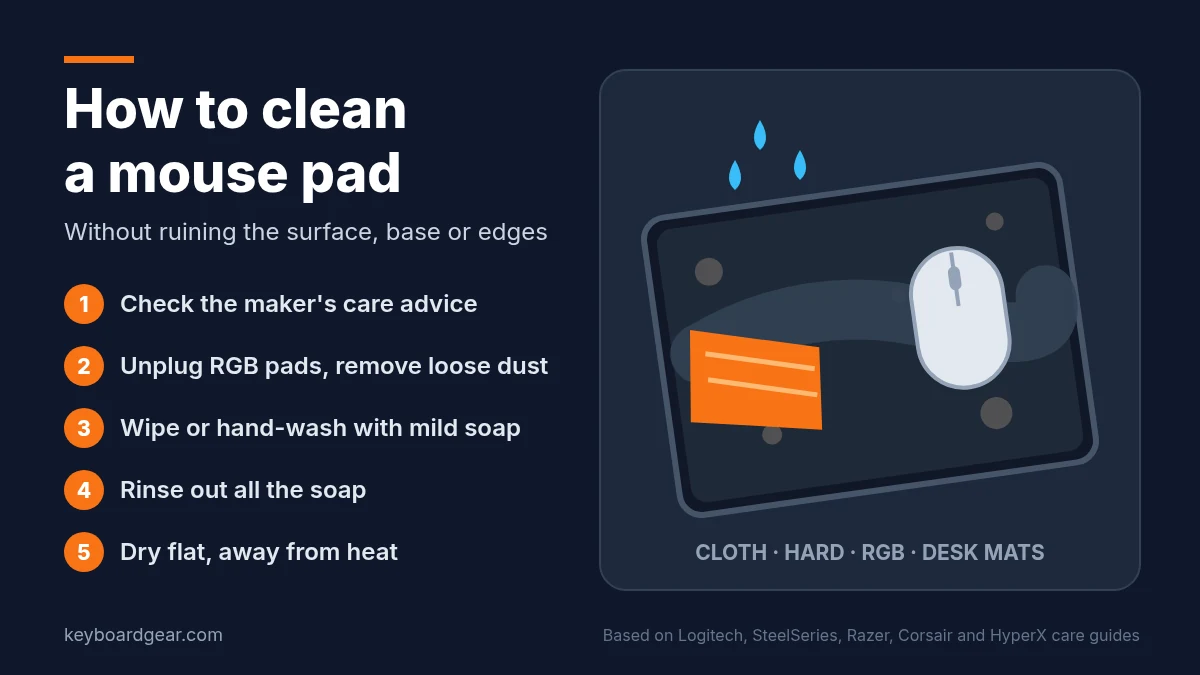
For most cloth mouse pads, shake or brush off loose dirt, then wipe the surface with a soft cloth lightly dampened with water. For stains, add a small amount of mild soap to the cloth, rub gently, and wipe again with a clean damp cloth until no soap is left. Let it dry flat before you use it. Logitech, Corsair and HyperX all say not to put a mouse pad in the washing machine or tumble dryer.
Only soak a pad if its maker says it is safe (SteelSeries does for its regular cloth QcK pads). Never submerge an RGB or wired pad, and unplug it before you clean it.
What you need
- A soft, lint-free cloth, ideally microfiber. Razer recommends a lint-free microfiber cloth, and warns against coloured cloths that can transfer dye (Razer).
- Mild soap: a little hand soap or mild dish soap. SteelSeries says hand soap is kinder to fabrics than dish soap (SteelSeries).
- A soft-bristled brush for loose dirt and, if you deep-clean, for scrubbing the surface gently.
- A lint roller for hair and dust. Use a low-tack one meant for clothes, not a strong carpet roller (see the specialty pads section below).
- A dry towel to press water out after a wash.
Skip paper towels on textured or RGB pads: Corsair notes that small fragments break off while you scrub (Corsair).
First, check what your pad is made of
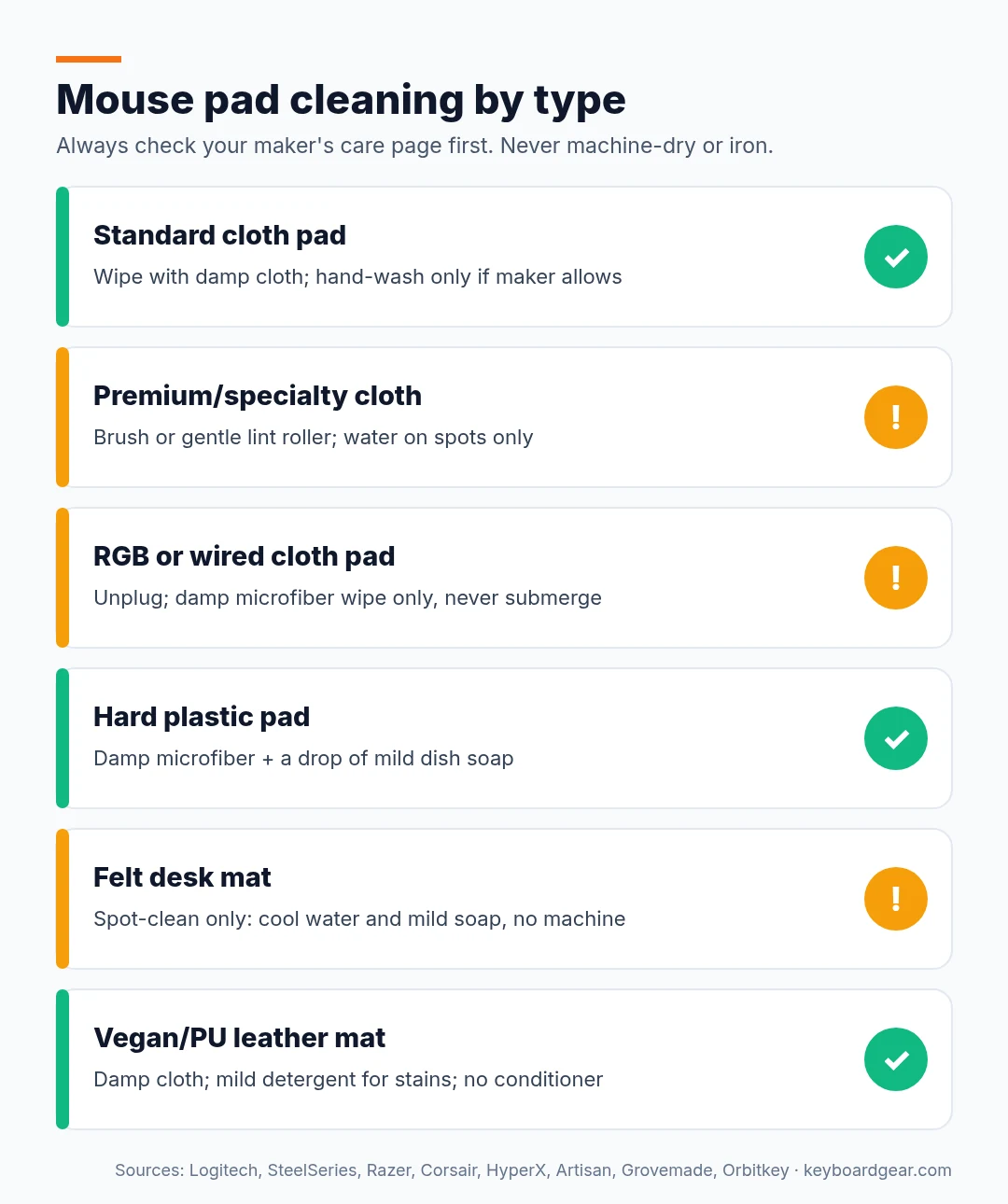
The right method depends on the surface, the base and whether there is any electronics inside. Look for the care advice on the box or the maker’s support page, then use this table as a guide.
| Pad type | Safe cleaning method | Avoid |
|---|---|---|
| Standard cloth pad (rubber base) | Damp-cloth wipe; mild soap on stains. Hand-wash only if the maker allows it | Washing machine, tumble dryer, bleach, high heat |
| Premium or specialty cloth (e.g. Artisan, SteelSeries QcK Performance) | Brush, gentle lint roller, water on dirty spots only | Soaking, soap where the maker says no, strong lint rollers |
| RGB or wired cloth pad | Unplug, then wipe with a lightly damp microfiber cloth | Submerging, running water, water near the cable or lighting strip |
| Hard plastic pad | Damp microfiber cloth with a drop of mild dish soap, then wipe the soap off | Abrasive pads, solvents |
| Felt desk mat | Spot-clean with cool water and mild soap | Washing machine, rubbing hard (felt fuzzes) |
| Vegan or PU leather desk mat | Damp cloth; a pea-sized amount of mild detergent for stains | Bleach, solvents, leather conditioner |
What the manufacturers say
Here is the official advice from the biggest mouse pad brands, so you can match it to the pad on your desk. Notice how much it differs, especially on soap and soaking.
| Brand | Method | Soap? | Soak or machine wash? |
|---|---|---|---|
| Logitech (cloth mats and pads) | Lightly moistened soft, lint-free cloth; disinfecting wipes without fragrance are OK | Small amount on the cloth for heavier stains | No washing machine, no tumble dryer, do not iron (source) |
| SteelSeries (regular QcK cloth) | Soak in warm water, scrub gently with a brush, rinse until clear | Yes, mild soap | Hand soak yes; machine wash only for pads made to handle it (source) |
| SteelSeries (QcK Prism RGB) | Unplug, wipe with a lightly damp microfiber towel | Not mentioned | Do not submerge; dry flat for at least 24 hours (source) |
| Razer (all mouse mats) | Lint-free microfiber cloth lightly dipped in tap water, circular motion | No | No washing machine, no running water (source) |
| Corsair (non-RGB) | Soft brush, then damp cloth; equal parts water and vinegar for tough stains | Yes, mild soap (test a hidden spot first) | Anti-fray pad: hand-wash allowed, no machine wash or tumble dry (source, source) |
| HyperX | Damp cloth with soapy water, dry in a well-ventilated area (source) | Yes | Not covered; its blog guide says to avoid direct sun and heat when drying (source) |
| Artisan (Japanese premium pads) | Clean only the surface and base with a clothes brush or low-tack clothes roller | No routine washing | Washing with water degrades the glide surface and foam layer (source) |
The safest rule follows from this: start with the gentlest method (dry brush, then damp cloth) and only go further if your pad’s maker allows it. If you cannot find any care advice, treat the pad like a Logitech or Razer pad and wipe it rather than washing it.
How to clean a cloth mouse pad
Quick clean (every week or two)
This is the method nearly every brand agrees on, and it is enough for regular upkeep.
- Unplug and move your gear. Take the mouse and keyboard off the pad. If the pad has RGB lighting or a USB port, unplug it.
- Remove loose dirt. Logitech suggests holding the mat upright with one hand and tapping it gently with the other to knock dust off (Logitech). A soft brush or a low-tack lint roller picks up hair and crumbs. Corsair advises light pressure so you do not push dirt deeper into the fabric (Corsair).
- Wipe with a damp cloth. Moisten a soft, lint-free cloth with tap water, wring it out well and wipe the whole surface. Razer suggests a circular motion (Razer).
- Treat stains with a little soap. Put a small amount of mild soap on the damp cloth, never straight on the pad, and rub the stained area gently (Logitech).
- Rinse the soap out. Wipe the area again with a clean damp cloth, rinsing it as you go, until no soap is left. HyperX notes that cleaners can leave residue, so rinse until the cloth comes away clean (HyperX).
- Dry it flat. Press with a dry towel, then leave the pad flat until it is completely dry before you put the mouse back.
Do not spray cleaner directly on the pad. Logitech says to spray the cloth and wipe instead, and not to use bleach, acetone (nail polish remover), strong solvents or abrasives, because they can discolour the polyester surface.
Deep clean by hand (only if your maker allows it)
A pad that is greasy all over, smells, or has sweat stains where your wrist sits may need a proper wash. SteelSeries publishes this method for its non-RGB cloth and fabric pads (SteelSeries, SteelSeries):
- Fill a sink, basin or bathtub with warm water. Do not do this with an RGB or wired pad.
- Submerge the pad and add a small amount of mild soap. A little goes a long way.
- Let it soak for a while so absorbed grease can loosen.
- Scrub the whole surface gently with a soft brush or your hand. Be extra careful on pads with a printed design, because rubbing hard can damage the print.
- Rinse under the tap until all the soap is gone and the water runs clear.
- Press out as much water as you can, then lay it on a towel cloth side down to dry.
Corsair’s Korean help centre gives a gentler middle option for its soft cloth pads: wipe with a soft sponge, warm water and a pea-sized amount of dish soap, remove the soap with a damp towel, pat dry and leave it for 24 hours (Corsair). If your pad has stitched edges and a thick rubber base, either method is usually fine. If it has thin, unstitched edges, go easy: scrubbing near the edge is where the cloth most often starts to lift.
How to clean an RGB mouse pad
RGB pads have a light strip around the edge, a cable and sometimes a USB pass-through port, so water is the enemy. All three big brands with RGB pads say the same thing:
- Unplug it from the PC, and remove anything plugged into its USB port.
- Wipe off loose dirt with a soft, dry cloth.
- Clean with a lightly damp microfiber cloth. Wring it out so it is only damp. For stubborn marks, Corsair allows a mild cleaning solution on the cloth (Corsair).
- Keep water away from the edges and electronics. Corsair warns that the lit rim is held on by thin plastic strands that can break if you are rough with them.
- Let it dry completely before you plug it back in. SteelSeries says to dry a QcK Prism flat for at least 24 hours (SteelSeries); Razer says at least five minutes for its Chroma mats (Razer). If in doubt, wait longer.
Never submerge an RGB pad or hold it under a tap, even if the cable is removable.
How to clean a hard mouse pad
Hard plastic and aluminium-style pads are the easiest to clean because nothing soaks in. SteelSeries says a hard or plastic pad only needs a wipe with a damp cloth and a mild cleaner (SteelSeries). Corsair’s steps for its hard MM600 and MM800 pads are: unplug any RGB, put a pea-sized drop of dish soap on a damp microfiber towel, wipe gently (avoiding the edges and electronics), remove the soap with a damp towel, pat dry and leave it to dry fully (Corsair). Avoid scouring pads and solvents, which can scratch or haze the textured surface that your sensor tracks on.
How to clean a desk mat
A desk mat is just a very big mouse pad, and cloth desk mats are cleaned the same way as cloth pads. The difference is that they are awkward to wash, so spot cleaning matters more. Logitech’s care guide covers its desk mats and mouse pads together, so the damp-cloth method above applies to both (Logitech). Two other materials need their own care:
- Wool felt: Grovemade says to spot clean its wool felt with cool water and mild soap and never to put it in a washing machine (Grovemade).
- Vegan (PU) leather: Orbitkey recommends wiping with a slightly damp clean cloth, and for stains a pea-sized amount of mild detergent wiped off with a non-abrasive microfiber cloth. Bleach or solvents can permanently damage the surface, and leather conditioner should not be used because the material is not real leather. Its felt underside should be brushed gently, because pressing hard makes it fuzz (Orbitkey).
- Real leather: follow the maker’s own leather care. Grovemade, for example, says liquid will mark its vegetable-tanned leather and that it should only be cleaned with products made for that leather (Grovemade).
Still choosing a mat? Our best desk mats guide compares cloth, felt and leather-look options, including spill-resistant surfaces that are much easier to keep clean.
Can you put a mouse pad in the washing machine?
Usually, no. Logitech says not to wash its mats in a washing machine or dry them in a tumble dryer (Logitech). Razer says not to put its mats in a washing machine (Razer), and Corsair says no machine wash or tumble dry for its anti-fray cloth pad (Corsair). Most makers do not spell out why, but a cloth top glued to a rubber base and unstitched edges are the parts most likely to suffer from tumbling and heat.
SteelSeries is the exception. It says that while machine washing soft fabric pads is not advised, some pads made of materials like polyester, nylon and rubber can take it, and gives these settings: brush off loose dirt, use a little mild detergent, choose cold water and a low tumble cycle, skip bleach, and air dry for 24 to 36 hours (SteelSeries). Even SteelSeries tells you to check with the maker first, and to hand-wash custom designs and delicate fabrics. Only machine-wash a pad if its care label says that is OK, and never machine-wash an RGB pad.
How to dry a mouse pad properly
Drying is where many pads get damaged. A pad that goes back on the desk damp can trap moisture under the rubber base, and too much heat can warp it.
- Press, do not wring. Roll it loosely in a towel or press down on it to push water out. Twisting it can crease the surface.
- Dry it flat. Logitech and SteelSeries both say to dry pads on a flat surface. SteelSeries suggests a towel with the cloth side down after a soak (SteelSeries).
- No tumble dryer and no iron (Logitech).
- Avoid direct heat and strong sun. HyperX warns against direct sunlight or any heat source (HyperX). If you are in a hurry, SteelSeries allows a hair dryer on its lowest heat setting, held well away from the pad (SteelSeries).
- Give it time. A wiped pad may be ready in hours; after a full soak, plan on around a day. Make sure no part is still damp before you put your mouse and keyboard back.
If the pad curls at the edges afterwards, HyperX suggests putting a book on top of it overnight to flatten it (HyperX). Razer gives similar advice for new mats: lay it flat for 24 hours with a book on top (Razer).
How to remove stains and sweat marks
- Oily palm or wrist marks: these are skin oil soaked into the cloth. A small amount of mild soap on a damp cloth, worked in gently and then wiped out, is the standard fix. For a pad that is shiny all over, a hand wash (if allowed) works better than spot cleaning.
- Drink spills: blot them straight away. Corsair notes that even its anti-fray pad is not spill-proof and that liquids should be wiped off promptly so moisture does not seep into the fabric (Corsair).
- Tough stains: Corsair suggests mixing equal parts water and vinegar, rubbing it onto the stain with a cloth, waiting a few minutes, then wiping it away with a clean damp cloth (Corsair). Test it on a corner first.
- Hair and fluff: use a low-tack lint roller, your hand, or tweezers. SteelSeries recommends exactly this for its QcK Performance pads (SteelSeries).
If a stain survives a couple of gentle rounds, stop. Scrubbing harder usually does more damage to the surface than the stain does to your aim.
How often should you clean a mouse pad?
There is no fixed schedule. HyperX says that, depending on how much you use it, a mouse pad may need cleaning as often as once a week (HyperX). A sensible routine for most people is a quick dust-off or lint roll every week, a damp-cloth wipe every few weeks, and a deeper clean only when the pad looks or feels dirty.
Clean it sooner if your cursor starts to stutter or skip, the glide feels uneven between areas, or the pad looks shiny where your hand rests. Before you blame the pad for cursor problems, also check the basics in our guides to mouse DPI and sensitivity and mouse acceleration, and how your sensor type handles different surfaces in optical vs laser mouse.
Specialty and premium cloth pads
High-end gaming pads are often more delicate than they look. Artisan, the Japanese maker of the FX Zero and Hien pads, told Game8 in a 2023 interview that it does not really recommend soaking its pads in water, even though many gamers do. It suggests cleaning only the top glide surface and the anti-slip base, with a horsehair clothes brush or a low-tack lint roller meant for clothes. Strong carpet rollers can damage the fibres or even pull the cloth away from the base. Artisan added that washing with water degrades the glide surface and the foam layer, and that for the best performance it hopes users will think of a pad as something to replace every few months, because everyday wear is unavoidable (Game8 interview with Artisan, Japanese).
SteelSeries gives similar advice for its QcK Performance line: remove hair and debris with your hand, a lint roller or tweezers, and use water and a microfiber cloth on dirty spots while avoiding soap (SteelSeries). So if you own a premium pad, find that model’s own care note before you reach for soap.
Clean your mouse feet and keyboard too
A freshly cleaned pad will not glide well under dirty mouse feet. Razer recommends cleaning the mouse feet regularly for the best glide (Razer). Unplug or switch off the mouse first, wipe the body and feet with a lint-free microfiber cloth, and do not use liquid on the sensor; Razer suggests a hand blower or compressed air for the sensor instead. If your mouse also double-clicks or misbehaves after a clean, our mouse double-clicking fixes guide covers the usual causes.
While everything is off the desk, it is a good time to deal with the keyboard as well. Our guide to cleaning your keyboard walks through crumbs, sticky keys and keycap washing, and the desk setup guide has tips for keeping the whole workspace easier to clean.
When to replace your mouse pad instead
Cleaning cannot fix physical wear. Consider a new pad when:
- The surface has a permanent bald or shiny patch where you move the mouse most, so the glide feels different in that area even after cleaning.
- The edges are frayed or the cloth is peeling away from the rubber base.
- The base no longer grips and the pad slides around the desk.
- Stains or smells come back no matter how often you clean it. Corsair’s own advice is that if a pad is still dirty after a few rounds of cleaning, it may be time to say goodbye (Corsair).
If you need a replacement, see our best gaming mouse pads for speed and control surfaces, or the best desk mats if you want one large mat under both keyboard and mouse. A pad with stitched edges and a water-resistant coating is easier to keep clean.
FAQ
Can I clean a mouse pad with dish soap?
Yes, for most cloth and hard pads, as long as you use a small amount of mild dish soap and rinse it all out. SteelSeries and Corsair both mention dish soap, though SteelSeries says hand soap is gentler on fabric. Razer is the exception: it says not to use soap on its mats, and SteelSeries advises against soap on its QcK Performance pads.
Can I use rubbing alcohol or disinfecting wipes on a mouse pad?
It depends on the brand. Logitech says fragrance-free disinfecting or antibacterial wet wipes are fine on its mats, but Razer says to avoid isopropyl alcohol and any alcohol-based cleaner on its devices. If you want to disinfect a pad, check your maker’s advice first and test a hidden corner.
Can I put a mouse pad in the washing machine?
Most makers say no. Logitech, Razer and Corsair all advise against machine washing. SteelSeries says some pads made of materials like polyester, nylon and rubber can be machine washed on a cold, low tumble cycle with mild detergent and no bleach, followed by 24 to 36 hours of air drying, but only if the maker confirms it. Never machine-wash an RGB pad.
How long does a mouse pad take to dry?
A pad that has only been wiped can be dry in a few hours. After a full soak, SteelSeries suggests air drying for 24 to 36 hours after a machine wash, and says to dry its RGB QcK Prism flat for at least 24 hours. It must be completely dry before you use it or plug it in.
Can I use a hair dryer to dry my mouse pad?
SteelSeries allows a hair dryer on the lowest heat setting held well away from the pad, because too much heat can damage the surface. HyperX advises against any heat source. Air drying flat is the safest option.
Will cleaning change how my mouse pad feels?
It can. Removing oil and dirt usually makes the glide more even again. Artisan says washing in water slowly degrades the glide surface and foam layer of its pads, which is why it prefers brushing.
How do I clean a gaming mouse pad with stitched edges?
The same way as any cloth pad: brush, wipe with a damp cloth and mild soap, rinse, and dry flat. Stitched edges are more resistant to fraying, so they handle a gentle hand wash better than pads with plain cut edges.
Sources
- Logitech Support: Cleaning the Logitech Desk Mat / Mouse Pad
- SteelSeries: How to clean a mousepad (cloth and fabric)
- SteelSeries: How to clean your mousepad
- SteelSeries Support: How do I clean my QcK Prism mousepad?
- SteelSeries: What makes a great gaming mousepad (QcK Performance maintenance)
- Razer Support: How to clean your Razer devices (Answer ID 845)
- Razer Support: Razer Strider FAQ (flattening a new mat)
- Corsair Help: How to clean your non-RGB mousepad
- Corsair: How to clean CORSAIR mouse pads (RGB and non-RGB)
- Corsair Help (Korean): Mousepad cleaning guide for soft cloth and hard pads
- Corsair: MM Anti-fray Cloth Gaming Mouse Pad FAQ
- HyperX Support: How to clean the mousepad
- HyperX: How to clean your mouse pad
- Game8: Interview with Artisan on mousepad care (Japanese, 15 Dec 2023)
- Grovemade FAQ: wool felt and leather care
- Orbitkey: How do I clean the Desk Mat?

Experience is what matters at the end!!
Hi! This is Jacob Jay – founder of Keyboardgear.com! From childhood to adulthood, I’ve always remained passionate about IT, and the revolution in this industry, especially gaming on the PC can’t go out of my way. Since I’m an enthusiastic gamer, and I love to experience various gaming accessories, particularly mechanical keyboards, that really boost my gaming adventure manifolds. So, my nerve cells hit me to transfer my experiences into word form and share with others to identify the ideal keyboards perfectly fit for their gaming modes.
I know very well how hard it is to find the high-quality items available on the internet that ought to be exactly the same as seen as on the screen. But the counterfeiters have ruined the user’s trust. As I have passed all such situations, I’m obliged to deliver the genuinity and express the same as what I am saying.
So, now, I’m working on the mission to provide very helpful and frankly but trustworthy reviews and guides about various mechanical keyboards, mouses, and other gaming accessories as per my personal experiences and sound knowledge.