

Keyboard Gear earns from qualifying purchases through Amazon links.
For most people, the Kinesis Freestyle2 with VIP3 lifters is the best split keyboard: the halves separate up to 9 inches and tent to 5, 10 or 15 degrees, with a familiar layout. If you want something easier to adjust to, the Logitech Ergo K860 is a one-piece curved split. Mechanical fans should look at the wireless Keychron Q11 Ultra 8K, and the Perixx Periboard-524B is the budget way to try fully separate halves.
A split keyboard divides the keys into two halves so your hands can sit at shoulder width, with your wrists straighter than on a standard keyboard. Some split keyboards are fully separate halves; others keep a fixed split in one board. If you’re new to the idea, our explainer on what a split keyboard is covers the basics and the research.
We chose these six from keyboards sold on Amazon US, covering wired and wireless, fully split and one-piece designs. We checked each listing’s availability, seller and price on November 29, 2026, and product details come from the manufacturers’ listings. We haven’t tested every keyboard ourselves, and prices change often.
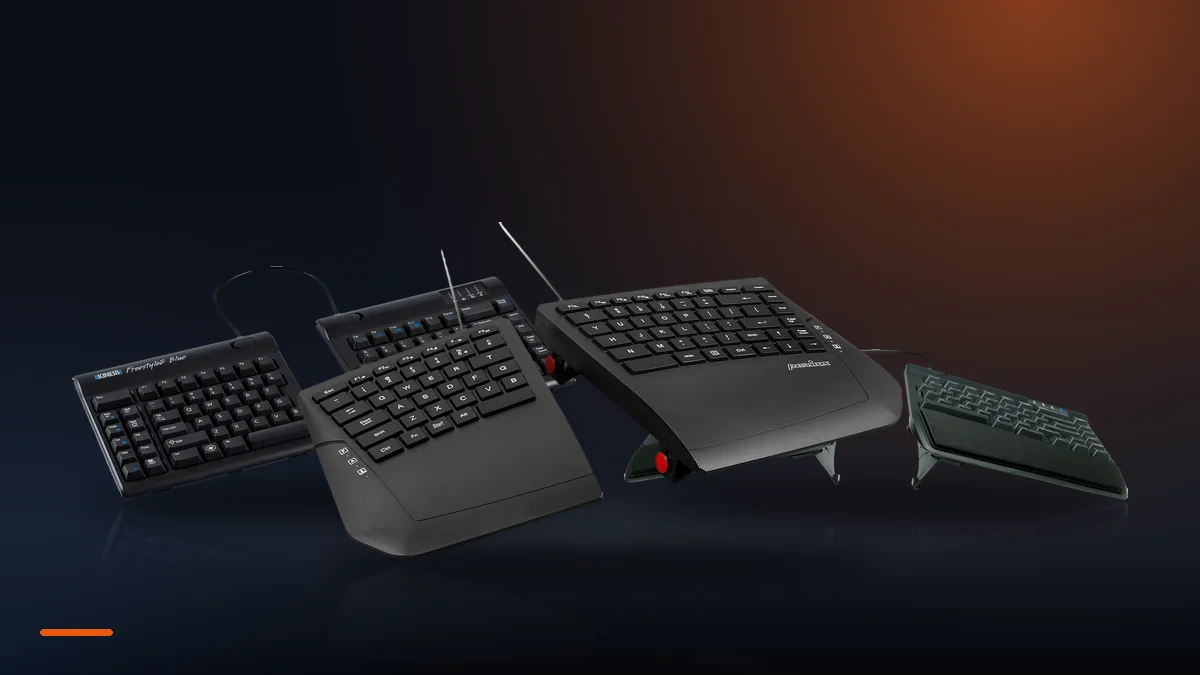
Best split keyboards at a glance
| Product | Best for | Key specs | Price |
|---|---|---|---|
1 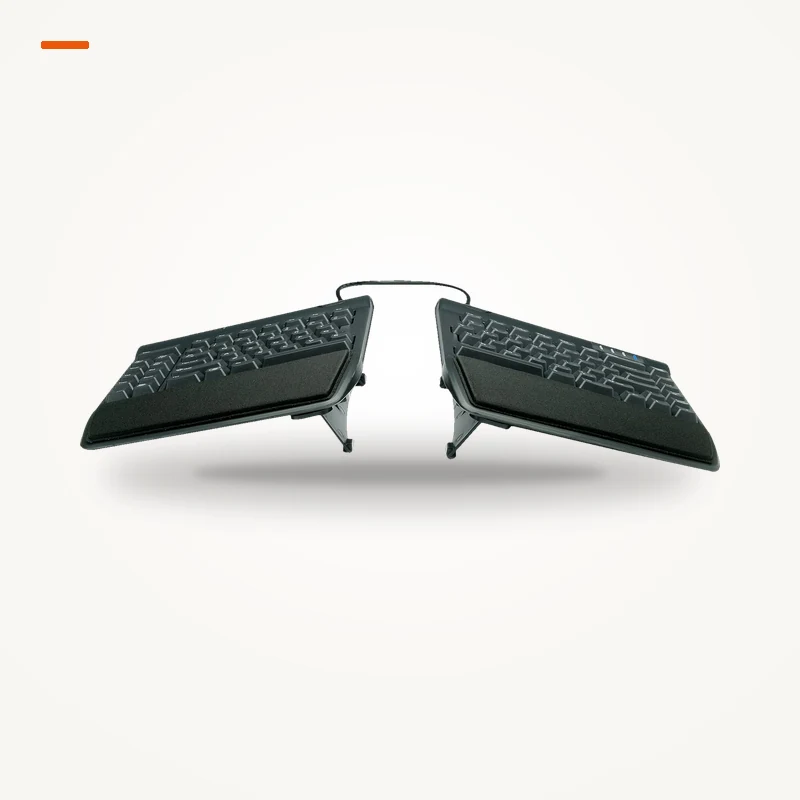 Kinesis Freestyle2 with VIP3 Lifters (PC) |
Best overall |
|
Check Price |
2 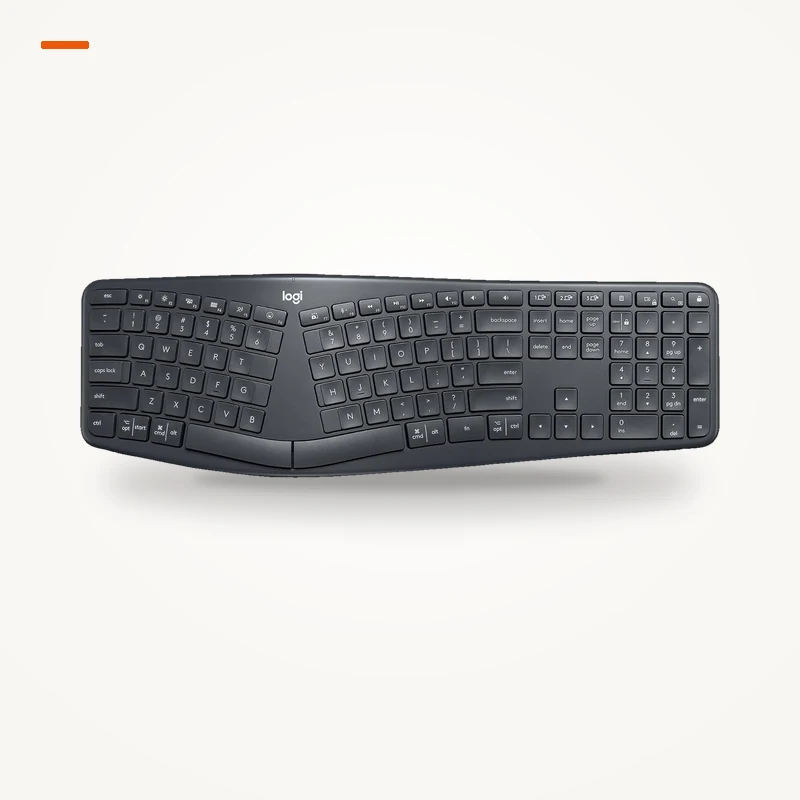 Logitech Ergo K860 |
Best one-piece split |
|
Check Price |
3 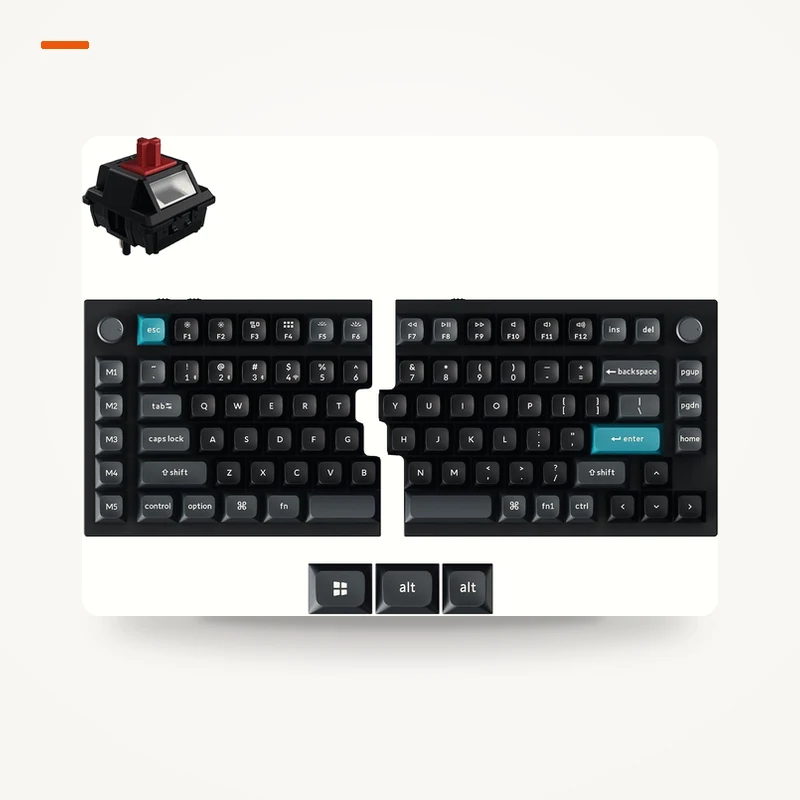 Keychron Q11 Ultra 8K |
Best mechanical split |
|
Check Price |
4 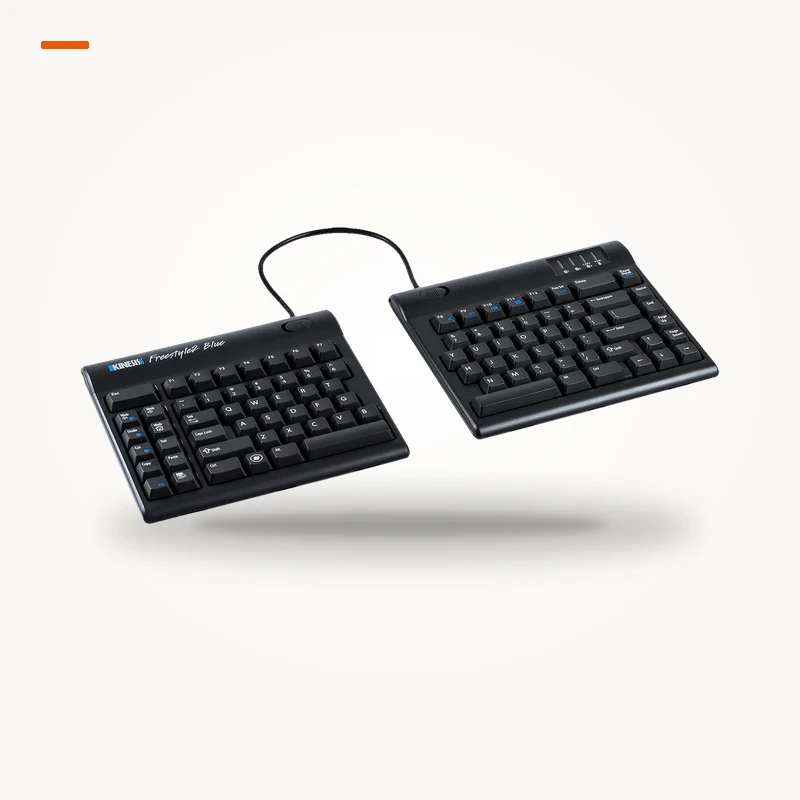 Kinesis Freestyle2 Blue Wireless (PC) |
Best wireless Freestyle |
|
Check Price |
5 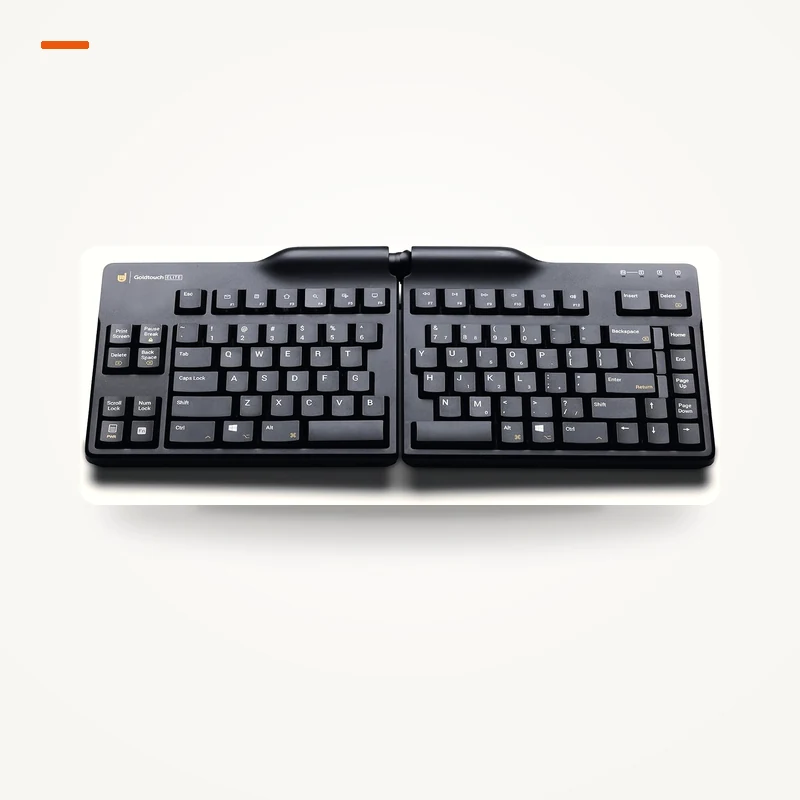 Goldtouch Elite Adjustable Keyboard |
Best adjustable angle |
|
Check Price |
6 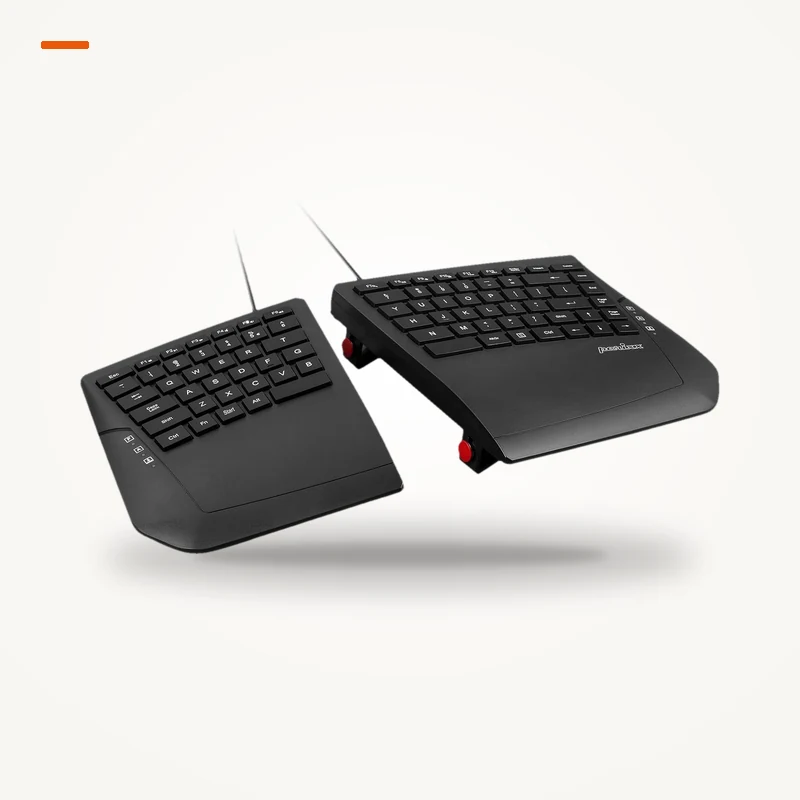 Perixx Periboard-524B |
Best budget |
|
Check Price |
The best split keyboards
1. Kinesis Freestyle2 with VIP3 Lifters (PC) — fully adjustable halves with tenting built in
Who it’s for: Anyone who wants a true split keyboard that still feels familiar, especially people with broad shoulders or wrist discomfort who want to try tenting without building a custom board.
The Freestyle2 is one of the simplest ways to get the two things that make a split keyboard worth it: adjustable separation and tenting. The two halves rotate and pull apart up to 9 inches on a pivot tether, so you can line each half up with your forearm. This version comes with Kinesis’s VIP3 accessory pre-installed, which raises the inner edges to 5, 10 or 15 degrees and adds cushioned palm supports.
The keys are low-force membrane switches with tactile feedback rather than mechanical switches, and the layout is a standard Windows layout with cut, copy and paste hotkeys, so there’s very little to relearn beyond the split itself. Kinesis says no software or drivers are needed. It was listed at $141.00, sold by ErgoWarehouse and shipped by Amazon, on November 29, 2026. If tenting is new to you, read our guide to tenting, splay and stagger first.
Key specs: Two separate halves on a pivot tether, up to 9 in apart; VIP3 tenting at 5, 10 or 15 degrees with palm supports; low-force membrane keys with tactile feedback; standard Windows layout with hotkeys; wired USB-A; no drivers needed.
- Real separation and tenting out of the box
- Familiar layout, short learning curve
- No software to install
- Wired only, PC layout
- Membrane keys, not mechanical
- Tether limits separation to 9 in
2. Logitech Ergo K860 — a curved split in one solid board
Who it’s for: People who want a gentler step into split typing, need a number pad, or switch between several computers including a Mac.
The K860 is not a fully separate split keyboard. The two key zones are split and angled within one curved board, which keeps everything in a fixed position and makes it much easier to adjust to. Logitech pairs it with a curved memory-foam wrist rest and tilt legs that set a negative slope of -4 or -7 degrees, as well as flat.
It connects over Bluetooth or a USB receiver, works with Windows, macOS, Linux and ChromeOS, and keeps a full-size layout with a number pad and quiet keys. Logitech says it is certified by United States Ergonomics. It was listed at $108.29, sold by Amazon.com, on November 29, 2026. It’s a good choice if you’re still deciding whether you need a split keyboard at all; our guide to whether ergonomic keyboards are worth it can help.
Key specs: Fixed split, curved keyframe; memory-foam wrist rest; palm lift at 0, -4 or -7 degrees; Bluetooth or USB receiver; full-size layout with number pad; Windows, macOS, Linux and ChromeOS; Logitech Options software for Fn keys and shortcuts.
- Easiest split layout to adapt to
- Built-in wrist rest and negative tilt
- Wireless, works with Mac and PC
- Halves can’t be moved apart
- Large footprint with the number pad
- No tenting adjustment
3. Keychron Q11 Ultra 8K — wireless halves with no cable between them
Who it’s for: Mechanical keyboard fans who want a split layout without giving up premium switches, programmability or a clean, cable-free desk.
Most split keyboards connect the halves with a cable. Keychron says the Q11 Ultra 8K links its two halves wirelessly over 2.4 GHz, so you can place each half exactly where your shoulders want it with no cable running across the desk. Push the halves together and it works as a standard 75% layout.
It’s a full mechanical keyboard: an aluminum body, hot-swappable switches (Keychron Silk POM switches are fitted), double-shot PBT keycaps, per-key RGB and sound-dampening foam. It connects over 2.4 GHz, Bluetooth 5.3 to up to three devices, or a USB-C cable, and runs open-source ZMK firmware that you can remap through Keychron’s Launcher web app. It was listed at $215.99, sold by Keychron’s store and shipped by Amazon, on November 29, 2026. Hot-swap sockets also mean you can try other switches later; see our hot-swappable keyboard guide.
Key specs: Two wireless halves linked over 2.4 GHz; 75% layout; 2.4 GHz, Bluetooth 5.3 (up to 3 devices) or wired USB-C; up to 8000 Hz polling (1000 Hz by default); ZMK firmware, remappable in Keychron Launcher; hot-swappable Keychron Silk POM switches; double-shot PBT keycaps; per-key RGB; CNC aluminum body; macOS, Windows and Linux.
- No cable between the halves
- Premium mechanical build and hot-swap
- Fully remappable, Mac and Windows
- Most expensive pick here
- No built-in tenting
- Heavier than plastic boards
4. Kinesis Freestyle2 Blue Wireless (PC) — the Freestyle2 split without the USB cable
Who it’s for: People who like the Freestyle2 idea but want a wireless keyboard for a laptop or tablet, and are happy to add tenting later.
The Freestyle2 Blue is the Bluetooth version of Kinesis’s split keyboard. You get the same idea, two halves that separate and rotate on a 9-inch tether, with low-force tactile keys, and you can pair it with several Bluetooth devices.
Unlike the VIP3 bundle above, it sits flat out of the box. Kinesis sells palm supports and VIP3 and V3 lifters as separate accessories if you want tenting. It was listed at $120.00, sold by ErgoWarehouse and shipped by Amazon, on November 29, 2026. The listing names Windows, Linux and Android support; Mac users should check the separate Mac version.
Key specs: Separate halves, standard 9 in separation; multichannel Bluetooth; low-force tactile keys; Windows, Linux and Android; optional palm supports, VIP3 and V3 lifters and number pad sold separately.
- Fully split and wireless
- Same short learning curve as the wired Freestyle2
- Pairs with several devices
- Flat unless you buy lifters
- PC layout version
- Tether limits separation to 9 in
5. Goldtouch Elite Adjustable Keyboard — a hinged split you can tent steeply
Who it’s for: Anyone who wants to experiment with steep tenting on a single, compact keyboard, and people who switch between Windows and Mac.
The Goldtouch Elite joins its halves with an adjustable hinge rather than separating them completely. A lever lets you splay the halves from 0 to 30 degrees and tent them anywhere from 0 to 60 degrees, a wider tenting range than most keyboards in this list. Goldtouch says the handle has been redesigned to make adjusting easier.
A switch on the back toggles between PC and Mac use, and between default and alternate layouts. The keys use silicone domes with laser-printed legends. It was listed at $96.00, sold by ErgoWarehouse and shipped by Amazon, on November 29, 2026; stock was low at the time. Our guide to ergonomic keyboard types explains how hinged boards compare with fully split ones.
Key specs: Hinged split with 0 to 30 degree splay and 0 to 60 degree tent; rear toggle for PC or Mac and default or alternate layouts; silicone-dome keys with laser-printed legends; wired USB-A.
- Very wide tenting range
- Works with Mac and PC
- Toggle for alternate layouts
- Halves can’t be moved apart
- Wired only
- Membrane-style feel
6. Perixx Periboard-524B — a fully split keyboard for under $60
Who it’s for: Anyone who wants to try a fully split layout on a budget before spending more, especially on a Windows PC.
The Periboard-524B is one of the cheapest ways to try fully separate halves. The two tenkeyless halves can sit up to 2 feet apart, the keys are curved, and an adjustable tilt underneath lets you change the typing angle.
Perixx notes that a June 2023 firmware update fixed earlier reports of phantom keys and repeating letters. It’s a wired, Windows keyboard with low-profile membrane keys and media shortcuts. It was listed at $59.99, sold by Perixx USA and shipped by Amazon, on November 29, 2026. If you’re new to split keyboards, our guide on how long it takes to get used to a split keyboard sets realistic expectations.
Key specs: Two separate tenkeyless halves, up to 2 ft apart; curved, sloped keys; adjustable tilt; low-profile membrane keys; media shortcuts; wired USB-A; Windows 7 to 11.
- Lowest price for a fully split board
- Wide separation range
- Compact tenkeyless halves
- Wired and Windows only
- No tenting
- Basic build
Split keyboards compared
| Keyboard | Split type | Tenting | Connection | Price (November 29) |
|---|---|---|---|---|
| Kinesis Freestyle2 VIP3 | Fully separate, 9 in | 5, 10, 15° | Wired | $141.00 |
| Logitech Ergo K860 | One-piece | No (negative tilt) | Bluetooth, receiver | $108.29 |
| Keychron Q11 Ultra 8K | Fully separate, wireless | No | 2.4 GHz, Bluetooth, USB-C | $215.99 |
| Kinesis Freestyle2 Blue | Fully separate, 9 in | Optional add-on | Bluetooth | $120.00 |
| Goldtouch Elite | Hinged | 0 to 60° | Wired | $96.00 |
| Perixx Periboard-524B | Fully separate, 2 ft | No | Wired | $59.99 |
Prices are what each listing showed on November 29, 2026 and can change at any time.
How to choose a split keyboard
| Question | What to look for |
|---|---|
| Fully split or one piece? | Fully separate halves let you match your shoulder width; a one-piece split is easier to get used to |
| Do you want tenting? | Tenting raises the inner edges to reduce forearm rotation; look for built-in or add-on lifters |
| Mac, Windows or both? | Check the layout and the listing’s supported systems; the Logitech, Keychron and Goldtouch support Mac |
| Wired or wireless? | Wireless keeps the desk tidy; wired never needs charging or batteries |
| Do you need a number pad? | Most split boards drop it; the Logitech K860 keeps one |
| Mechanical or membrane? | Mechanical boards like the Keychron feel crisper and can be customised; membrane boards are lighter and quieter |
Setting up a split keyboard
- Start with the halves close together, roughly the width of a standard keyboard, then widen them over a few days until your wrists sit straight.
- Line each half up with your forearm so your hands don’t bend outward.
- Add tenting slowly. Begin at a low angle and increase it only if it feels better.
- Keep the keyboard at elbow height with relaxed shoulders, and put the mouse close to the right half.
- Expect a slower week. Keys that were typed by the “wrong” hand will need relearning, especially B, Y and 6.
A split keyboard is one part of a comfortable setup, not a cure. If you have ongoing pain, read our guide to wrist pain from typing and speak to a health professional. For non-split options, see our full list of the best ergonomic keyboards.
FAQ
Are split keyboards better for your wrists?
They let your hands sit at shoulder width with straighter wrists, which many people find more comfortable. Research suggests split and tented designs can reduce wrist deviation, but they are not a guaranteed fix for pain.
What is the difference between a split and a fully split keyboard?
A one-piece split, like the Logitech K860, separates the keys within one board. A fully split keyboard, like the Kinesis Freestyle2, has two halves you can move apart and angle independently.
How long does it take to get used to a split keyboard?
Most people feel comfortable within one to two weeks of daily use, sometimes less with a one-piece split.
Do split keyboards work with a Mac?
Some do. The Logitech K860, Keychron Q11 Ultra 8K and Goldtouch Elite list Mac support. The Kinesis models above are PC versions, and Kinesis sells separate Mac versions.
Is a split mechanical keyboard worth it?
If you want the feel and customisation of a mechanical keyboard as well as a split layout, yes. If comfort is your only goal, a membrane split like the Freestyle2 costs less.
Final thoughts
For most people, the Kinesis Freestyle2 with VIP3 is the split keyboard to get: real separation, built-in tenting and a layout you already know. Choose the Logitech Ergo K860 if you want a gentler start or need a number pad, the Keychron Q11 Ultra 8K for a premium wireless mechanical split, and the Perixx Periboard-524B to try split typing without spending much.

Experience is what matters at the end!!
Hi! This is Jacob Jay – founder of Keyboardgear.com! From childhood to adulthood, I’ve always remained passionate about IT, and the revolution in this industry, especially gaming on the PC can’t go out of my way. Since I’m an enthusiastic gamer, and I love to experience various gaming accessories, particularly mechanical keyboards, that really boost my gaming adventure manifolds. So, my nerve cells hit me to transfer my experiences into word form and share with others to identify the ideal keyboards perfectly fit for their gaming modes.
I know very well how hard it is to find the high-quality items available on the internet that ought to be exactly the same as seen as on the screen. But the counterfeiters have ruined the user’s trust. As I have passed all such situations, I’m obliged to deliver the genuinity and express the same as what I am saying.
So, now, I’m working on the mission to provide very helpful and frankly but trustworthy reviews and guides about various mechanical keyboards, mouses, and other gaming accessories as per my personal experiences and sound knowledge.