

Keyboard Gear earns from qualifying purchases through Amazon links.
Writers spend more time on a keyboard than almost anyone, yet most of us write on whatever came in the box. The right keyboard for writing won’t write the book for you, but it can make a 3,000-word day noticeably more comfortable: keys that tell your fingers when a letter has registered, a sound level that won’t annoy the people around you, editing keys where you expect them, and a shape that keeps your wrists relaxed in hour four.
This guide compares eight of the best keyboards for writers on Amazon US, from quiet low-profile boards like the Logitech MX Keys S to tactile mechanical keyboards, ergonomic designs and a slim travel keyboard. We checked each Amazon US listing on November 27, 2026 (Asia/Karachi) and only included keyboards that were in stock and sold new by Amazon or the brand’s own store. Specifications come from the makers’ product pages and datasheets. Prices change often, so use the Check Price buttons to see the current price. If you want to get faster as well as more comfortable, pair your new keyboard with our research-based guide to typing faster.
| Product | Best for | Key specs | Price |
|---|---|---|---|
1 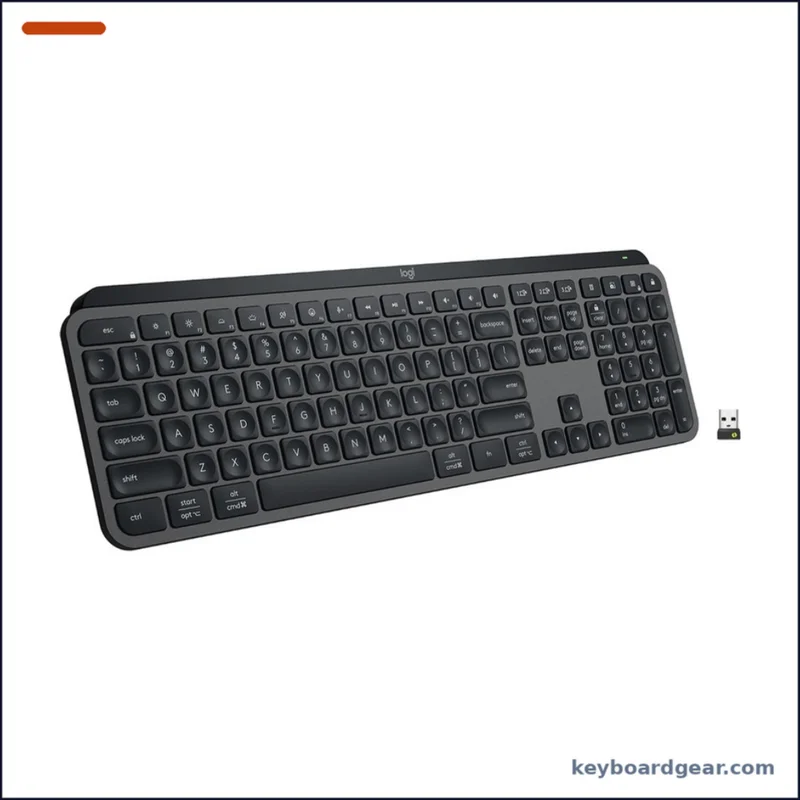 Logitech MX Keys S |
Best overall |
|
Check Price |
2 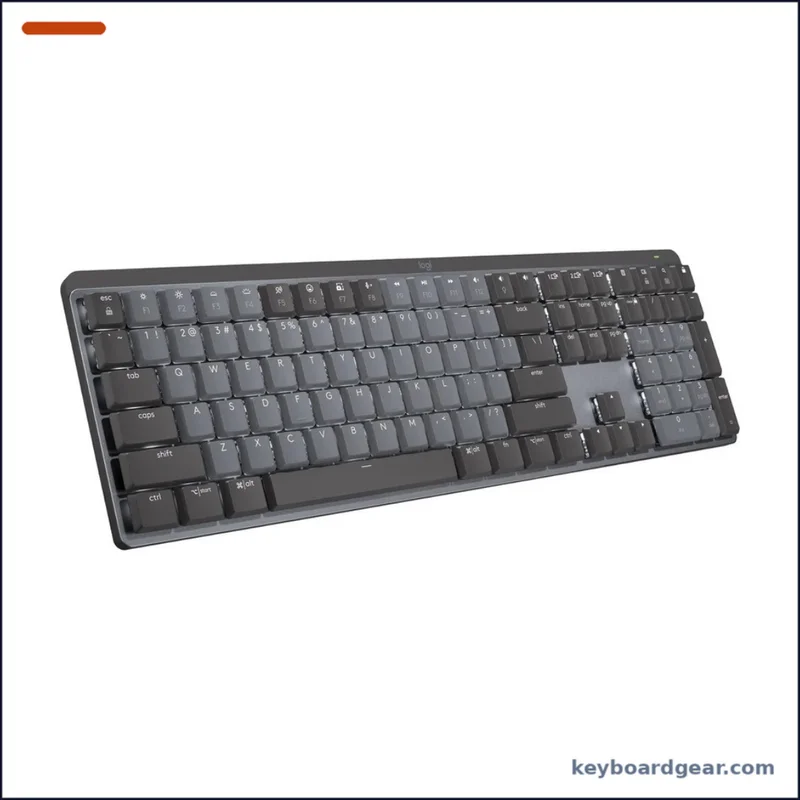 Logitech MX Mechanical (Tactile Quiet) |
Best quiet mechanical |
|
Check Price |
3 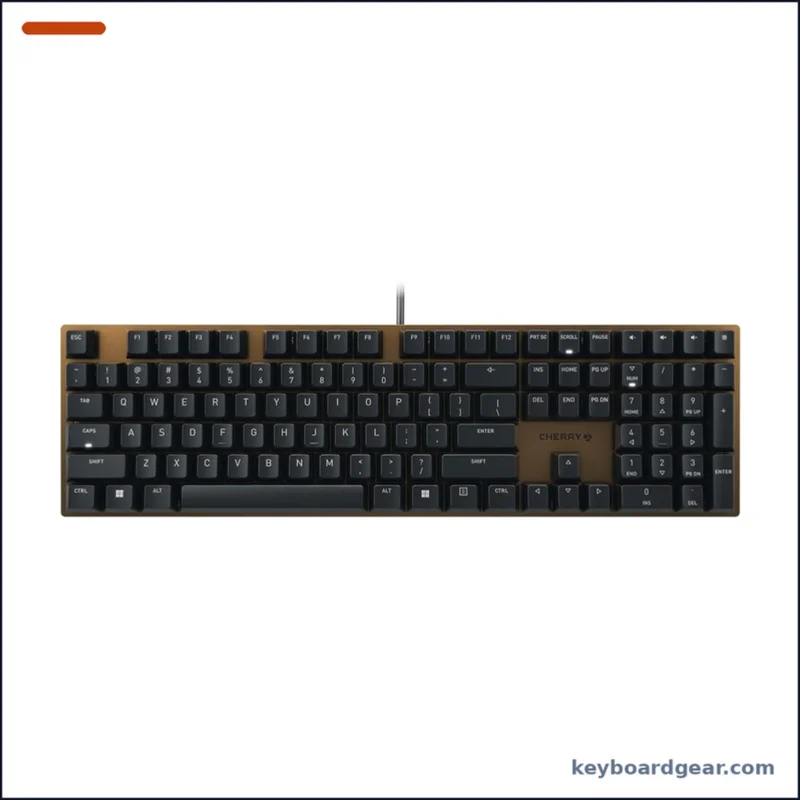 Cherry KC 200 MX (MX2A Brown) |
Best wired value |
|
Check Price |
4 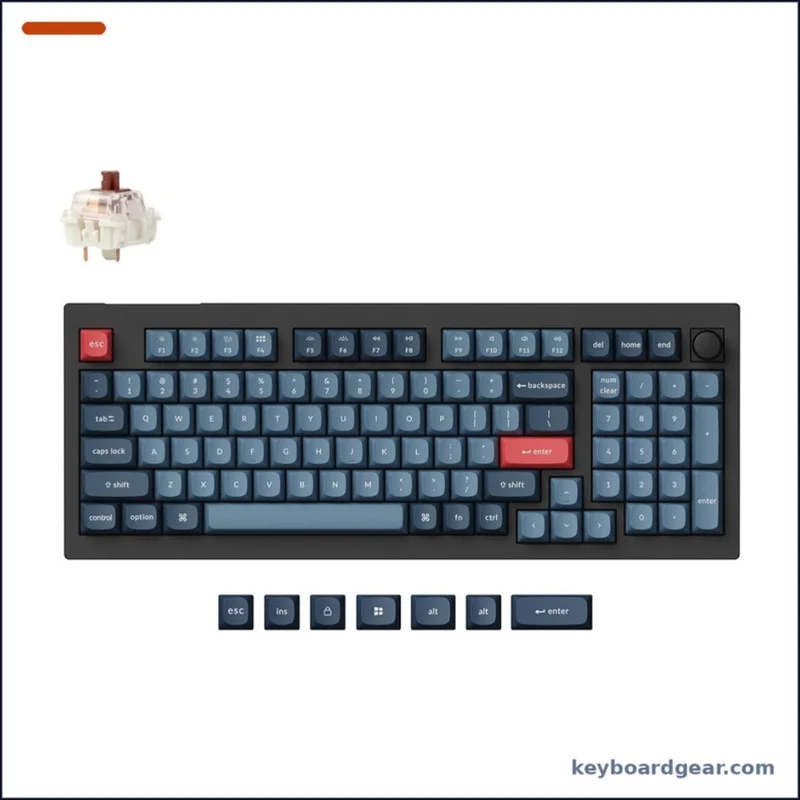 Keychron V5 Max (Jupiter Brown) |
Best customizable |
|
Check Price |
5 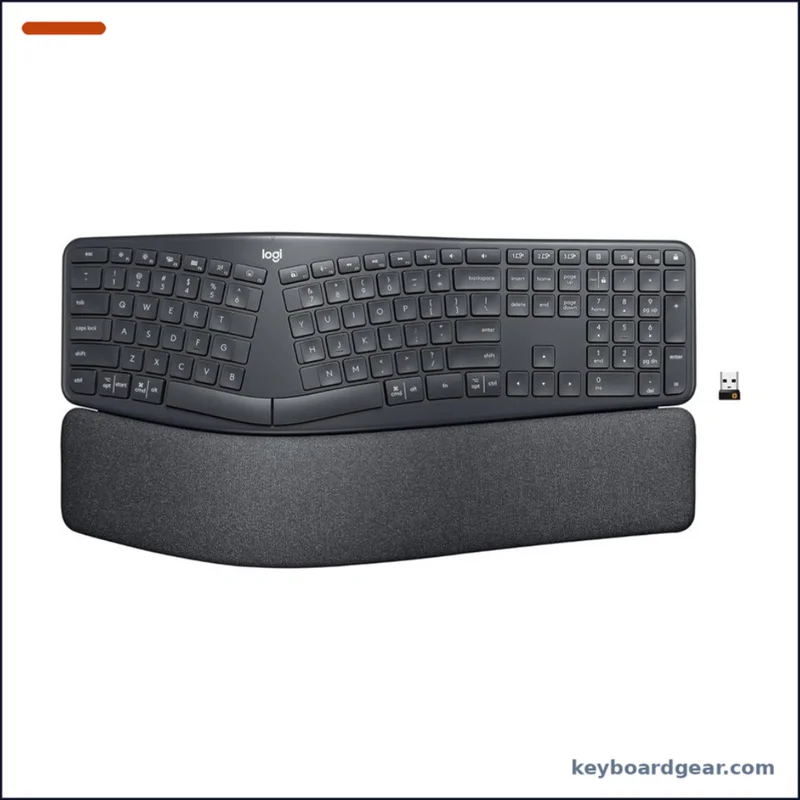 Logitech Ergo K860 |
Best ergonomic |
|
Check Price |
6 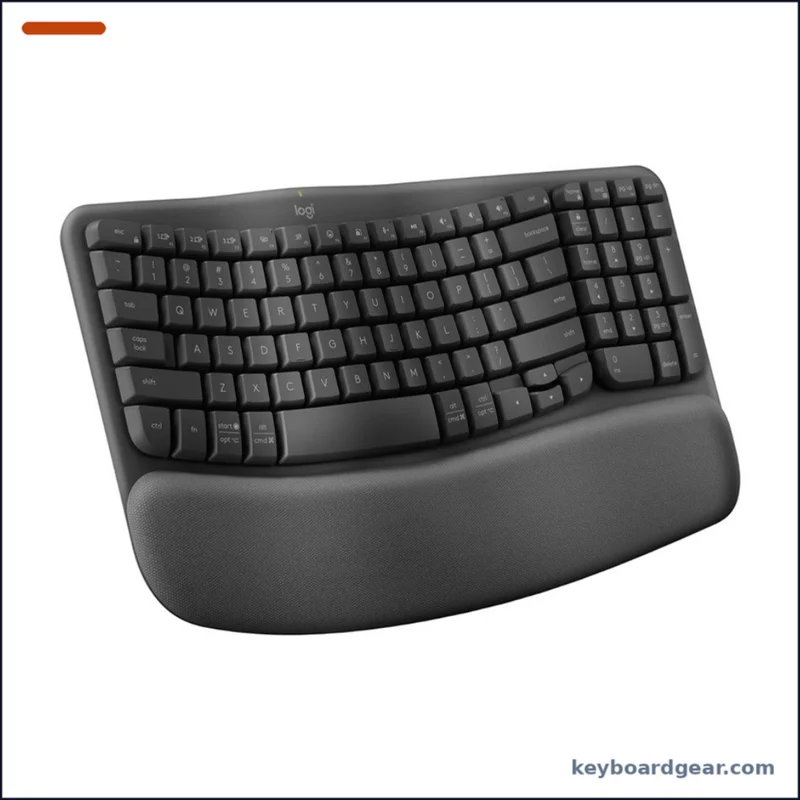 Logitech Wave Keys |
Best budget ergonomic |
|
Check Price |
7 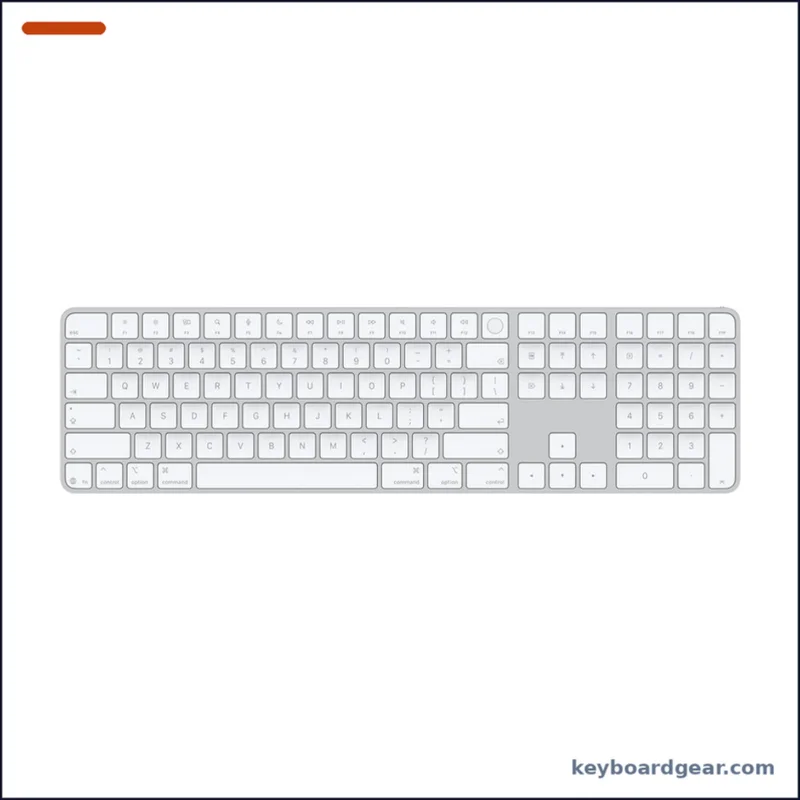 Apple Magic Keyboard with Touch ID and Numeric Keypad |
Best for Mac |
|
Check Price |
8 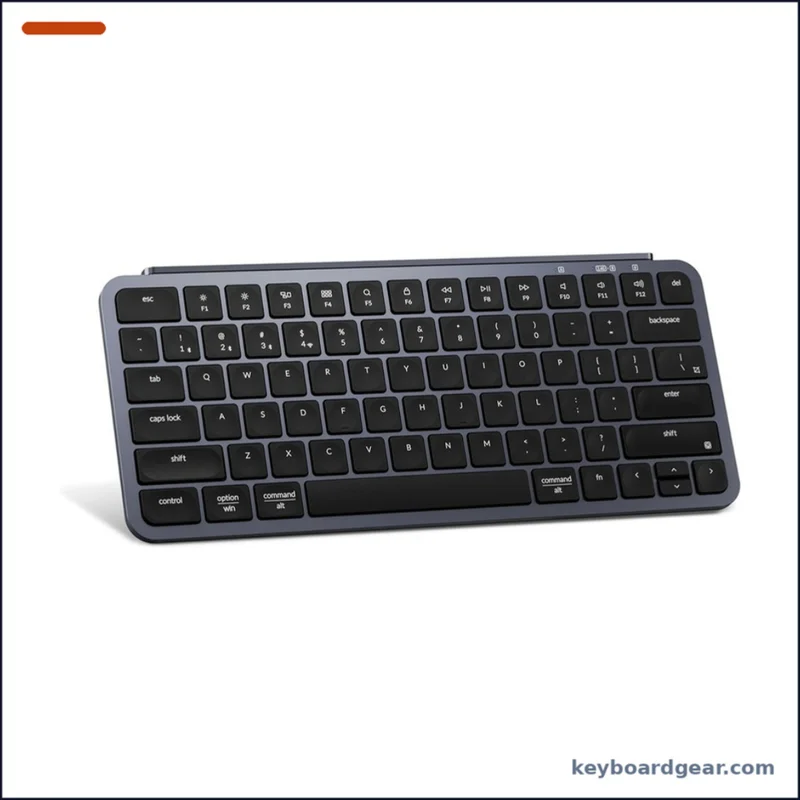 Keychron B1 Pro |
Best budget & portable |
|
Check Price |
Quick picks
- Best overall: Logitech MX Keys S — quiet, precise low-profile keys, smart backlighting and three-device switching.
- Best quiet mechanical: Logitech MX Mechanical (Tactile Quiet) — a tactile bump without the click, in a low-profile full-size body.
- Best wired value: Cherry KC 200 MX — genuine Cherry MX2A Brown switches and a metal plate at a modest price.
- Best customizable: Keychron V5 Max — QMK remapping, hot-swap switches and PBT keycaps with a number pad.
- Best ergonomic: Logitech Ergo K860 — split, curved layout with negative tilt and a memory-foam wrist rest.
- Best budget ergonomic: Logitech Wave Keys — a gentle wave shape and palm rest with almost no learning curve.
- Best for Mac: Apple Magic Keyboard with Touch ID and Numeric Keypad — native macOS keys and Touch ID.
- Best budget & portable: Keychron B1 Pro — ultra-slim, three connection modes and months of battery life.
How we chose these keyboards
We focused on what matters for writing rather than gaming: comfort over long sessions, accurate key feedback, low noise, a layout that keeps editing keys handy, and reliable connections to more than one device. We then narrowed the list to well-documented keyboards from established brands, covering the four main feel types (low-profile scissor, low-profile mechanical, full-height mechanical and ergonomic). Each listing had to be in stock and sold new by Amazon or the brand’s own store on the day we checked; we skipped listings that were only available used or from third-party resellers. Where a maker doesn’t publish a figure, we leave it out rather than guess.
How to choose a keyboard for writing
Key feel: scissor, low-profile mechanical or full-height mechanical
Scissor-switch keyboards (MX Keys S, Magic Keyboard, B1 Pro) have short, light, quiet keys like a laptop. They’re easy to adapt to and great in shared spaces. Low-profile mechanical boards (MX Mechanical) add a distinct actuation point while staying close to the desk. Full-height mechanical boards (Cherry KC 200 MX, Keychron V5 Max) have the deepest travel and the clearest feedback, and many writers find them the most satisfying for long drafts. Our mechanical vs membrane comparison goes deeper into the differences.
Tactile, linear or clicky switches
Most writers are happiest with tactile switches, such as Brown-type or Logitech’s Tactile Quiet. The small bump tells you a key has registered, so you can learn to type without bottoming out hard. Linear switches are smooth with no bump. Clicky switches add an audible click that can be satisfying alone but distracting to anyone nearby. For a primer on switch colours, see our Cherry MX switches guide.
Noise and where you write
If you write in an office, on calls, or near a sleeping partner, noise matters. Scissor boards are the quietest, followed by low-profile tactile switches; full-height mechanical boards are louder, although foam and gaskets (as on the V5 Max) soften the sound. Our best quiet mechanical keyboards list has more options if you want mechanical feel at low volume.
Layout: do writers need a number pad?
Most prose doesn’t need a number pad, but writers still lean heavily on Home, End, Page Up/Down and the arrow keys to move through long documents. A full-size or 96% board keeps those keys in standard places. A compact 75% board saves desk space and keeps your mouse closer, at the cost of smaller or relocated navigation keys. If you’re unsure, start with a full layout; if your shoulders feel stretched reaching for the mouse, a compact board can help.
Comfort, tilt and wrist support
Long writing sessions reward a neutral wrist position. Keep the keyboard flat or tilted slightly away from you rather than propped up on its rear feet, keep your elbows close to your sides, and rest your palms between bursts rather than while typing. Ergonomic designs like the K860 and Wave Keys do some of this for you. With a full-height mechanical keyboard, a padded rest from our best keyboard wrist rests usually helps. If typing causes pain, numbness or tingling, see a health professional; a keyboard is not a medical treatment.
Connections, batteries and operating systems
If you write on more than one device, look for multi-device switching (every wireless pick here supports three devices). A USB receiver such as Logi Bolt or Keychron’s 2.4 GHz dongle is usually more stable than Bluetooth in a crowded office. Check that the legends and shortcuts suit your operating system: Mac writers get the most from the Magic Keyboard, the Logitech MX boards or the Keychron models, which include Mac keycaps or Mac layouts.
1. Logitech MX Keys S — best keyboard for most writers
Who it’s for: Novelists, journalists, students and content writers who type for hours, move between a laptop and a desktop, and want a quiet keyboard that feels precise without any learning curve.
The MX Keys S is the keyboard we would hand to almost any writer first. Its keys are low and shallow like a good laptop’s, but each one is spherically dished to cradle a fingertip, so your fingers find the centre of the key and mistypes drop. Logitech says the increased key stability also reduces noise, which helps make it one of the quieter keyboards here — a real advantage if you write in a shared room, a library or late at night while others sleep.
The rest of the package is built around long writing days. Backlighting switches on as your hands approach and adjusts to the room, the full-size layout keeps Home, End, Page Up/Down and the arrow cluster where editing muscle memory expects them, and Easy-Switch keys jump between up to three devices — handy if you draft on a desktop and answer email on a laptop. In Logi Options+ you can build Smart Actions, for example a single key that opens the apps and files you use to start a writing session. Battery life is rated at up to 10 days with backlighting on or up to 5 months with it off, and it charges over USB-C.
Key specs: Full-size low-profile layout with number pad; spherically dished keys; proximity-sensing adaptive backlight; Bluetooth Low Energy or Logi Bolt USB receiver; Easy-Switch for 3 devices; USB-C rechargeable (up to 10 days lit, up to 5 months unlit); Logi Options+ Smart Actions on Windows and macOS; works with Windows, macOS, Linux, ChromeOS and iPadOS; about 18 × 6 × 1.5 in.
- Quiet, precise laptop-style keys with dished tops
- Full layout keeps editing keys in the right place
- Smart backlight and three-device switching
- Logi Bolt receiver included for reliable wireless
- Shallow travel won’t satisfy mechanical-keyboard fans
- No adjustable tilt beyond its fixed angle
- Advanced features need Logi Options+
2. Logitech MX Mechanical (Tactile Quiet) — best quiet mechanical keyboard for writers
Who it’s for: Writers who want the feedback of a mechanical switch but still work around other people, on video calls or in an open-plan office.
If the MX Keys S feels a little too soft, the MX Mechanical is the natural step up. We link the Tactile Quiet version: each low-profile switch has a small bump you feel at the actuation point (1.3 mm into the 3.2 mm stroke) but no click, so you get confirmation that a letter registered without the chatter of a clicky board. That tactile signal is useful for touch typists, because you learn to release the key as soon as you feel it rather than bottoming out hard on every stroke.
It keeps everything that makes Logitech’s MX line good for desk work: a full-size layout with number pad, smart white backlighting, Logi Bolt or Bluetooth with three-device switching, and Logi Options+ for remapping function keys and app-specific shortcuts. Logitech rates the battery at up to 15 days with the backlight on or up to 10 months with it off. The low profile also means many people can type on it without a wrist rest. It is quieter than most mechanical keyboards, but it is still louder than a scissor-switch board, which our quiet mechanical keyboard guide explains in more detail.
Key specs: Full-size; Logitech low-profile Tactile Quiet switches (1.3 mm actuation, 3.2 mm total travel, rated 50 million keystrokes); smart white backlight; Logi Bolt + Bluetooth LE; 3 devices; USB-C charging; up to 15 days lit or 10 months unlit; about 828 g; Logi Options+.
- Tactile bump without a click
- Low profile is comfortable for long sessions
- Excellent multi-device wireless with Logi Bolt
- Very long battery life with the backlight off
- Switches are not hot-swappable
- Louder than the scissor-key MX Keys S
- Pricier than the scissor-key MX Keys S
3. Cherry KC 200 MX (MX2A Brown) — best wired mechanical keyboard for writers
Who it’s for: Writers at a fixed desk who want a genuine Cherry tactile switch, a full layout and a simple plug-in keyboard without paying for wireless or RGB.
Cherry invented the MX switch that most mechanical keyboards copy, and the KC 200 MX is its no-nonsense office board. The version we link uses the new MX2A Brown switch: tactile, no click, factory-lubricated, with redesigned springs and a rating of more than 100 million keystrokes per key. Brown switches are the classic writer’s choice because the light bump gives feedback without the noise of a Blue switch.
The design is deliberately plain. An anodized metal plate in black and bronze gives the board some weight on the desk, keycaps are shaped and laser-etched so the legends stay readable, and there are white indicator LEDs in Caps Lock, Scroll Lock and Num Lock plus four extra keys for volume and the calculator. It supports full N-key rollover and anti-ghosting — useful when you type fast, as our ghosting and rollover explainer shows. The trade-offs: it is wired only, has no backlight, and Cherry’s KEYS software and printed legends are aimed at Windows.
Key specs: Full-size (104 + 4 keys); Cherry MX2A Brown tactile switches (no click, >100 million keystrokes); anodized metal plate; shaped, laser-etched ABS keycaps; N-key rollover and anti-ghosting; white status LEDs; no backlight; wired USB-A; 430 × 121 × 39 mm; CHERRY KEYS software for macros.
- Genuine Cherry MX2A tactile switches
- Sturdy metal plate at a modest price
- Full NKRO and anti-ghosting
- Plug-and-play, no battery to charge
- Wired only
- No backlighting
- Windows-focused legends and software
4. Keychron V5 Max (Jupiter Brown) — best customizable mechanical keyboard for writers
Who it’s for: Writers who enjoy a full-height mechanical keyboard and want to tune it: remap keys, swap switches later, and keep a number pad in a smaller footprint.
The V5 Max packs almost a full-size layout into a 96% body by tucking the navigation keys next to the number pad, so you keep arrows and numbers without the extra width. Inside it uses a gasket mount with a polycarbonate plate and sound-absorbing foam, which gives a softer, more muted sound than older hollow-case boards. Our linked version ships with Gateron Jupiter Brown switches, and every socket is hot-swappable for 3-pin and 5-pin MX-style switches if you later want something quieter or lighter.
For writers, the strongest feature is QMK firmware. With the Keychron Launcher web app you can move Caps Lock, put Delete-word or your editor’s shortcuts on spare keys, and save separate Mac and Windows layouts — Keychron includes keycaps for both. The double-shot PBT keycaps resist shine (see our PBT vs ABS keycaps guide). It connects by 2.4 GHz (both USB-A and USB-C receivers are in the box), Bluetooth 5.1 for three devices, or cable, and the 4,000 mAh battery is rated at up to 190 hours with the backlight off. As a full-height board it sits taller than a low-profile keyboard, so a wrist rest is worth considering.
Key specs: 96% ANSI layout with knob; Gateron Jupiter Brown switches (hot-swappable 3/5-pin); gasket mount, PC plate, sound-absorbing foam; double-shot PBT OSA keycaps (Mac and Windows sets); 2.4 GHz (1000 Hz), Bluetooth 5.1 (3 devices) and USB-C wired; 4,000 mAh (up to 190 h, backlight off); QMK with Keychron Launcher; south-facing RGB; NKRO; about 925 g.
- Full QMK remapping for writing shortcuts
- Hot-swap sockets let you change switch feel later
- Durable double-shot PBT keycaps
- Number pad in a narrower 96% body
- Full-height keys may need a wrist rest
- 96% layout squeezes the navigation keys
- Heavier than the low-profile picks
5. Logitech Ergo K860 — best ergonomic keyboard for long writing days
Who it’s for: Writers who type for many hours a day, feel tension in their wrists or forearms, and are willing to spend a week or two adapting to a split layout.
The Ergo K860 changes your posture rather than just the feel of the keys. Its key frame is split and curved so your wrists don’t have to bend outward, it slopes gently, and an integrated memory-foam wrist rest supports the heel of your hand. Logitech says the rest gives 54% more wrist support and 25% less wrist bending than a standard keyboard without a palm rest. Unusually for a mainstream keyboard, its palm-lift legs set negative tilt of -4° or -7°, which keeps wrists straighter when you sit upright or stand — our keyboard tilt guide explains why that matters.
Day to day it is quiet and familiar: low-profile, scooped keys, a full number pad, and Bluetooth or a USB receiver with Easy-Switch for three devices. It runs on two AAA batteries, which Logitech rates at up to 24 months, so you rarely think about power. The trade-offs are size — it is deep and takes over the front of a desk — and the lack of backlighting. If you’re new to split boards, expect a short adjustment period for keys near the split, such as B, T and Y. For more options, see our best ergonomic keyboards.
Key specs: Split, curved key frame with full number pad; low-profile scooped keys (1.8 mm travel per Logitech’s datasheet); integrated three-layer pillowed wrist rest; palm-lift legs at 0°, -4° and -7°; USB receiver or Bluetooth Low Energy; Easy-Switch for 3 devices; 2 × AAA, up to 24 months; no backlight; about 1160 g; certified by United States Ergonomics.
- Negative tilt and split layout for straighter wrists
- Comfortable built-in memory-foam wrist rest
- Quiet keys and a full number pad
- Two-year rated battery life
- Large footprint
- Split layout takes time to learn
- No backlight
6. Logitech Wave Keys — best budget ergonomic keyboard for writers
Who it’s for: Writers who want more comfort than a flat keyboard but don’t want to relearn a split layout — or who want an ergonomic upgrade on a modest budget.
Wave Keys is the gentle way into ergonomic typing. The keys follow a subtle wave so the middle of the board sits slightly higher and your hands rest in a more natural position, and a cushioned memory-foam palm rest is built in. Because the layout is not split, there is very little to relearn, which matters if you’re on a deadline and can’t afford a slow adjustment week.
It keeps a full number pad in a compact body, connects by Logi Bolt receiver or Bluetooth with Easy-Switch for three devices, and runs for up to three years on two AAA batteries, according to Logitech. Like the K860, it is certified by United States Ergonomics. The keys are deeper and softer than the MX Keys S, and there’s no backlight or negative tilt, so treat it as a comfort upgrade rather than a full ergonomic fix. Pair it with good posture from our desk setup guide.
Key specs: Wave-shaped layout with number pad; integrated cushioned memory-foam palm rest; Logi Bolt USB receiver or Bluetooth Low Energy; Easy-Switch for 3 devices; about 2.5 mm key travel; 2 × AAA, up to 36 months; no backlight; about 750 g; Logi Options+; certified by United States Ergonomics.
- Almost no learning curve
- Built-in memory-foam palm rest
- Number pad in a compact body
- Very long battery life
- Only a mild ergonomic change, not a true split
- No backlight
- Softer, deeper keys feel less crisp
7. Apple Magic Keyboard with Touch ID and Numeric Keypad — best keyboard for writers on a Mac
Who it’s for: Mac writers who use Scrivener, Pages, Ulysses or Word on macOS and want Touch ID, native Mac keys and the same feel as their MacBook.
For Mac users, Apple’s own keyboard is still the smoothest experience. It pairs automatically when you connect it to your Mac with the included woven USB-C cable, every key and media function is labelled for macOS, and Touch ID handles logins and purchases with a fingertip instead of a typed password. The low-profile scissor keys feel much like a recent MacBook’s keyboard, so moving between laptop and desk is seamless.
This extended version adds a numeric keypad, document-navigation keys and full-size arrow keys, which are genuinely useful when you move through long manuscripts. Apple rates the battery at about a month or more between charges. Touch ID works with Macs that have Apple silicon. The keys have short travel, which some writers find tiring over very long sessions, and there’s no backlight or tilt adjustment. If you prefer something mechanical on macOS, see our best keyboards for Mac.
Key specs: Extended Magic Keyboard layout with numeric keypad, document-navigation keys and full-size arrow keys; Touch ID (Macs with Apple silicon); low-profile scissor keys; Bluetooth with auto-pairing; USB-C port and woven USB-C charge cable; rechargeable battery (about a month or more per charge); white keys on the linked listing; about 1.39 lb.
- Touch ID and native macOS keys
- Feels like a MacBook keyboard
- Navigation keys and numeric keypad
- Auto-pairs over USB-C
- Touch ID needs a Mac with Apple silicon
- Short key travel
- No backlight or adjustable tilt
8. Keychron B1 Pro — best budget and travel keyboard for writers
Who it’s for: Writers who work from cafés, libraries or a tablet, or who want a cheap, quiet second keyboard that can live in a laptop bag.
The B1 Pro is a lot of keyboard for very little money. It is only 5.2 mm thick at the front and 14.5 mm at the back, weighs 425 g, and uses quiet scissor switches with concave keycaps that help your fingers stay centred. Unlike most budget slim boards, it offers three ways to connect — a 2.4 GHz receiver (1000 Hz), Bluetooth 5.2 for up to three devices, and a USB-C cable — so it works with a work PC that has no Bluetooth as well as a phone or tablet.
Battery life is its standout: Keychron rates the 800 mAh cell at up to 1,200 hours, or about eight months at five hours of use a day. You can also remap keys in the Keychron Launcher web app, which few keyboards at this price allow. Keep the trade-offs in mind: the 75% layout drops the number pad and has small arrow keys, there’s no backlight, the keycaps are ABS, and Keychron lists no N-key rollover — very fast typists may occasionally see dropped letters in quick sequences. For more travel options, see our foldable travel keyboards.
Key specs: 75% ANSI layout, 77 keys; quiet scissor switches with concave ABS keycaps; 2.4 GHz (1000 Hz), Bluetooth 5.2 (3 devices) and USB-C wired; 800 mAh battery, up to 1,200 hours; 296 × 130 mm; 5.2 mm front / 14.5 mm rear height; 425 g; no backlight; ZMK firmware with Keychron Launcher remapping; macOS, iOS, Windows, Android and Linux.
- Very slim and light for travel
- 2.4 GHz, Bluetooth and wired modes
- Months of use per charge
- Remappable keys at a budget price
- No number pad and small arrow keys
- No backlight
- No N-key rollover listed
Keyboards for writers compared
| Keyboard | Best for | Key type | Layout | Connection | Backlight | Power |
|---|---|---|---|---|---|---|
| Logitech MX Keys S | Overall | Low-profile scissor | Full-size | Bluetooth / Logi Bolt | Yes, adaptive | USB-C rechargeable |
| Logitech MX Mechanical | Quiet mechanical | Low-profile Tactile Quiet | Full-size | Bluetooth / Logi Bolt | Yes, white | USB-C rechargeable |
| Cherry KC 200 MX | Wired value | Cherry MX2A Brown (tactile) | Full-size | Wired USB-A | No | USB-powered |
| Keychron V5 Max | Customizable | Gateron Jupiter Brown, hot-swap | 96% | 2.4 GHz / Bluetooth / USB-C | RGB | 4,000 mAh |
| Logitech Ergo K860 | Ergonomic | Low-profile, split | Full-size split | Receiver / Bluetooth | No | 2 × AAA |
| Logitech Wave Keys | Budget ergonomic | Membrane, wave | Full-size compact | Logi Bolt / Bluetooth | No | 2 × AAA |
| Apple Magic Keyboard (Touch ID, keypad) | Mac | Scissor | Full-size | Bluetooth / USB-C | No | Rechargeable |
| Keychron B1 Pro | Budget & portable | Scissor | 75% | 2.4 GHz / Bluetooth / USB-C | No | 800 mAh |
Which keyboard fits how you write?
| If you… | Choose | Why |
|---|---|---|
| Write in a shared room or on calls | Logitech MX Keys S | The quietest full-size pick, with smart backlighting |
| Want mechanical feel without annoying anyone | Logitech MX Mechanical (Tactile Quiet) | Tactile bump, no click, low profile |
| Write at one desk and want a classic tactile board | Cherry KC 200 MX | Cherry MX2A Brown switches, wired and simple |
| Like to remap keys and tinker | Keychron V5 Max | QMK remapping and hot-swap switches |
| Type all day and feel it in your wrists | Logitech Ergo K860 | Split layout, negative tilt, wrist rest |
| Want comfort without a learning curve | Logitech Wave Keys | Wave shape and palm rest, normal layout |
| Write on a Mac | Apple Magic Keyboard with Touch ID | Native macOS keys and Touch ID |
| Write in cafés or on a tablet | Keychron B1 Pro | Slim, light, three connection modes |
Related guide: 3 Best Typewriter Keyboards with Round Retro Keycaps
FAQ
What is the best keyboard for writers?
For most writers, the Logitech MX Keys S is the best all-round choice: quiet, precise low-profile keys, a full layout with editing keys, smart backlighting and three-device switching. If you prefer mechanical feedback, the Logitech MX Mechanical (Tactile Quiet) adds a tactile bump without the click, and if your wrists ache after long sessions the Logitech Ergo K860 is our ergonomic pick.
Are mechanical keyboards better for writing?
Not automatically. Mechanical keyboards give clearer feedback and longer key travel, and many writers find tactile switches more satisfying and accurate over long drafts. But a good scissor keyboard like the MX Keys S is quieter and easier to move to from a laptop. Choose by feel and noise: tactile mechanical if you want feedback and write alone, scissor or low-profile tactile if you share a space.
What switches are best for writing?
Tactile switches without a click, such as Cherry MX2A Brown, Gateron Jupiter Brown or Logitech’s Tactile Quiet, are the usual recommendation for writers. The bump confirms each keystroke without the noise of clicky switches. Linear switches also work well if you prefer a smooth stroke, while clicky switches are best kept for a private room.
Is a quiet keyboard better for writing?
If you write around other people, yes. Scissor-switch keyboards such as the MX Keys S, Magic Keyboard and Keychron B1 Pro are the quietest. Low-profile tactile mechanical boards are a good middle ground. Noise is also personal: some writers find a little sound helps them keep a rhythm, so choose what keeps you focused.
Do writers need an ergonomic keyboard?
Not everyone, but if you write for several hours a day and feel strain in your wrists or forearms, an ergonomic keyboard is worth trying. The Logitech Ergo K860 changes your posture the most, with a split layout and negative tilt; the Logitech Wave Keys is a gentler, cheaper option. Good setup matters too: see our keyboard tilt guide and get medical advice if pain persists.
Will a better keyboard help me type faster?
A comfortable keyboard with consistent keys removes friction, but speed comes mainly from technique and practice. Touch typing and consistent finger use matter far more than hardware. Our how to type faster guide lays out a practice plan based on typing research.
Can I use these keyboards with an iPad or tablet?
The wireless picks with Bluetooth can pair with tablets: the Logitech MX Keys S, MX Mechanical, Ergo K860 and Wave Keys, the Keychron V5 Max and the Keychron B1 Pro. The B1 Pro is the most practical to carry. The Magic Keyboard is designed for the Mac, and Touch ID only works with a Mac with Apple silicon.
Final verdict
Get the Logitech MX Keys S if you want one quiet, comfortable keyboard that suits almost any writer and any desk. Choose the Logitech MX Mechanical (Tactile Quiet) for mechanical feedback that stays office-friendly, or the Cherry KC 200 MX for genuine Cherry Brown switches on a budget at a fixed desk. The Keychron V5 Max is for writers who want to remap and tune their keyboard. If comfort is the priority, the Logitech Ergo K860 changes your posture the most, while the Logitech Wave Keys is the easy, affordable step up. Mac writers should start with the Apple Magic Keyboard with Touch ID, and the Keychron B1 Pro is the slim, cheap keyboard to take anywhere. Whatever you choose, set it up well with our desk setup guide and spend a few minutes a day on technique.

Experience is what matters at the end!!
Hi! This is Jacob Jay – founder of Keyboardgear.com! From childhood to adulthood, I’ve always remained passionate about IT, and the revolution in this industry, especially gaming on the PC can’t go out of my way. Since I’m an enthusiastic gamer, and I love to experience various gaming accessories, particularly mechanical keyboards, that really boost my gaming adventure manifolds. So, my nerve cells hit me to transfer my experiences into word form and share with others to identify the ideal keyboards perfectly fit for their gaming modes.
I know very well how hard it is to find the high-quality items available on the internet that ought to be exactly the same as seen as on the screen. But the counterfeiters have ruined the user’s trust. As I have passed all such situations, I’m obliged to deliver the genuinity and express the same as what I am saying.
So, now, I’m working on the mission to provide very helpful and frankly but trustworthy reviews and guides about various mechanical keyboards, mouses, and other gaming accessories as per my personal experiences and sound knowledge.