

Quick answer
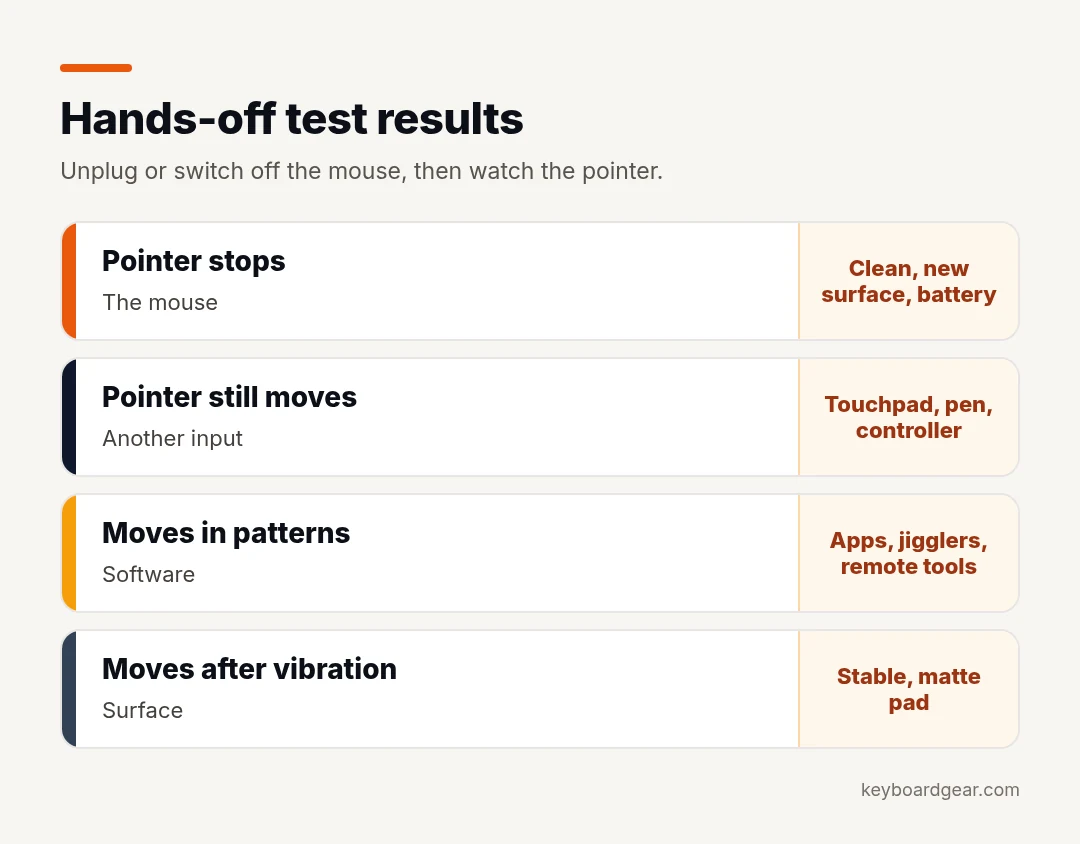
If your mouse pointer moves by itself, unplug or switch off the mouse and watch the screen. If the pointer stops, the mouse is the cause: usually a dirty sensor, a reflective or vibrating surface, or a failing battery. If it keeps moving, something else is controlling it, such as a laptop touchpad, a touchscreen, a pen tablet, a game controller, or an app like a remote-access tool or mouse jiggler.

A “ghost cursor” sounds alarming, but it almost always has an everyday cause. This guide is about a pointer that moves when your hand is off the mouse. If the cursor skips or jumps while you’re using it, see mouse cursor jumping instead.
Step 1: The hands-off test
Turn off or unplug the mouse (and its USB receiver), then watch for a minute.
- The pointer stops: go to the mouse causes below.
- The pointer keeps moving: go to the other device and software causes.
If the mouse is the cause
A dirty sensor
A hair or speck of dust across the sensor can make it read movement that isn’t there. Switch off the mouse and gently clean around the lens with a dry cotton swab. See how to clean a mouse.
The surface
Optical sensors can “see” movement on glass, gloss, mirrors or very busy patterns, and a desk that vibrates (from a fan, speakers or a PC on the desk) can nudge a light mouse. A plain, matte desk mat or mouse pad usually fixes both.
A low battery or failing mouse
Erratic behavior can start as a wireless battery runs down. Fit new batteries or charge it. If the drift continues on a clean pad with a full battery, try the mouse on another computer.
Gaming mice with very high DPI react to tiny vibrations. Lowering DPI in the mouse software can stop a slow creep.
If something else is moving the pointer
A touchpad or touchscreen
On laptops, a resting palm, a sleeve or even a loose cable touching the touchpad can move the pointer. A damaged or dirty touchscreen can also register phantom touches.
- Turn the touchpad off when a mouse is connected (on Windows, Settings > Bluetooth & devices > Touchpad).
- Clean the touchpad and screen with a lightly damp microfiber cloth after switching the laptop off.
Other input devices
Drawing tablets, pens, game controllers, presentation remotes and a second wireless mouse can all move the pointer. A forgotten mouse in a bag can move when bumped if it’s still paired. Disconnect them one at a time.
Apps that control the pointer
Remote-support tools, screen-sharing apps that grant control, accessibility tools and mouse-jiggler apps can all move the cursor. Check what’s running, and end sessions you didn’t start. A mouse jiggler moves the pointer on purpose to keep a computer awake.
If you see the pointer opening apps or typing without you, disconnect from the internet, end any remote-access sessions, change your passwords from another device and run your security software’s scan. This is rare, but it’s worth ruling out.
Settings that make drift worse
- Pointer speed and acceleration. A very high speed amplifies tiny sensor errors. See mouse acceleration explained.
- Lift-off distance. On gaming mice, a high lift-off setting can track when you lift or tilt the mouse; see mouse lift-off distance.
A quick diagnosis table
| What you see | Likely cause |
|---|---|
| Pointer drifts on a clean, flat pad | Dirty sensor or worn mouse |
| Pointer moves only on a certain surface | Surface confusing the sensor |
| Pointer jumps when you touch the desk | Vibration or a loose cable |
| Pointer moves when another device is on | Another receiver or Bluetooth device |
| Pointer moves in set patterns | Remote access or automation software |
Software that can move the pointer
Remote-control and screen-sharing software lets another person move your cursor, and automation tools can move it by script. If you didn’t start one, close any remote session and check which programs start with your computer. Accessibility features such as Mouse Keys, which let the number pad move the pointer, can also cause surprises.
Try these next
- Unplug other mice, receivers and Bluetooth devices.
- Clean the mouse. See how to clean a mouse.
- If the cursor jumps rather than drifts, read mouse cursor jumping.
- If nothing helps, test on another computer and see mouse not working or our mouse problems hub.
FAQ
Why is my mouse moving on its own?
Most often a dirty sensor or unsuitable surface, a touchpad or another input device, or an app that controls the pointer.
Is a ghost cursor a sign of a virus?
Rarely. Rule out the mouse, touchpad, other devices and apps first. If the pointer opens apps or types by itself, disconnect from the internet and run a security scan.
Why does my cursor drift slowly in one direction?
Commonly a dirty or damaged sensor, or a game controller stick that isn’t centered.
Can a mouse pad stop the cursor moving by itself?
Often, yes. A plain, matte surface gives the sensor a stable texture to track.
Final thoughts
Do the hands-off test first. It tells you in one minute whether to clean the mouse and change its surface, or to look for a touchpad, another device or an app that’s moving your pointer.

Experience is what matters at the end!!
Hi! This is Jacob Jay – founder of Keyboardgear.com! From childhood to adulthood, I’ve always remained passionate about IT, and the revolution in this industry, especially gaming on the PC can’t go out of my way. Since I’m an enthusiastic gamer, and I love to experience various gaming accessories, particularly mechanical keyboards, that really boost my gaming adventure manifolds. So, my nerve cells hit me to transfer my experiences into word form and share with others to identify the ideal keyboards perfectly fit for their gaming modes.
I know very well how hard it is to find the high-quality items available on the internet that ought to be exactly the same as seen as on the screen. But the counterfeiters have ruined the user’s trust. As I have passed all such situations, I’m obliged to deliver the genuinity and express the same as what I am saying.
So, now, I’m working on the mission to provide very helpful and frankly but trustworthy reviews and guides about various mechanical keyboards, mouses, and other gaming accessories as per my personal experiences and sound knowledge.