

Quick answer
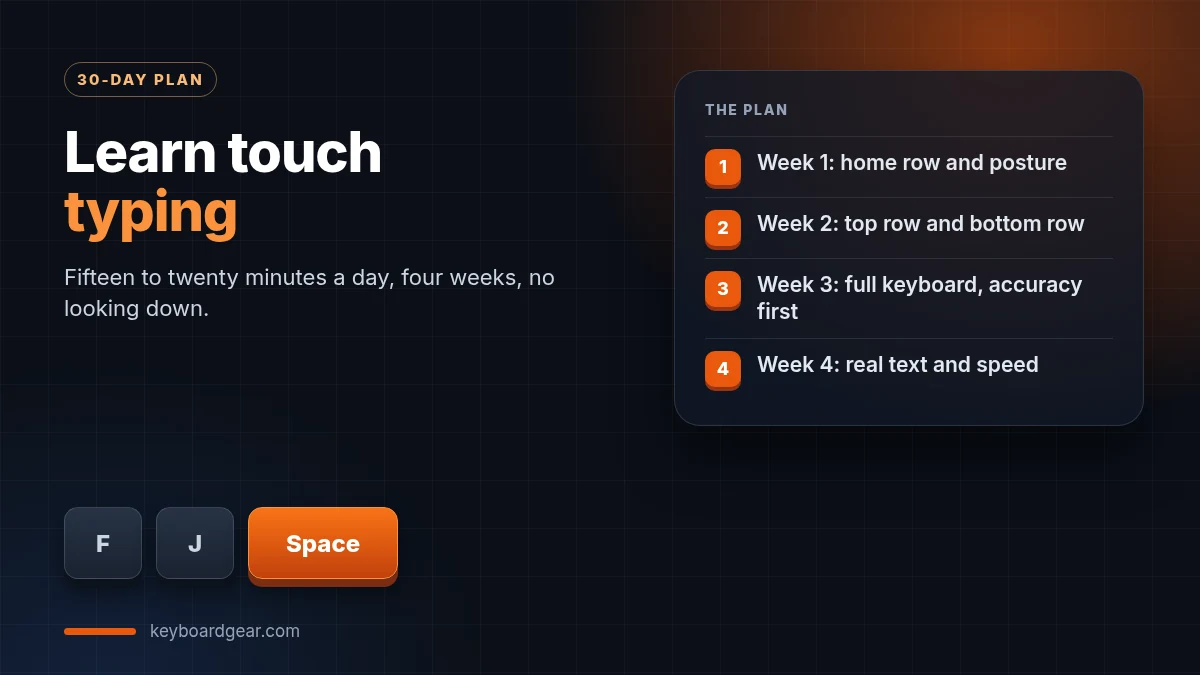
To learn touch typing, put your index fingers on F and J, learn which finger presses each key, and practise for 15 to 20 minutes a day without looking at the keyboard. Start with the home row, add the top and bottom rows in week two, then numbers and punctuation, and only push for speed in week four.
Most beginners can type without looking within two to four weeks. Reaching your old “hunt and peck” speed again often takes longer, and that is normal.
Touch typing means typing without looking at the keys, using a fixed finger for each key. It frees your eyes to stay on the screen, which helps you catch mistakes as they happen and keeps your neck in a better position.
The hardest part is not learning where the keys are. It is accepting that you will type slower for a couple of weeks while your fingers build new habits. This plan keeps each stage small so you see progress every week.
Does touch typing really make you faster?
The best evidence comes from a 2018 study of 168,000 volunteers who took an online typing test (Dhakal et al., CHI 2018). The average was about 52 words per minute. Fast typists used more fingers than slow typists, about 8.4 versus 5.3 on average, and people who had taken a typing course used more fingers than those who had not.
The same study found some people who never learned the formal system still reached high speeds. The biggest difference between fast and slow typists was rollover: fast typists start the next key before releasing the last one, while slow typists almost never do. Touch typing helps here, because rollover is much easier when your fingers already rest near the next key.
If you want to know where you stand now, see what counts as a good typing speed.
Before you start: set up for comfort
Spend five minutes on this on Day 1. A poor position makes practice tiring and can lead to aches.
- Keyboard height: elbows bent at roughly 90 degrees with relaxed shoulders. Our keyboard height guide shows how to measure it.
- Wrists: keep them straight and floating while typing; rest them only during pauses. A flat or slightly negative keyboard tilt is usually more comfortable than raised feet.
- Screen: at eye level so you are not tempted to look down.
- Light touch: press only as hard as needed.
Find the small bumps on the F and J keys. They are there so you can find the home row by touch, without looking.
The finger map
Each finger owns a column of keys. On a standard QWERTY keyboard:
| Finger | Left hand | Right hand |
|---|---|---|
| Index | R, T, F, G, V, B (and 4, 5) | Y, U, H, J, N, M (and 6, 7) |
| Middle | E, D, C (and 3) | I, K, comma (and 8) |
| Ring | W, S, X (and 2) | O, L, full stop (and 9) |
| Little | Q, A, Z, Tab, Caps Lock, left Shift (and 1) | P, semicolon, slash, Enter, right Shift, brackets (and 0) |
| Thumbs | Space bar | Space bar |
Your fingers return to A S D F and J K L ; after every keystroke. If key names like Tab, Caps Lock or the bracket keys are unfamiliar, our guide to keyboard keys and their names explains each one.
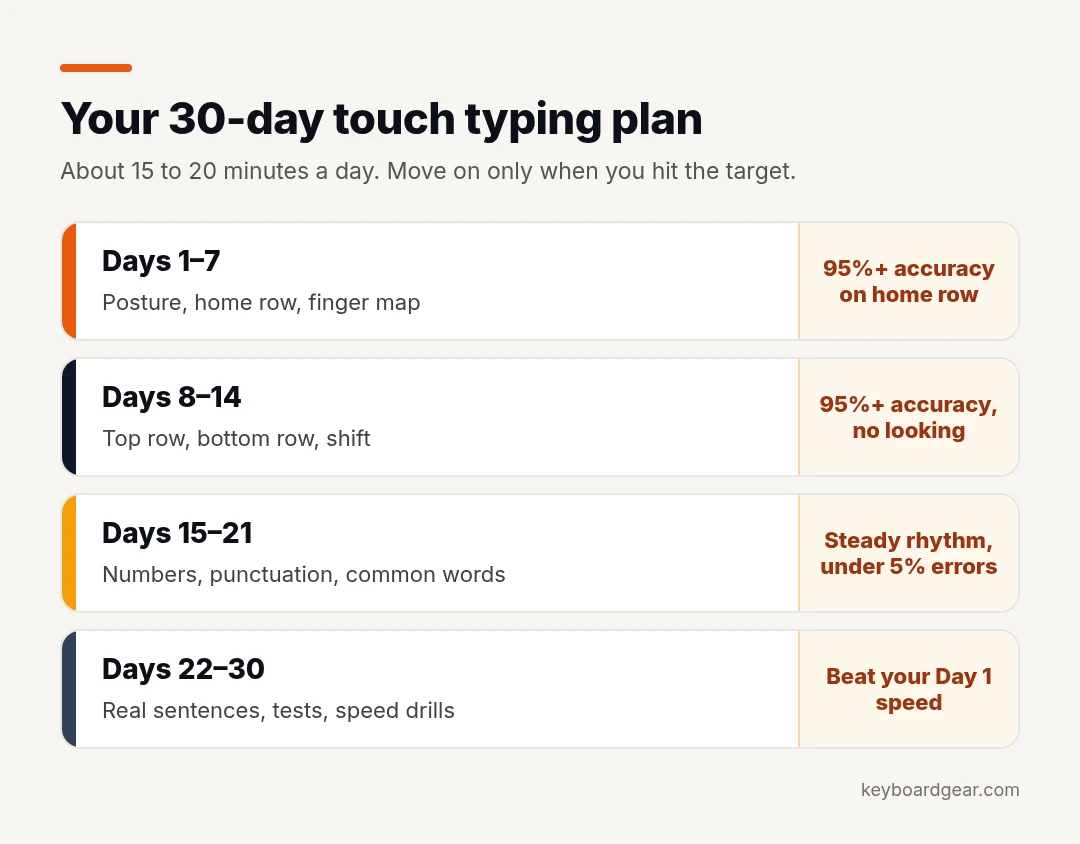
Week 1 (Days 1–7): home row and posture
- Days 1–2: learn F, J, D, K and Space. Type slowly and say each letter in your head.
- Days 3–4: add S, L, A and the semicolon. Practise short words like “sad”, “lass”, “flask”.
- Days 5–6: add G and H, which your index fingers reach sideways.
- Day 7: review. Type the whole home row in words without looking.
Target: 95% accuracy on home-row words. Speed does not matter yet.
Week 2 (Days 8–14): top and bottom rows
- Days 8–10: add E, I, R, U, then T, Y, W, O, Q, P.
- Days 11–13: add the bottom row: C, M, V, N, X, comma, Z, full stop, B.
- Day 14: practise Shift. Use the Shift key on the opposite hand to the letter you are capitalising.
Target: 95% accuracy and no glancing down. If you look, slow down instead.
Week 3 (Days 15–21): the full keyboard and accuracy
- Add numbers and common punctuation: apostrophe, question mark, hyphen.
- Practise the most common English words and short sentences.
- Watch your error rate. If it climbs above 5%, slow down until it drops again.
Target: a steady, even rhythm. Smooth beats fast.
Week 4 (Days 22–30): real text and speed
- Type real paragraphs: emails, articles, notes you actually need to write.
- Take one timed test every few days and record your score.
- Add short speed bursts: one minute as fast as you can, then one minute at a calm pace.
Target: match or beat the speed you had before you started, with fewer errors. Our guide on how to type faster covers the next steps.
Where to practise
You don’t need paid software. TypingClub and Typing.com have free structured lessons, keybr adapts to your weak keys, and Monkeytype is good for tracking your speed. We compare them in our guide to the best free typing practice sites.
Common problems and fixes
| Problem | Fix |
|---|---|
| You keep looking at the keys | Lower your speed and cover your hands with a light cloth for a few minutes |
| One finger keeps hitting the wrong key | Drill words that use that key, slowly, for two minutes a day |
| You were faster before you started | This is normal for a few weeks; keep going and stop hunting for keys |
| Hands or wrists ache | Take breaks, relax your grip and check your desk height |
| Progress has stopped | Switch to real text and timed tests, and focus on accuracy again |
If you have pain, numbness or tingling in your hands that does not go away with rest, see a doctor or physiotherapist. Our guide to wrist pain from typing explains common causes.
FAQ
How long does it take to learn touch typing?
Most people can type without looking within two to four weeks of daily practice. Getting back to, and past, your old speed often takes one to three months.
How many minutes a day should I practise?
About 15 to 20 minutes a day. Short daily sessions work better than long weekly ones.
Why are F and J the starting keys?
They sit under your index fingers on the home row and have small bumps, so you can find them by touch.
Should I learn on a laptop or a separate keyboard?
Either works. Learn on the keyboard you use most so your fingers get used to its layout and spacing.
Do I have to use all ten fingers?
You’ll get the most benefit from using all of them. The large 2018 study found faster typists used more fingers on average, though some fast typists use fewer.
Related guide: Best Free Typing Games for Kids (Checked for Accounts and Safety)
Related guide: When Should Kids Learn to Type? What Standards and Research Say
Related guide: How to Reduce Typing Errors: Accuracy vs Speed
Sources

Experience is what matters at the end!!
Hi! This is Jacob Jay – founder of Keyboardgear.com! From childhood to adulthood, I’ve always remained passionate about IT, and the revolution in this industry, especially gaming on the PC can’t go out of my way. Since I’m an enthusiastic gamer, and I love to experience various gaming accessories, particularly mechanical keyboards, that really boost my gaming adventure manifolds. So, my nerve cells hit me to transfer my experiences into word form and share with others to identify the ideal keyboards perfectly fit for their gaming modes.
I know very well how hard it is to find the high-quality items available on the internet that ought to be exactly the same as seen as on the screen. But the counterfeiters have ruined the user’s trust. As I have passed all such situations, I’m obliged to deliver the genuinity and express the same as what I am saying.
So, now, I’m working on the mission to provide very helpful and frankly but trustworthy reviews and guides about various mechanical keyboards, mouses, and other gaming accessories as per my personal experiences and sound knowledge.