

Keyboard Gear earns from qualifying purchases through Amazon links.
For most people, the Azio Large Print Keyboard is the best choice: big bold letters, a backlight in three colours and a reliable wired connection. For the highest contrast, choose a yellow keyboard with black letters, like the XDL-POWER model. Mac users should get the Macally Large Print Backlit Keyboard, and the Nuklz Magnus 325 is the pick if you want wireless.
Standard keyboards print their letters small and in thin type, often in grey on black. For people with low vision, older eyes or a new typist who is still hunting for keys, that makes every email slower and more frustrating. A large print keyboard fixes this with letters several times bigger, bolder fonts and high-contrast colours such as black on yellow or black on white.
This guide covers seven large print keyboards on Amazon US, including backlit, wireless, Mac and keyboard-and-mouse options. We checked that each one was in stock on Amazon US on November 28, 2026, and the specs come from the official listings. We haven’t tested these keyboards hands-on, so we focus on what each listing confirms and who each design suits.
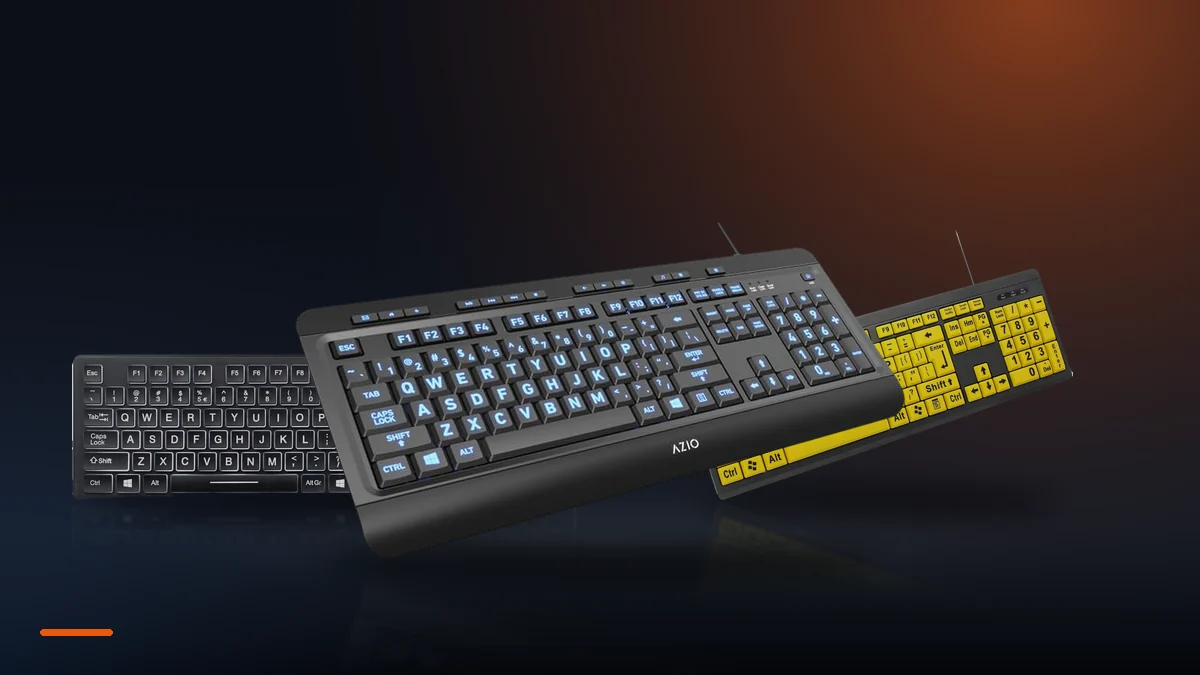
Best large print keyboards overview
| Product | Best for | Key specs | Price |
|---|---|---|---|
1 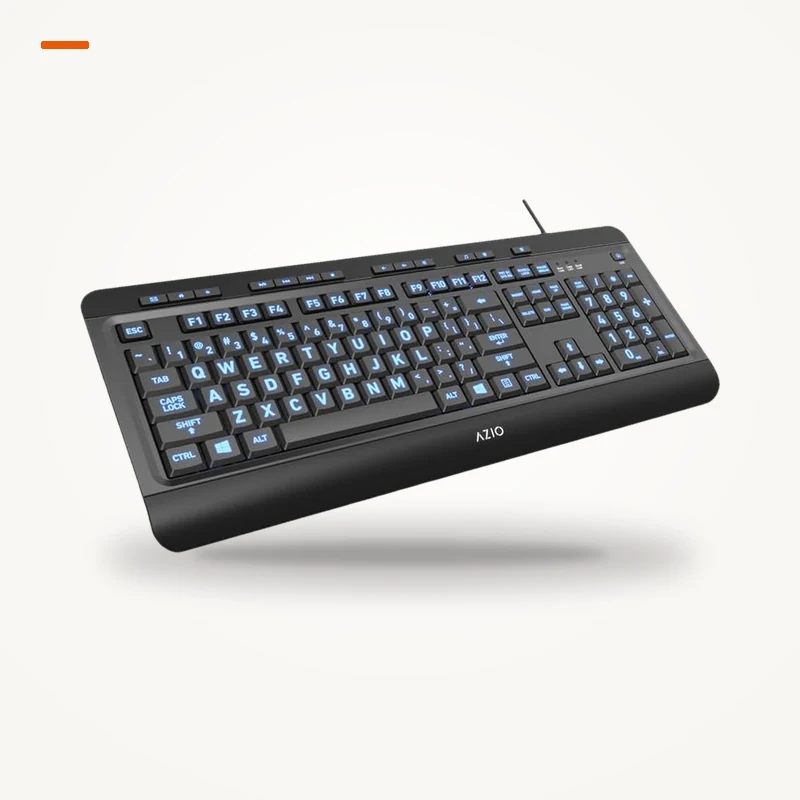 Azio Large Print Keyboard (KB505U) |
Best overall |
|
Check Price |
2 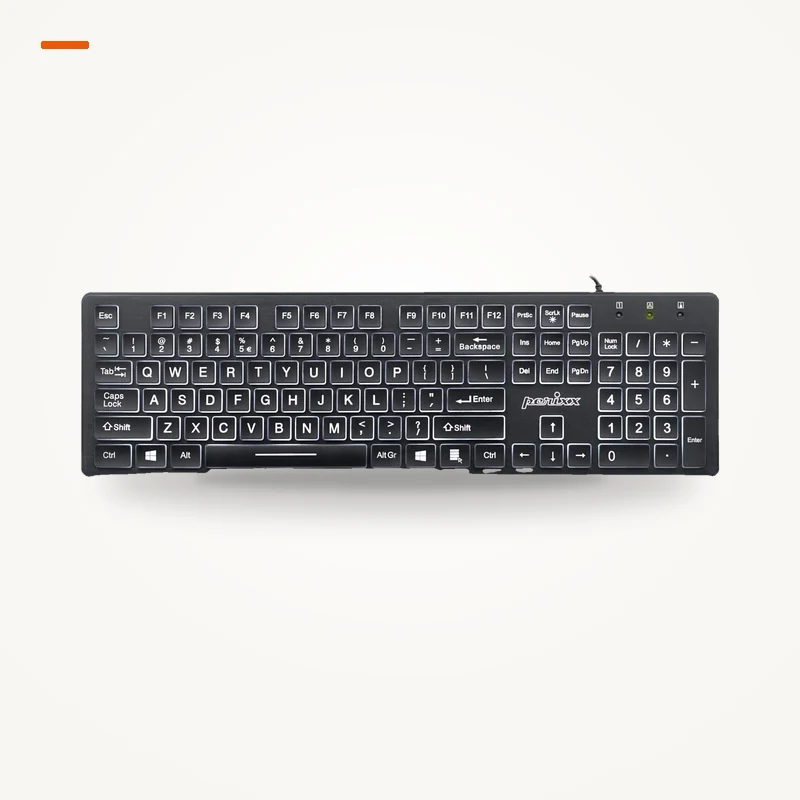 Perixx PERIBOARD-317 |
Best budget backlit |
|
Check Price |
3 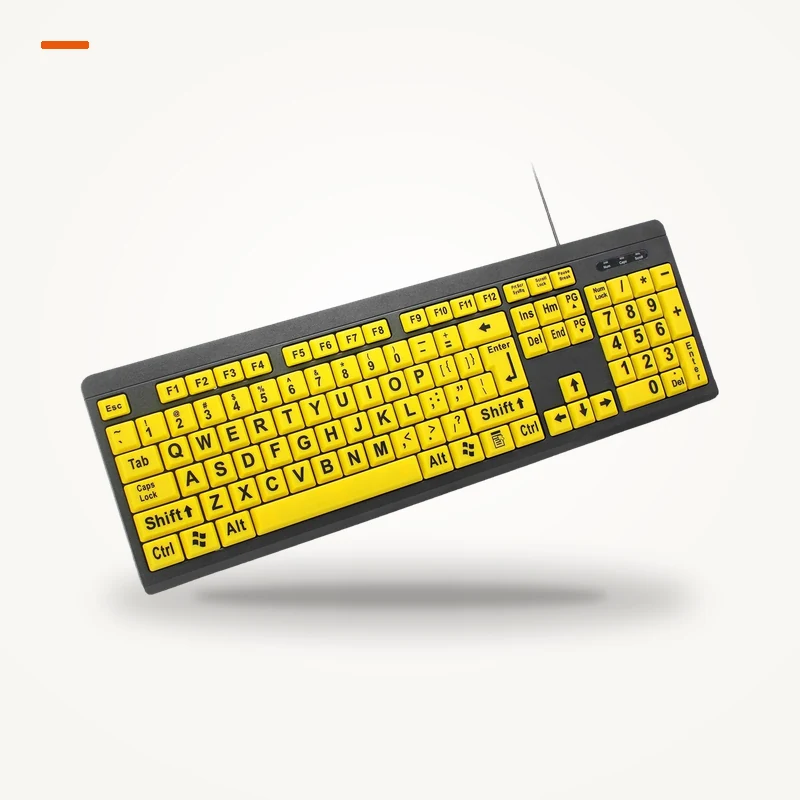 XDL-POWER Yellow Large Print Keyboard |
Best high contrast |
|
Check Price |
4 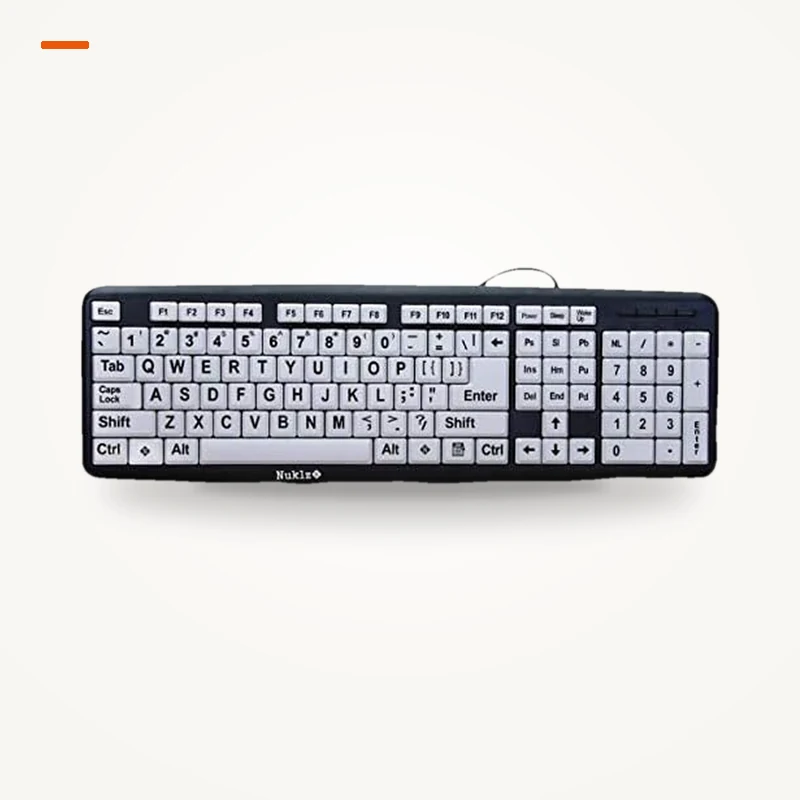 Nuklz N Large Print Keyboard (Wired) |
Best black on white |
|
Check Price |
5 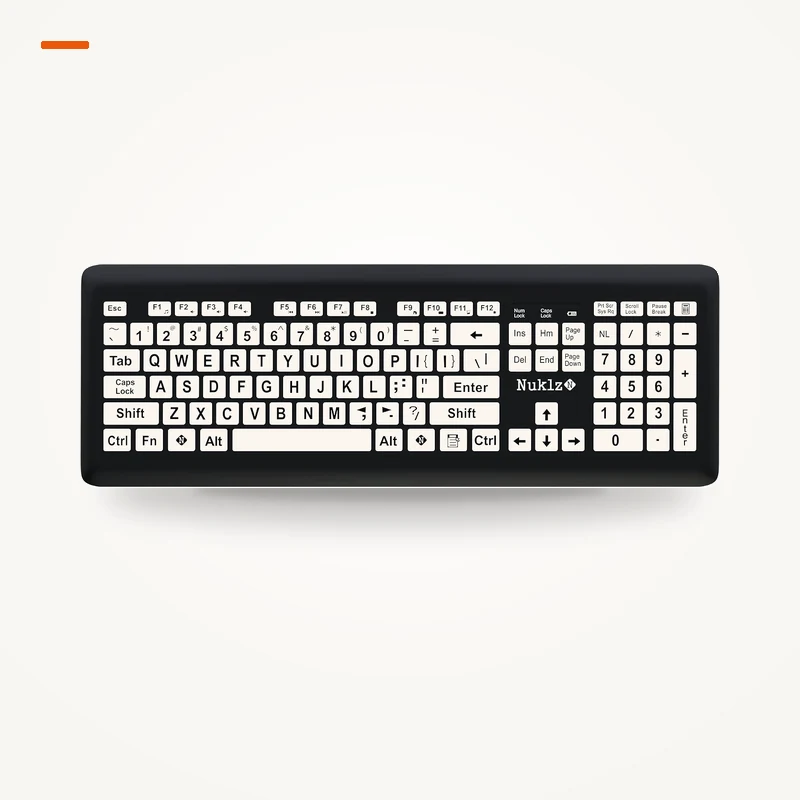 Nuklz Magnus 325 Wireless |
Best wireless |
|
Check Price |
6 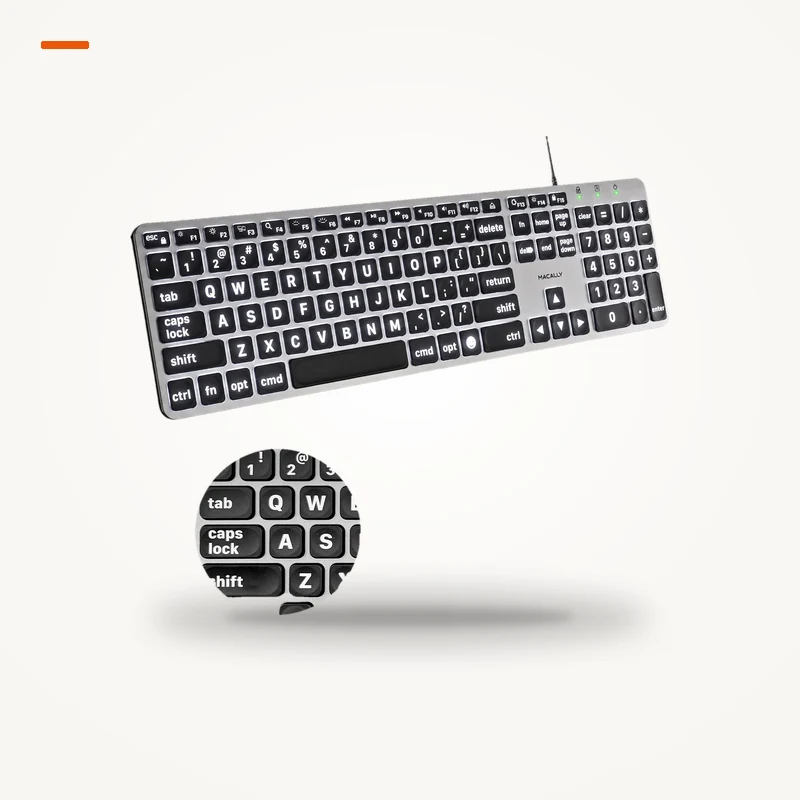 Macally Large Print Backlit Keyboard for Mac |
Best for Mac |
|
Check Price |
7 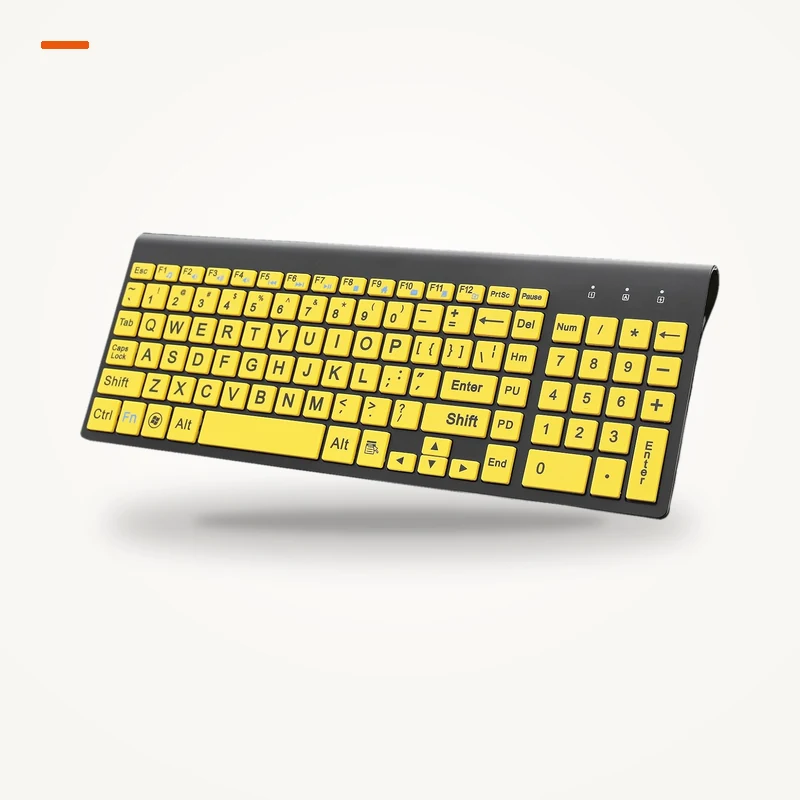 HXMJ Wireless Large Print Keyboard and Mouse |
Best combo |
|
Check Price |
Quick picks
- Best overall: Azio Large Print Keyboard (KB505U) — best backlit large print keyboard.
- Best budget backlit: Perixx PERIBOARD-317 — best budget large print keyboard.
- Best high contrast: XDL-POWER Yellow Large Print Keyboard — best yellow high-contrast keyboard.
- Best black on white: Nuklz N Large Print Keyboard (Wired) — best black-on-white large print keyboard.
- Best wireless: Nuklz Magnus 325 Wireless — best wireless large print keyboard.
- Best for Mac: Macally Large Print Backlit Keyboard for Mac — best large print keyboard for Mac.
- Best combo: HXMJ Wireless Large Print Keyboard and Mouse — best large print keyboard and mouse set.
How we chose
We searched Amazon US for large print and high-visibility keyboards, then kept models that were in stock, clearly described, and covered different needs: backlit for dim rooms, high-contrast colours for bright rooms, wireless, Mac layout and a full keyboard-and-mouse set. We compared print size and contrast, backlighting, key feel and noise, connection type, compatibility and price.
What to look for in a large print keyboard
Contrast comes first
Letter size matters, but contrast matters more. Black letters on yellow keys are often the easiest to read for people with low vision. Black on white is close behind and looks more familiar. White or lit letters on black keys reduce glare and work well in dim light, especially with a backlight. If you are buying for someone else, ask which they find easier, or check with their eye care professional.
Backlight or no backlight
A backlight shines through the legends so you can see them in a dark room or at night. It is a big help on black keyboards. On yellow or white keyboards, normal room light is usually enough, and most of them aren’t backlit. Our guide on how to turn on the keyboard light explains backlight shortcuts on common keyboards.
Key feel and noise
Most large print keyboards use membrane or scissor-switch keys, which are light and quiet. Scissor keys feel like a laptop; membrane keys have a little more travel. Both are fine for everyday typing. If wrist comfort matters, see our notes on keyboard tilt and the best ergonomic keyboards.
Wired or wireless
Wired keyboards are the simplest: plug in and go, with no batteries. Wireless keyboards remove the cable and are easier to use on a lap or a small table, but someone has to remember batteries or charging.
Windows or Mac layout
Mac users should look for a macOS layout with Command and Option keys, like the Macally. Windows keyboards work on a Mac, but the modifier keys are labelled differently and some shortcuts won’t match.
Extras that help
Look for Caps Lock and Num Lock indicator lights, a number pad if they use it, and dedicated volume or media keys. A large mouse with clear buttons is worth considering too.
The best large print keyboards reviewed
1. Azio Large Print Keyboard (KB505U) — best backlit large print keyboard
Who it’s for: Anyone who wants clear, bold legends that stay readable in a dim room, from a known keyboard brand at a modest price.
Azio’s KB505U is one of the longest-running large print keyboards on Amazon, and it gets the basics right: oversized, bold letters on black keys, and a backlight that lights the legends from behind so they stay readable when the room is dark. You can switch the backlight between red, blue and purple, which lets you pick the colour you find easiest on your eyes.
It is a full-size wired keyboard with a number pad, built-in multimedia and quick-access hotkeys, and a 5-foot USB cord, so it simply plugs in. Light-on-dark legends suit people who find glare from white keys tiring. If you need maximum contrast in a bright room instead, look at the yellow or white keyboards below.
Key specs: Full-size wired USB keyboard; large print legends; tri-colour backlight (red, blue or purple); multimedia and quick-access hotkeys; 5 ft cord; plug and play.
- Legends readable in the dark
- Choice of three backlight colours
- Known brand, sold by Amazon
- Hotkeys for media and apps
- Light-on-dark isn’t the highest contrast in daylight
- Wired only
- Large footprint
2. Perixx PERIBOARD-317 — best budget large print keyboard
Who it’s for: People who want a slim, quiet, affordable large print keyboard with a clean white backlight.
The PERIBOARD-317 prints its legends about four times larger than a standard keyboard, according to Perixx, and lights them with an evenly spread white LED backlight that you can switch on or off and dim. It is a slim full-size keyboard with low-profile keys that feel closer to a laptop than a chunky desktop board, and Perixx says the keys are quieter than standard ones.
It plugs in with a 5.25-foot USB cable and needs no drivers on Windows. One quirk to know: when the backlight is on, the Scroll Lock function is disabled, which only matters for a few spreadsheet users. It also comes with a 12-month warranty.
Key specs: Full-size slim wired keyboard; 4× larger key fonts; white LED backlight with on/off and brightness control; low-profile membrane keys rated for 10 million keystrokes; 5.25 ft USB-A cable; Windows 7 to 11; 17.32 × 5.04 × 1.18 in; 1.15 lb.
- Very affordable
- Even, dimmable white backlight
- Slim and quiet
- Sold by Amazon
- Backlight disables Scroll Lock
- Officially listed for Windows
- Low-profile keys feel shallow to some
3. XDL-POWER Yellow Large Print Keyboard — best yellow high-contrast keyboard
Who it’s for: People with low vision who need the strongest possible contrast: big black letters on bright yellow keys.
Black on yellow is one of the most readable colour combinations for people with low vision, and that is exactly what this keyboard offers. The large black legends are about four times the size of standard keyboard fonts, according to the listing, and the yellow keys stand out clearly against the black frame, so you can find the right key area at a glance.
It is a simple, wired, plug-and-play USB keyboard with membrane keys and a spill-resistant design. There is no backlight, so it works best in a well-lit room. It is the cheapest keyboard in this guide and a very practical choice for a parent, grandparent or classroom.
Key specs: Wired USB keyboard; yellow keys with large black print (about 4× standard size); membrane keys rated for 5 million keystrokes; spill-resistant design; plug and play on Windows.
- Excellent contrast
- Very low price
- Spill resistant
- Simple plug and play
- No backlight
- Basic build
- Third-party seller
4. Nuklz N Large Print Keyboard (Wired) — best black-on-white large print keyboard
Who it’s for: People who prefer bold black letters on white keys, and beginners who are still learning where the keys are.
Nuklz N’s wired keyboard uses white keys with large, bold black lettering inside a black frame, which gives strong contrast in normal room light and a familiar look. The keys are soft and quiet, and the full-size layout keeps the number pad, arrows and function keys in the usual places, which helps anyone moving from a regular keyboard.
It connects with a single USB cable and needs no drivers or software on Windows or Mac. It is not backlit. If you like this layout but want to drop the cable, Nuklz also makes the wireless Magnus 325 below.
Key specs: Full-size wired USB keyboard; large print black legends on white keys; high-contrast black frame; soft, quiet membrane keys; plug and play on Windows and Mac; not backlit.
- Strong black-on-white contrast
- Quiet, soft keys
- Works on Windows and Mac
- Plug and play
- No backlight
- White keys show dirt
- Third-party brand
5. Nuklz Magnus 325 Wireless — best wireless large print keyboard
Who it’s for: Anyone who wants a large print keyboard without a cable on the desk, for example on a lap or a small table.
The Magnus 325 is the wireless version of Nuklz’s large print design. You plug the small receiver into your computer and start typing, with no drivers. Large bold letters sit on high-contrast black and white keys, and indicator lights show when Num Lock or Caps Lock is on, which is a small but useful detail for anyone who can’t easily see the screen.
Nuklz made it heavier than earlier versions so it feels more solid and stays put, and it has an adjustable stand and soft-touch keys. As with any wireless keyboard, keep spare batteries or a charge in mind, and plug the receiver into a port close to the keyboard for a reliable connection.
Key specs: Full-size wireless keyboard with USB receiver; large bold print on high-contrast black and white keys; Num Lock and Caps Lock indicator lights; soft-touch keys; adjustable stand; plug and play.
- No cable on the desk
- Lock indicator lights
- Solid, weighted feel
- Plug and play
- Not backlit
- Needs batteries or charging
- Third-party brand
6. Macally Large Print Backlit Keyboard for Mac — best large print keyboard for Mac
Who it’s for: Mac users who want large print legends with a proper macOS layout and keys that light up.
Most large print keyboards are made for Windows, so Mac users end up with the wrong modifier keys and no media shortcuts. Macally’s keyboard fixes that with a 107-key macOS layout, including Command and Option keys and 16 Mac shortcut keys, and its print is about four times larger than a standard keyboard’s, according to Macally.
The keys are backlit with three brightness levels, and the scissor-switch keys feel similar to a Mac keyboard. A dual-ended plug gives you USB-C and USB-A, so it connects directly to a modern MacBook, Mac mini or iMac without an adapter. For other Mac keyboard ideas, see our guide to the best keyboards for Mac.
Key specs: 107-key macOS layout with 16 shortcut keys; print about 4× larger than standard; backlit keys with 3 brightness levels; scissor-switch keys; wired, dual USB-C and USB-A plug; 16.85 × 4.61 × 0.87 in.
- Real Mac layout and shortcuts
- Backlit large print
- USB-C and USB-A plug
- Slim scissor keys
- Wired only
- Sold by a third-party seller
- Pricier than Windows models
7. HXMJ Wireless Large Print Keyboard and Mouse — best large print keyboard and mouse set
Who it’s for: Someone setting up a computer for a parent or grandparent who wants a matching keyboard and mouse that are easy to see and use.
This set pairs a slim, full-size wireless keyboard with yellow keys and large black print with a quiet wireless mouse, both running on one USB receiver. The high-contrast yellow keys are easy to see, and the scissor-switch keys give a light, laptop-like press that suits people who don’t type with much force.
The keyboard measures about 14.5 × 5.8 inches and has 102 keys, with an inclined angle for comfort. It works with Windows and macOS. It is a no-name brand, so don’t expect premium build quality, but as a simple, high-visibility starter set it is good value.
Key specs: Wireless large print keyboard (102 keys, scissor switches) and quiet wireless mouse; yellow keys with large black print; single USB receiver; about 14.5 × 5.8 in; Windows and macOS.
- Keyboard and mouse in one box
- High-contrast yellow keys
- Light scissor keys
- Works on Windows and Mac
- Lesser-known brand
- Not backlit
- Mouse is basic
Large print keyboards compared
| Keyboard | Best for | Colours | Backlight | Connection |
|---|---|---|---|---|
| Azio KB505U | Best overall | Large print on black keys | Red, blue or purple | Wired USB |
| Perixx PERIBOARD-317 | Best budget backlit | Large print on black keys | White, dimmable | Wired USB |
| XDL-POWER Yellow | Best high contrast | Black on yellow | No | Wired USB |
| Nuklz N Wired | Best black on white | Black on white | No | Wired USB |
| Nuklz Magnus 325 | Best wireless | Black and white | No | Wireless receiver |
| Macally Large Print for Mac | Best for Mac | Large print, Mac layout | Yes, 3 levels | Wired USB-C + USB-A |
| HXMJ Keyboard and Mouse | Best combo | Black on yellow | No | Wireless receiver |
Which large print keyboard fits you?
| If you… | Choose | Why |
|---|---|---|
| Type in a dim room or at night | Azio or Perixx | Backlit legends stay readable in the dark |
| Have low vision and need maximum contrast | XDL-POWER Yellow | Bold black letters on bright yellow keys |
| Want a familiar look | Nuklz N Wired | Black letters on white keys |
| Don’t want a cable | Nuklz Magnus 325 | Wireless with lock indicator lights |
| Use a Mac | Macally | Mac layout, backlight and USB-C |
| Are setting up a whole computer for someone | HXMJ set | Matching high-contrast keyboard and mouse |
Tips to make any keyboard easier to see
- Large print keyboard stickers can be added to an existing keyboard, though they wear over time.
- Increase the text size and cursor size in your computer’s accessibility settings so what you type is easier to read too.
- Improve the lighting on the desk with a lamp aimed at the keyboard, not at the screen.
- Learn the home row bumps: the small ridges on F and J help you find your place without looking. Our guide on how to type faster covers touch typing basics, and our keyboard key names guide explains what each key does.
FAQ
What is a large print keyboard?
A keyboard with much bigger, bolder letters on the keys than a standard keyboard, usually in high-contrast colours such as black on yellow or black on white. They are designed for people with low vision, seniors and beginners.
Which colour large print keyboard is easiest to read?
Many people with low vision find black letters on yellow keys the easiest, followed by black on white. White or backlit letters on black keys reduce glare and work well in dim light. Personal preference and the type of vision loss matter, so it is worth asking the person who will use it.
Are large print keyboards good for seniors?
Yes. Bigger letters and stronger contrast make keys easier to find, which reduces mistakes and eye strain. Light, quiet keys and a simple plug-and-play connection also help.
Do large print keyboards work with Mac?
Many work on a Mac as standard USB keyboards, but their keys are labelled for Windows. For a proper Mac layout with Command and Option keys, choose a Mac model such as the Macally large print backlit keyboard.
Are there wireless large print keyboards?
Yes. The Nuklz Magnus 325 and the HXMJ keyboard and mouse set in this guide both connect wirelessly with a small USB receiver.
Final verdict
The Azio Large Print Keyboard is the best all-round pick, with big legends and a backlight for any lighting. For maximum contrast at the lowest price, choose the XDL-POWER yellow keyboard. Mac users should go for the Macally Large Print Backlit Keyboard, and the Nuklz Magnus 325 is the one to get if you want to lose the cable. Looking for a regular budget keyboard instead? See our best wireless keyboards under $50.

Experience is what matters at the end!!
Hi! This is Jacob Jay – founder of Keyboardgear.com! From childhood to adulthood, I’ve always remained passionate about IT, and the revolution in this industry, especially gaming on the PC can’t go out of my way. Since I’m an enthusiastic gamer, and I love to experience various gaming accessories, particularly mechanical keyboards, that really boost my gaming adventure manifolds. So, my nerve cells hit me to transfer my experiences into word form and share with others to identify the ideal keyboards perfectly fit for their gaming modes.
I know very well how hard it is to find the high-quality items available on the internet that ought to be exactly the same as seen as on the screen. But the counterfeiters have ruined the user’s trust. As I have passed all such situations, I’m obliged to deliver the genuinity and express the same as what I am saying.
So, now, I’m working on the mission to provide very helpful and frankly but trustworthy reviews and guides about various mechanical keyboards, mouses, and other gaming accessories as per my personal experiences and sound knowledge.