
Keyboard Gear earns from qualifying purchases through Amazon links.
A regular flat keyboard makes you bend your wrists outward, upward and inward for hours a day. The best ergonomic keyboards reduce that strain with split or curved layouts, negative tilt, tenting and proper wrist support, so your hands rest closer to a neutral position.
We compared seven ergonomic keyboards currently sold on Amazon US, from gentle wave layouts that need no relearning to fully split and tented designs. Specs come from Logitech, Kinesis, Keychron and HP’s product pages and from the current Amazon listings. If you are new to the topic, start with the types of ergonomic keyboards and whether ergonomic keyboards are worth it.
Quick picks
- Best overall: Logitech Ergo K860
- Best for beginners: Logitech Wave Keys
- Best adjustable split: Kinesis Freestyle2 Blue
- Best mechanical split: Keychron Q11 Ultra 8K
- Best with detachable numpad: HP 960 Ergonomic Wireless Keyboard
- Best adjustable tenting: Goldtouch Elite Adjustable Keyboard
- Best budget: Perixx Periboard-512
At a glance: best ergonomic keyboards compared
| Product | Best for | Key specs | Price |
|---|---|---|---|
1 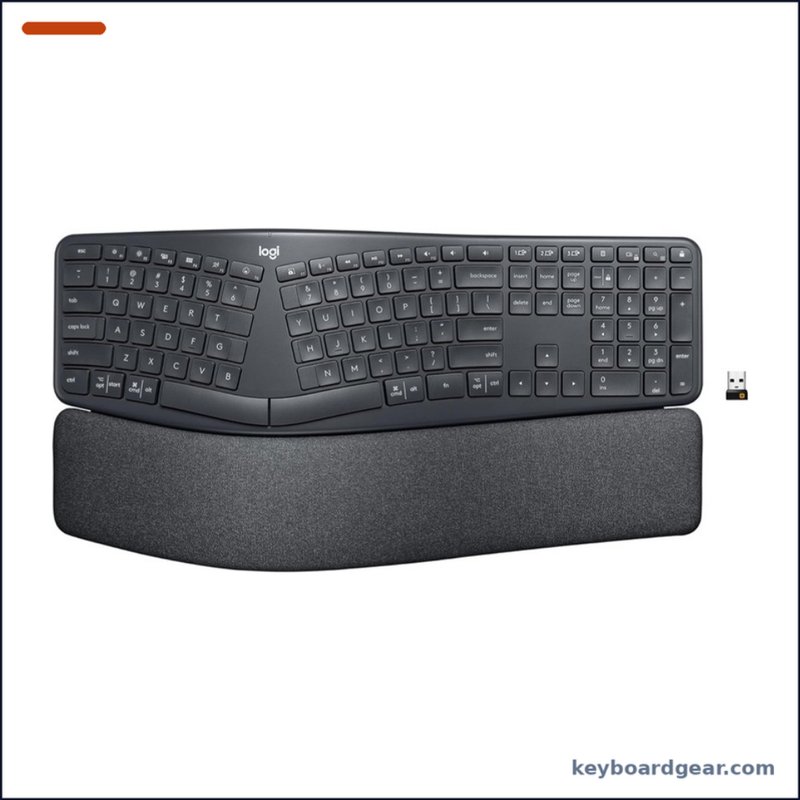 Logitech Ergo K860 Logitech Ergo K860 |
Best overall |
|
Check price |
2 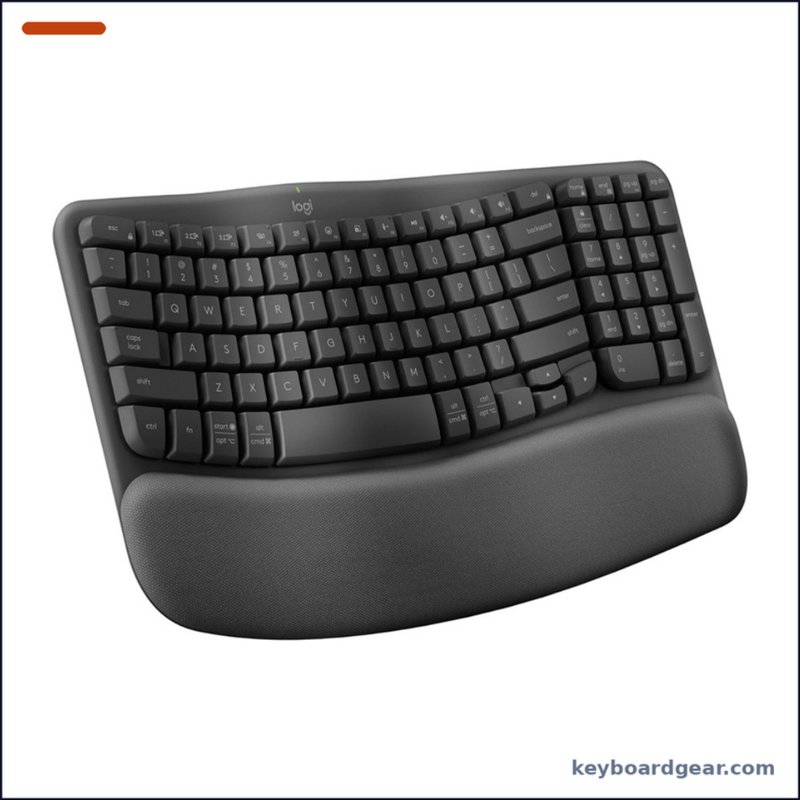 Logitech Wave Keys Logitech Wave Keys |
Best for beginners |
|
Check price |
3 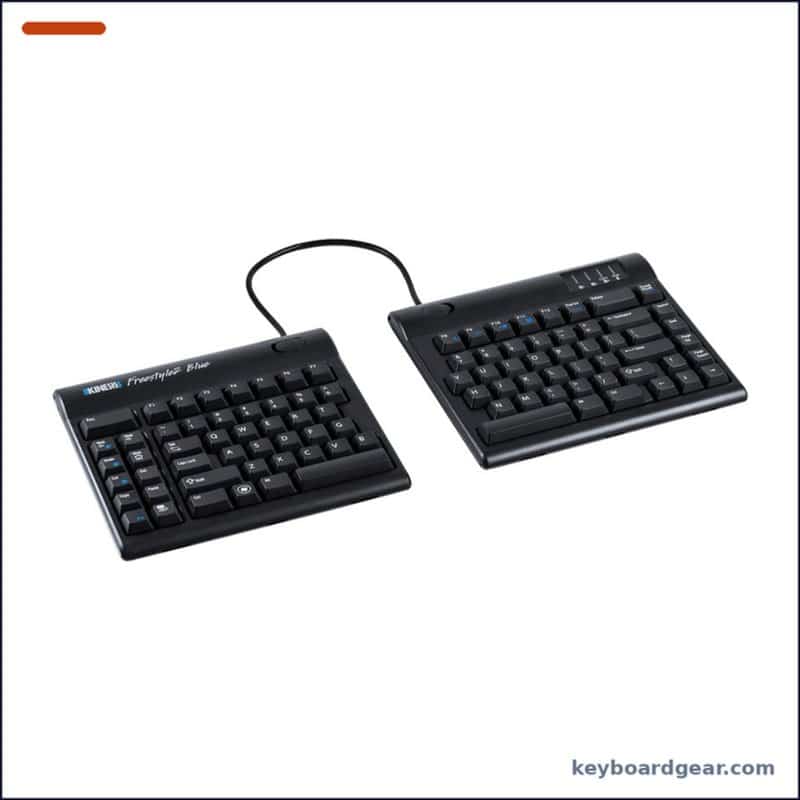 Kinesis Freestyle2 Blue Kinesis Freestyle2 Blue |
Best adjustable split |
|
Check price |
4 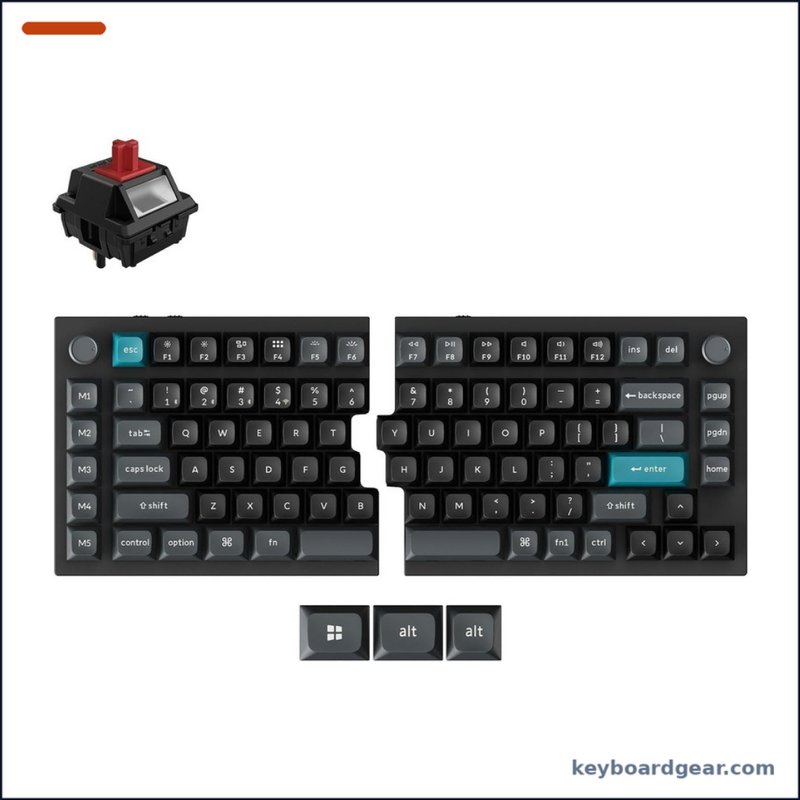 Keychron Q11 Ultra 8K Keychron Q11 Ultra 8K |
Best mechanical split |
|
Check price |
5 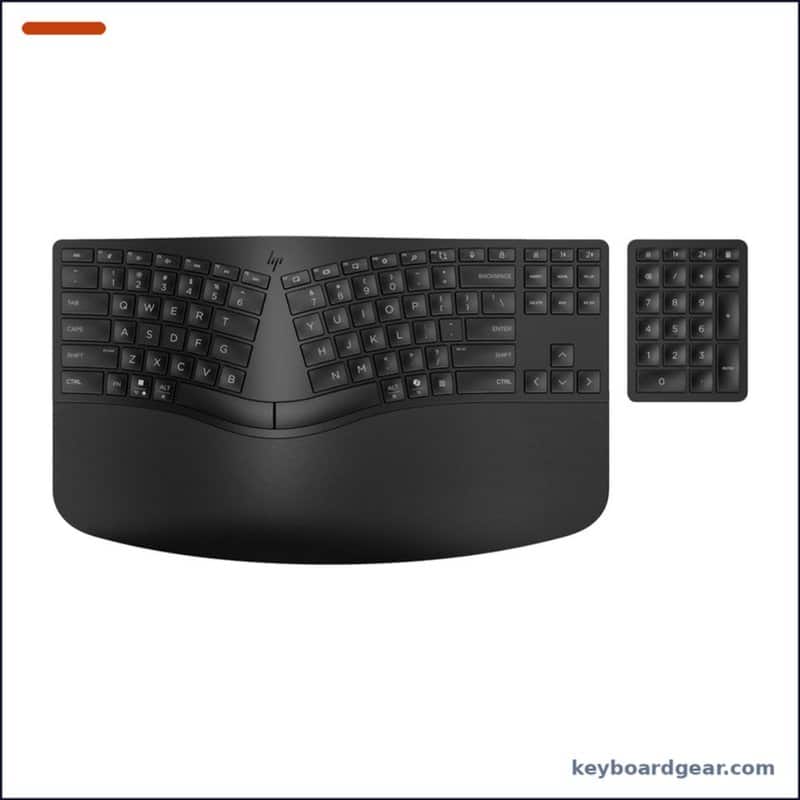 HP 960 Ergonomic Wireless Keyboard HP 960 Ergonomic Wireless Keyboard |
Best with detachable numpad |
|
Check price |
6 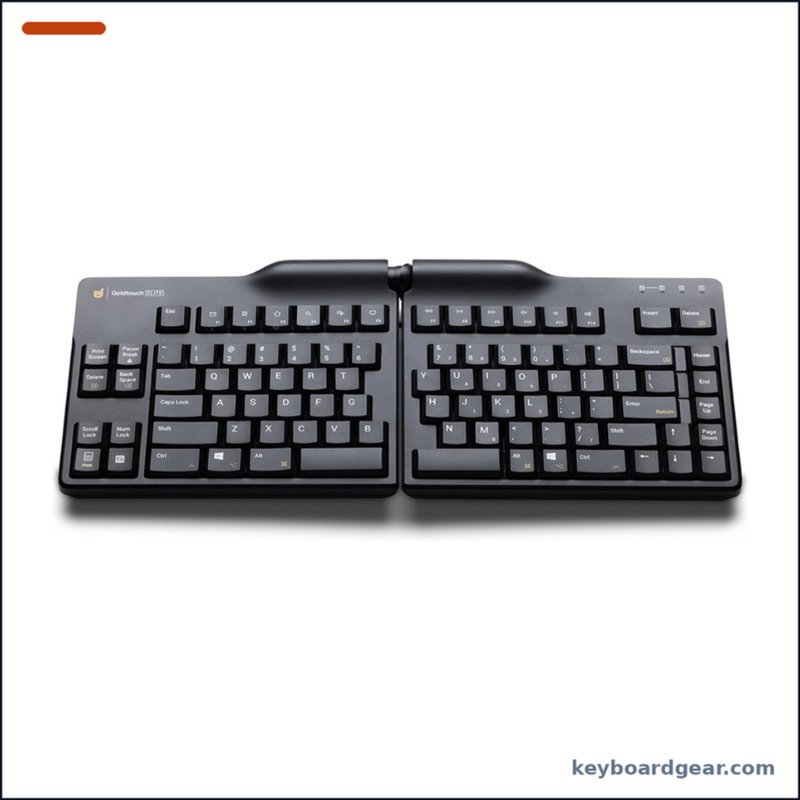 Goldtouch Elite Adjustable Keyboard Goldtouch Elite Adjustable Keyboard |
Best adjustable tenting |
|
Check price |
7 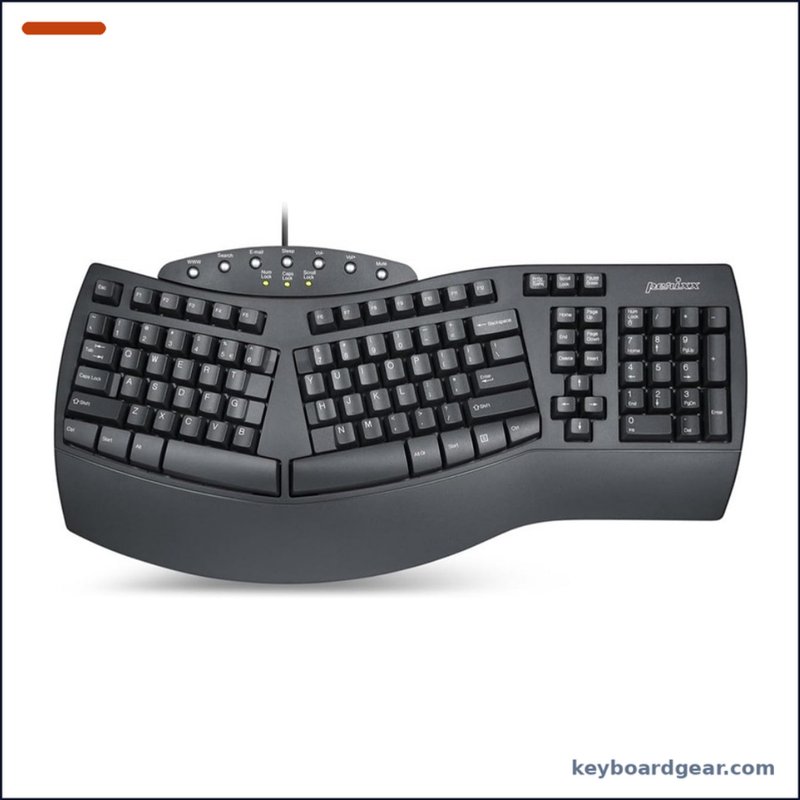 Perixx Periboard-512 Perixx Periboard-512 |
Best budget |
|
Check price |
1. Logitech Ergo K860 — best ergonomic keyboard overall
Who it’s for: Office workers and anyone with wrist or forearm discomfort who wants a proven split-curve design without learning a fully separated keyboard.
Why we picked it: The K860 keeps a familiar full-size layout (with number pad) but splits and curves the key frame so your wrists sit straighter, and adds a three-layer pillowed wrist rest. Its standout feature is negative tilt: the legs set the board at 0°, -4° or -7°, angling the keys away from you, which reduces upward wrist bend. Logitech says the K860 is certified by United States Ergonomics. It runs for up to 24 months on two AAA batteries and can switch between three computers.
Key specs: Split, curved key frame with a full numpad; low-profile scissor-style keys (60 gf actuation, 1.8 mm travel per Logitech’s datasheet); no backlight; integrated three-layer pillowed wrist rest; palm-lift legs at 0°, -4° and -7°; Logitech Unifying USB receiver or Bluetooth Low Energy; Easy-Switch for 3 devices; 2 × AAA batteries, up to 24 months; about 1160 g; Logi Options+ on Windows and macOS.
- Negative tilt is rare and genuinely helps wrist extension
- Plush, built-in wrist rest
- Familiar layout with numpad, short learning curve
- Two-year battery life and 3-device switching
- Large footprint pushes your mouse further out
- No backlight
- Fixed split cannot be widened or tented
- Uses the older Unifying receiver, not Logi Bolt
2. Logitech Wave Keys — best entry-level ergonomic keyboard
Who it’s for: First-time ergonomic buyers who want more comfort than a flat keyboard but don’t want to relearn typing on a split layout.
Why we picked it: Wave Keys is the gentlest step into ergonomics. Instead of a split, the key rows follow a subtle wave so your hands sit at a more natural angle, and a cushioned memory-foam palm rest supports your wrists. The compact layout still includes a number pad, so it takes less desk space than the K860. Logitech rates it for up to 36 months on two AAA batteries, and it is also certified by United States Ergonomics.
Key specs: Wave-shaped layout with 10-key number pad; integrated cushioned palm rest; Logi Bolt USB receiver or Bluetooth Low Energy; Easy-Switch for 3 devices; about 50 g actuation force and 2.5 mm key travel; no backlight; 2 × AAA, up to 36 months; about 750 g; Logi Options+.
- Almost no learning curve
- Compact footprint that still keeps a numpad
- Comfortable memory-foam palm rest
- Excellent battery life
- Only a mild ergonomic adjustment, no true split
- No backlight
- No negative tilt or tenting options
- Palm rest is not removable
3. Kinesis Freestyle2 Blue — best fully split ergonomic keyboard
Who it’s for: Wider-shouldered typists and anyone who wants to place each half exactly where their hands fall, with the option to add tenting later.
Why we picked it: The Freestyle2 is a true split: the two halves are joined by a pivot tether and can be separated by up to 9 inches, so you can keep your wrists straight instead of bent outward. It has a zero-degree slope (no upward tilt) and a slim profile, and the Blue version is wireless with Bluetooth multichannel for three devices and a rechargeable battery that Kinesis rates for more than 300 hours of typing. Kinesis sells optional VIP3 and V3 accessories that tent each half at 5°, 10° or 15°.
Key specs: Split layout with pivot tether and up to 9″ separation; zero-degree slope, maximum height 0.875″; membrane rubber-dome keys with tactile feel (about 45 g operating force, 3.9 mm travel); Bluetooth 5.1 multichannel, up to 3 devices, no dongle; rechargeable lithium-polymer battery, 300+ hours of typing; Windows hotkeys (Mac supported for basic functions); optional tenting and palm supports; 2-year warranty.
- Adjustable separation for a truly neutral wrist angle
- Flat, zero-slope design avoids wrist extension
- Optional tenting kits grow with you
- Wireless with 3-device Bluetooth
- Tenting and palm supports cost extra
- Membrane keys, not mechanical
- Mac users get basic functions only
- Splitting takes a few days to get used to
4. Keychron Q11 Ultra 8K — best split mechanical ergonomic keyboard
Who it’s for: Enthusiasts and programmers who want a split layout with premium mechanical switches, programmable keys and the option to use one half on its own.
Why we picked it: The Q11 Ultra 8K is a CNC-aluminium, gasket-mounted 75% keyboard split into two halves that link wirelessly over 2.4 GHz, so there is no cable between them. Keychron’s Silk POM switches are hot-swappable (3- and 5-pin MX), there are two rotary knobs and five macro keys, and the board polls at up to 8,000 Hz over cable or 2.4 GHz. It runs ZMK firmware with the Keychron Launcher web app. Note that it is heavy (about 1.7 kg) and has no built-in tenting. See our polling rate guide for whether 8K matters to you.
Key specs: 75% split layout; halves sync over 2.4 GHz; 2.4 GHz, Bluetooth 5.3 (3 devices) and USB-C wired; up to 8000 Hz polling on wired and 2.4 GHz; hot-swappable 3/5-pin sockets; Keychron Silk POM switches; KSA double-shot PBT keycaps; gasket mount; CNC aluminium body; dual knobs and M1–M5 macro keys; 4000 mAh battery, up to 160 hours (backlight off); NKRO; ZMK + Keychron Launcher; about 1724 g.
- Real mechanical, hot-swappable split keyboard
- No cable between halves
- Programmable with knobs and macro keys
- 8K polling on wired and 2.4 GHz
- Most expensive pick here
- Heavy aluminium halves
- No built-in tenting or wrist rest
- Home-row mods/mod-tap are not supported
5. HP 960 Ergonomic Wireless Keyboard — best ergonomic keyboard with a separate numpad
Who it’s for: Spreadsheet and data-entry users who need a number pad but want to keep the mouse close when they don’t.
Why we picked it: HP’s 960 combines a split, two-zone layout with negative tilt and a foam wrist rest, then moves the number pad into a separate wireless unit you can put on either side or away entirely. HP says the design reduces forearm muscle activity by 19% and lateral wrist deviation by 60%. It has 20 programmable keys, low-profile scissor keys, works with up to three devices, and uses at least 60% recycled materials.
Key specs: Split two-zone layout with negative tilt; separate wireless numeric keypad; low-profile scissor keys with 2.0 mm travel; foam wrist rest; 20 programmable keys; Bluetooth or USB dongle; up to 3 devices; keyboard runs on 2 × AA (up to 24 months, LEDs off), numpad on a CR2032 coin cell (up to 6 months); at least 60% recycled materials.
- Detachable numpad frees mouse space
- Negative tilt and wrist rest
- 20 programmable keys
- Made with at least 60% recycled materials
- Numpad needs its own coin-cell battery
- No backlight
- No built-in palm-lift legs for positive tilt
- Fixed split, no tenting
6. Goldtouch Elite Adjustable Keyboard — best keyboard for adjustable tenting
Who it’s for: People who want to dial in both the split angle and the tent angle without buying separate accessories, especially if a clinician has recommended tenting.
Why we picked it: Goldtouch’s hinged design lets you open the two halves sideways (splay) and raise the middle (tent) with one locking handle, so you can find your own angle and change it during the day. The listing quotes 0–30° of splay and 0–60° of tenting. It is a simple wired USB keyboard with a PC/Mac toggle, making it easy to deploy in an office.
Key specs: Hinged split layout; adjustable splay 0–30° and tenting 0–60° via a locking handle; wired USB; PC/Mac toggle; silicone-dome (membrane) key switches; 92 keys, no number pad.
- Built-in adjustable tenting, no extra kit
- Splay and tent adjust in seconds
- Plug-and-play wired USB
- Works with PC and Mac
- Wired only
- No number pad
- Membrane keys feel softer than mechanical
- Halves cannot be fully separated
7. Perixx Periboard-512 — best budget ergonomic keyboard
Who it’s for: Anyone on a tight budget who wants a classic split, curved ergonomic layout for the price of a regular keyboard.
Why we picked it: The Periboard-512 follows the classic natural-ergonomic shape: a one-piece split keyboard with a raised centre, a full number pad and a built-in palm rest. It is wired USB with no batteries to manage. Perixx rates the membrane keys at 4.2 mm travel and a 20-million-keystroke life.
Key specs: One-piece split layout with full number pad and hotkeys; built-in palm rest; wired USB; membrane keys, 4.2 mm travel (per Perixx); 20 million keystroke rating.
- Lowest price in this guide
- Classic split-curve shape
- Full number pad and palm rest
- Wired, no batteries or pairing
- Wired only
- Bulky footprint
- Membrane keys, not mechanical
- No wireless or multi-device features
How to choose an ergonomic keyboard
Split, curved or wave layout
A wave layout (Logitech Wave Keys) is the easiest change and needs almost no relearning. A fixed split-curve (K860, HP 960, Perixx) angles each half to reduce inward wrist bending. A fully split keyboard (Kinesis Freestyle2, Keychron Q11) lets you set the halves at shoulder width, which is the most adjustable option but takes a few days to adapt. Our are ergonomic keyboards better guide explains the trade-offs.
Tilt and tenting
Most keyboards tilt up at the back, which bends your wrists upward. Negative tilt (K860, HP 960) or a flat, zero-slope design (Freestyle2) avoids that. Tenting raises the middle of the keyboard so your palms face each other slightly, which reduces forearm rotation. The Goldtouch has tenting built in; Kinesis sells it as an add-on.
Number pad and mouse reach
A full-size keyboard pushes your mouse further to the right, which strains the shoulder. If you rarely use a numpad, a compact board or the HP 960’s detachable keypad keeps your mouse closer. Not sure what size suits you? See our keyboard sizes guide.
Wireless or wired, mechanical or membrane
Most ergonomic keyboards use low-profile scissor or membrane keys. If you want mechanical switches, the Keychron Q11 Ultra 8K is the pick here. For connection trade-offs, read wired vs wireless keyboards, and for switch feel, mechanical vs membrane.
FAQ
Do ergonomic keyboards really help?
They can reduce awkward wrist postures such as ulnar deviation (bending outward) and extension (bending upward). They work best together with a good desk height, chair and break routine. They are not a medical treatment, so see a professional if you already have pain.
How long does it take to get used to a split keyboard?
Most people adapt to a wave or fixed split-curve keyboard within a few days. A fully split keyboard can take one to two weeks before your typing speed returns to normal.
What is negative tilt?
Negative tilt angles the keyboard so the front edge is higher than the back. It keeps your wrists flatter instead of bent upward. The Logitech Ergo K860 offers -4° and -7° settings.
Are mechanical ergonomic keyboards better?
Not automatically. The shape matters more than the switch. Mechanical switches like those in the Keychron Q11 Ultra 8K offer a consistent feel and are hot-swappable, but a well-designed membrane ergonomic keyboard can be just as comfortable.
What is the best ergonomic keyboard for Mac?
The Logitech Ergo K860 and Wave Keys work well on macOS with Logi Options+, and the Keychron Q11 Ultra 8K supports Mac layouts too. The Kinesis Freestyle2 Blue PC supports only basic functions on a Mac, so Kinesis sells a separate Mac version.
Final verdict
For most people, the Logitech Ergo K860 is the best ergonomic keyboard thanks to its split curve, negative tilt and plush wrist rest. If you want the easiest transition, choose Logitech Wave Keys. Pick the Kinesis Freestyle2 Blue for a fully adjustable split, the Keychron Q11 Ultra 8K for a premium mechanical split, the HP 960 if you need a detachable numpad, the Goldtouch Elite for built-in tenting, and the Perixx Periboard-512 if budget comes first.
