

You found a keycap set you love, the listing says “fits most mechanical keyboards”, and the photos look great. Then it arrives and the spacebar is too short, the Enter key is the wrong shape, or there is no cap for the small key next to your right Shift. Nearly every keycap fit problem comes down to keycap sizes, and they are easy to check once you know what the numbers mean.
This guide explains the unit system keycaps use, the standard sizes on a normal keyboard, where layouts differ, and a step-by-step way to confirm a set will fit your board before you buy it.
Quick answer
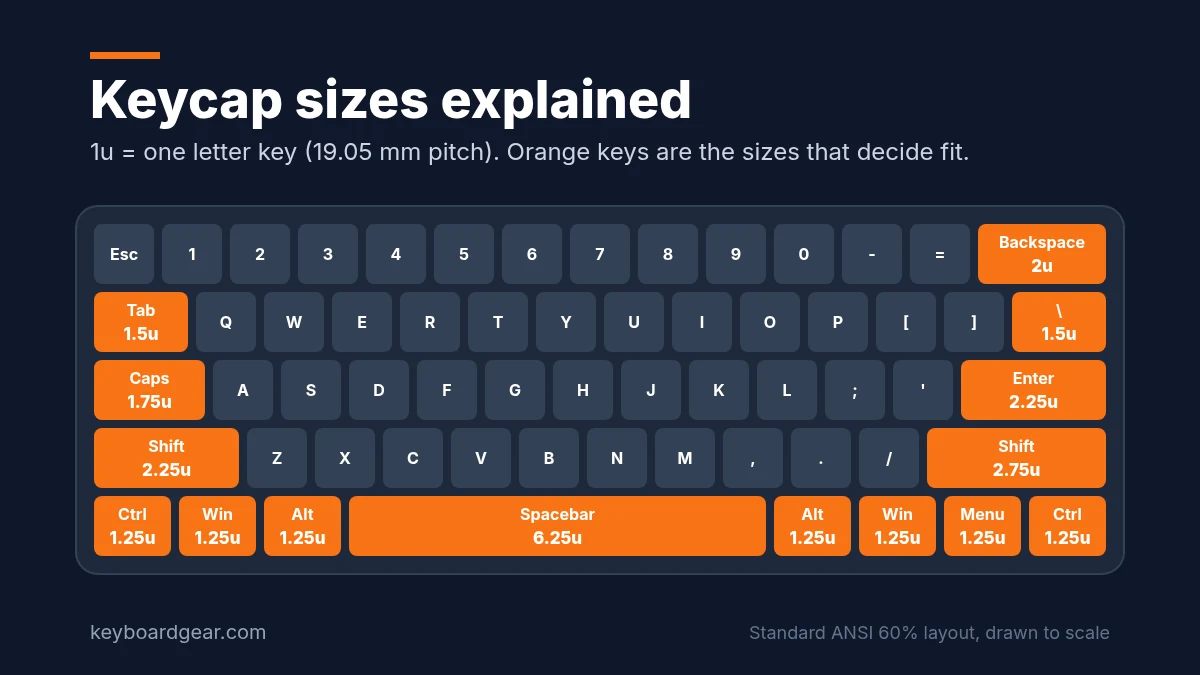
Keycap sizes are measured in units (u). One unit is the space a letter key takes up: 19.05 mm (0.75 in) from the centre of one key to the next. Other keys are multiples of that, such as a 2u Backspace, a 2.25u left Shift and a 6.25u spacebar.
A keycap set will fit if four things match: the stem (most boards use an MX-style cross), the physical layout (ANSI or ISO), the bottom row and spacebar sizes, and, for sculpted sets, the row each key belongs to. The bottom row causes the most problems, so check it against the set’s kit diagram first.
What does 1u mean on a keycap?
Keycap sizes use a unit written as u. A 1u key is the size of a single letter or number key, and every other key is described as a multiple of it: a 1.5u Tab key is one and a half letter keys wide, and a 2u Backspace is as wide as two.
On MX-style keyboards one unit is 19.05 mm, which is exactly three quarters of an inch. Deskthority’s wiki notes that Cherry defines one unit as 19.05 mm (0.75″).
Two details trip people up:
- 19.05 mm is the key spacing, not the plastic. It is the distance from the centre of one key to the centre of the next. The keycap itself is smaller, so there is a gap between caps. If you measure a 1u cap with a ruler you will get a smaller number, and the exact figure depends on the maker and profile.
- It is a convention, not a law. According to Deskthority’s unit article, the old ISO 1091 standard specified a 19 mm ± 1 mm unit, but it was withdrawn in 1994 and the current ISO 9995 series does not define one. Almost all full-size keyboards still use about 19 mm, which is why keycaps are so widely interchangeable, but some compact and low-profile boards use different spacing (more on that below).
The unit only describes width (and, for a few keys, height). It says nothing about the keycap’s shape or height, which is a separate topic covered in our guide to keycap profiles.
Keycap size chart: standard sizes in units and millimetres
These are the widths you will see in almost every keycap listing. The millimetre column is simply units × 19.05 mm, the nominal spacing a key occupies on the board, rounded to two decimals (as in Thockery’s keycap size table).
| Size | Nominal width | Where you usually find it |
|---|---|---|
| 1u | 19.05 mm | Letters, numbers, function row, arrows, most numpad keys |
| 1.25u | 23.81 mm | Ctrl, Win/Cmd, Alt and Fn on a standard bottom row; ISO left Shift |
| 1.5u | 28.58 mm | Tab and Backslash (\); Ctrl and Alt on Tsangan-style bottom rows |
| 1.75u | 33.34 mm | Caps Lock; right Shift on many 65% and 75% boards |
| 2u | 38.10 mm | Backspace; numpad 0 (wide) and numpad + and Enter (tall) |
| 2.25u | 42.86 mm | Left Shift and Enter on ANSI boards |
| 2.75u | 52.39 mm | Right Shift on most full-size, TKL and 60% boards |
| 6.25u | 119.06 mm | The most common spacebar |
| 7u | 133.35 mm | Spacebar on Tsangan, WKL and many custom boards |
A full standard ANSI keyboard therefore uses a predictable mix: dozens of 1u keys plus a handful of larger ones. Omnitype’s ANSI size list gives the same breakdown: 1.5u Tab, 1.75u Caps Lock, 2.25u left Shift, 1.25u bottom-row modifiers, a 6.25u spacebar, a 2.75u right Shift, a 2.25u Enter and a 2u Backspace. Keys that are 2u or wider also sit on stabilizers, which is why the stabilizer position matters as much as the width for long keys.
The four things that decide whether keycaps fit
Width is only part of the story. Keychron’s own compatibility guide lists the switch mount, the layout and non-standard key sizes as the factors that decide fit. In practice you need to check four things.
1. The stem (how the cap attaches)
Under every keycap is a mount that grips the switch. Most mechanical keyboards use the cross-shaped MX-style stem, and most aftermarket keycaps are made for it. If a set says “MX compatible” and your board uses MX-style switches, the stems will fit. If you are not sure what your switches are, our Cherry MX switch guide shows what the cross stem looks like.
Some switches are different. Keychron notes that boards with Alps or Topre switches have their own stem shapes and need matching keycaps, and that most membrane and rubber-dome keyboards cannot take MX keycaps at all. Low-profile boards are their own case: Keychron says its low-profile models (such as the K1, K3, K5, K7 and K13) need low-profile keycaps made for them. Kailh Choc V1 low-profile switches use a two-prong stem that is not MX compatible, while Choc V2 switches have an MX-style stem (Keebio, The Keyboard Wiki). If you own a low-profile board, see our low-profile keyboard guide and buy only caps that name your switch or model.
Spacing changes too. Boards built only for Choc switches usually space keys about 18 mm apart side to side and 17 mm front to back, so normal 19.05 mm keycaps will not fit that grid (Keyboard Builders).
2. The physical layout: ANSI or ISO
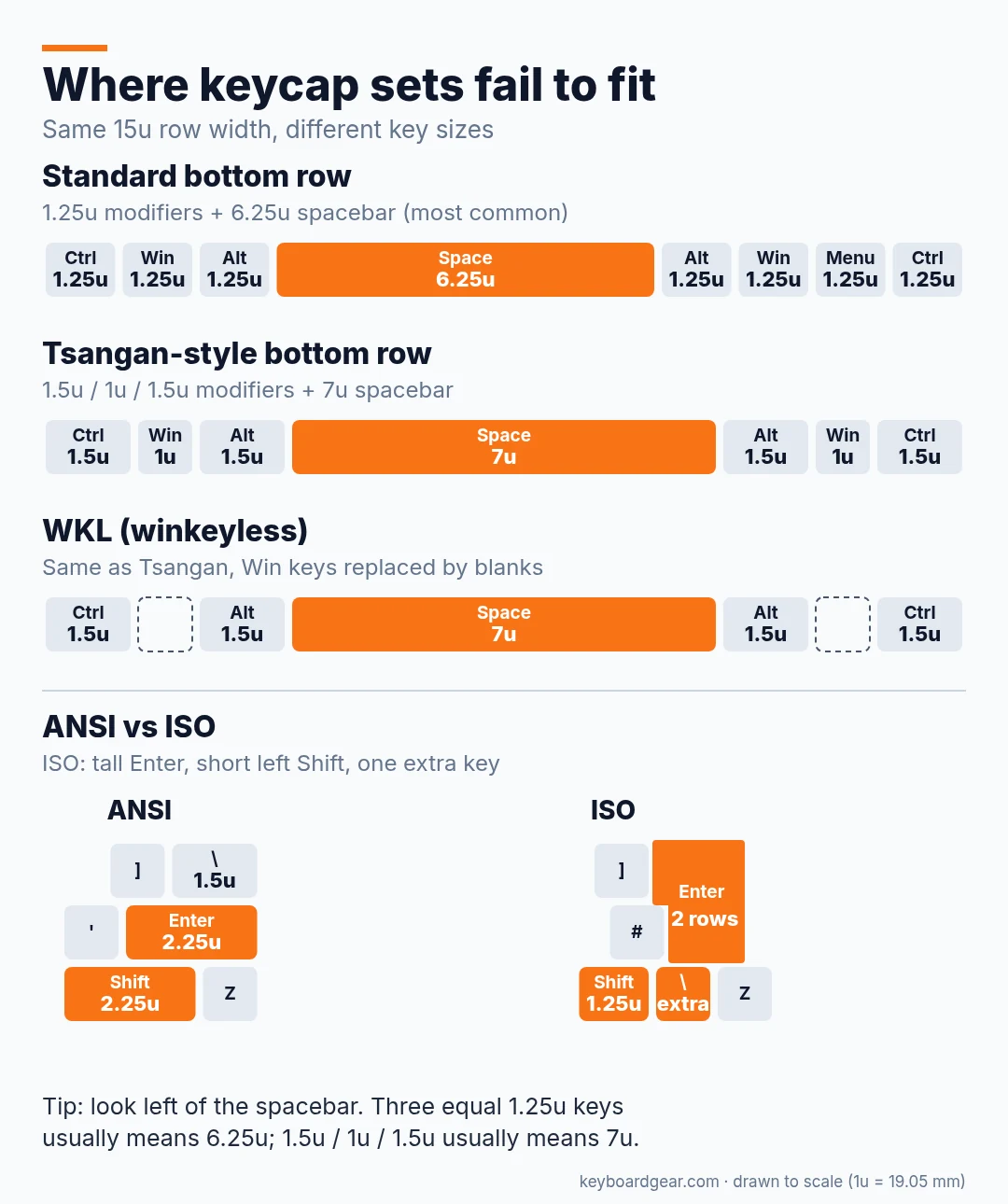
ANSI and ISO are physical layouts, not just different symbols printed on the keys. ANSI is common in the United States; ISO is common in the UK and much of Europe. The differences that matter for keycaps:
| Feature | ANSI | ISO |
|---|---|---|
| Enter key | Wide, one row tall (2.25u) | Tall, inverted-L shape spanning two rows |
| Left Shift | 2.25u | 1.25u |
| Extra key next to left Shift | No | Yes (1u, between Shift and Z) |
| Typical full-size key count | 104 | 105 |
Source: Thockery, ANSI vs ISO. Deskthority adds that the ISO Enter is typically 1.25u wide at the bottom and 0.25u wider on the top row (Deskthority, Enter key).
An ANSI-only set simply does not contain a tall Enter, a 1.25u left Shift or the extra key, so it leaves gaps on an ISO board however well the colours match. The reverse is also true. Keychron sells ISO keycap sets as separate country listings (DE-ISO, UK-ISO, Nordic-ISO and others) for exactly this reason (Keychron). Note that a layout such as German QWERTZ or French AZERTY is about legends: an ISO-shaped set can fit your board and still print the wrong symbols for your language.
3. The bottom row and spacebar
This is where most keycap sets fail. Above the spacebar row, mainstream keyboards agree with each other. On the bottom row they do not. Keychron calls the bottom row “the most likely culprit for compatibility issues”, and Deskthority notes that even boards using the same switches can have different spacebar widths and mount positions (Deskthority, space bar dimensions).
The three bottom rows you will meet most often:
- Standard: 1.25u modifiers on both sides of a 6.25u spacebar. This is what most sets are built around.
- Tsangan-style: 1.5u Ctrl and Alt keys separated by a 1u Win key, with a 7u spacebar (Admiral Shark’s Keyboard Dictionary).
- WKL (winkeyless): the same 1.5u / 7u arrangement with the Win key positions left empty or covered by blockers.
Variations sit on the other side of the spacebar too. Many compact boards use 1u keys there. Simpocubic’s guide gives the Keychron V1 as an example: three 1.25u keys left of a 6.25u spacebar, then three 1u keys on the right, while the full-size V6 has four 1.25u keys on the right (Simpocubic).
A 6.25u spacebar will not fill a 7u slot, and a 7u bar will not fit a 6.25u board. Even two spacebars of the same width can mount differently: Deskthority lists 6.25u bars with the stabilizer mounts 50 mm either side of the centre and others with the mounts 40 mm apart or with no centre mount at all. If your board has an unusual bottom row, buy a set with a matching spacebar kit or plan to keep your original spacebar.
4. The row (sculpted sets only)
Sculpted keycap profiles such as Cherry and OEM give each row a different height and angle. Their keycaps are labelled by row, often R1 to R4, and the same size key in a different row is a different part. A 1.75u key from the home row will not look or feel right on the bottom row, even though it is the same width. Uniform profiles such as DSA and XDA use one shape on every row, which makes rearranging easy (Thockery). Our keycap profiles guide explains which is which.
Keycap sizes by keyboard layout
Smaller keyboards remove keys, but they also tend to introduce odd sizes, which is why compact boards are the riskiest to buy keycaps for. Here is what to look out for. If you are unsure which size you have, see our guides to keyboard sizes and keyboard percentages.
| Layout | Sizes that usually differ | What to check |
|---|---|---|
| Full-size (100%) | Numpad: tall 2u + and Enter, wide 2u zero | That the set includes a numpad kit |
| TKL (80%) | Mostly standard; bottom row may be 6.25u or 7u | Spacebar and bottom-row modifiers |
| 75% | Often a 1.75u right Shift and 1u keys right of the spacebar | Right Shift and right-side bottom row |
| 65% | Often a 1.75u right Shift, 1u keys right of the spacebar and a column of 1u nav keys | Right Shift, bottom row, extra 1u keys |
| 60% | Usually 2.75u right Shift and a standard row, but Tsangan and WKL versions exist | Spacebar size and Win key positions |
These are tendencies, not rules. Thockery’s warning is worth repeating: a keyboard’s percentage does not tell you its spacebar size or right Shift width. Compare the boards in our best 75% keyboards and best 65% keyboards roundups and you will see how much these layouts vary.
How to check which keycap sizes your keyboard needs
- Find the layout diagram. Search for your exact model plus “keycap layout” or “keycap size chart”. Many brands publish one; Keychron, for example, has per-model keycap size pages. A diagram that lists widths such as “1.75u right Shift” beats any measurement.
- Identify ANSI or ISO. Look at the Enter key. A wide, one-row Enter is ANSI; a tall Enter spanning two rows with a short left Shift is ISO.
- Read the bottom row from left to right. Compare each key with a 1u letter key. If the three keys left of the spacebar are equal and only slightly wider than a letter key, the spacebar is almost certainly 6.25u. If they run 1.5u, 1u, 1.5u, you probably need a 7u spacebar (is-this-good stabilizer guide).
- Do the 15u check. On 60%, TKL and similar boards the main block is usually 15 units wide. Subtract the widths of the bottom-row modifiers from 15 to get the spacebar width. For example, 15 − (3 × 1.25 + 4 × 1.25) = 6.25u.
- Check the right Shift and the keys around the arrows. Compact boards often use a 1.75u right Shift with a 1u key next to it.
- Check the stem. Pull one keycap (our guide on removing keyboard keys shows how) and look for the MX cross. A low-profile switch or an unusual stem means you need caps made for it.
- Compare against the set’s kit diagram. Do not rely on the promo render. Find each non-1u key from your board in the set’s kit picture, in the right row if the set is sculpted.
How to read a keycap set listing
Enthusiast sets are often split into a base kit plus add-on kits (numpad, spacebars, ISO, extra modifiers), while mass-market sets usually come as one box with spare keys. Either way, look for:
- A full kit diagram showing every cap and its size, not just a keyboard render.
- A compatibility list of tested keyboard models. Keychron, for example, puts one on each of its keycap set pages.
- Bottom-row coverage: both 1.25u and 1u keys, plus 6.25u and 7u spacebars if your board might need either.
- ISO coverage if you have an ISO board: the tall Enter, the 1.25u left Shift and the extra key.
- Right Shift options: 2.75u and 1.75u if you own or plan to own a compact board.
Material and legend method do not change the fit, but they do change how long the set lasts; see PBT vs ABS keycaps before you choose. For ready-made options, our custom keycaps guide is a good starting point.
Common keycap fit problems and fixes
| Problem | Likely cause | Fix |
|---|---|---|
| Spacebar too short or too long | Board needs 7u (or 6u), set has 6.25u, or the reverse | Buy a matching spacebar or spacebar kit; keep the original bar meanwhile |
| Spacebar won’t clip onto stabilizers | Same width, different mount positions | Check stabilizer spacing for your board; use a bar made for those mounts |
| Gap next to a short left Shift | ISO board with an ANSI-only set | Buy an ISO kit or a set that lists ISO keys |
| No cap for the key beside right Shift | Board uses a 1.75u Shift + 1u key | Choose a set that includes a 1.75u Shift and spare 1u keys |
| Keys on the bottom row look odd | Sculpted caps from the wrong row | Use the row the set intends, or a uniform profile |
| Caps won’t seat at all | Different stem (low-profile, Alps, Topre) | Buy keycaps made for that switch or model |
For odd bottom rows, mixing is often the cheapest fix: keep your stock modifiers and spacebar, or fill gaps with blank caps in a matching colour.
FAQ
How big is a 1u keycap?
A 1u key occupies 19.05 mm (0.75 in) of spacing, measured from the centre of one key to the centre of the next. The plastic cap itself is a bit smaller so there is a gap between keys; its exact size depends on the manufacturer and profile.
What size is a standard spacebar?
The most common spacebar is 6.25u, about 119 mm of spacing. Tsangan-style and WKL boards use a 7u spacebar, and some boards use 6u or split spacebars. Check your board’s layout diagram rather than assuming.
Will any keycaps fit my mechanical keyboard?
Most keycap sets with MX-style stems fit most standard-height mechanical keyboards with MX-style switches, but only if the layout matches. ANSI vs ISO, the bottom row and the right Shift size are the usual problems. Low-profile, Alps, Topre and membrane keyboards need keycaps made for them.
Do ANSI keycaps fit an ISO keyboard?
Most 1u letter keys will fit if the stems and profile match, but an ANSI set is missing the tall ISO Enter, the 1.25u left Shift and the extra key, so you will need ISO add-ons or an ISO-compatible set.
Can I put keycaps on a laptop keyboard?
Generally no. Laptop keyboards use low-profile scissor-style mechanisms rather than MX-style stems, so standard mechanical keycaps will not attach.
How do I know if my keyboard has a standard bottom row?
Look at the keys left of the spacebar. Three equal 1.25u keys (Ctrl, Win, Alt) usually mean a standard row with a 6.25u spacebar. A 1.5u / 1u / 1.5u pattern means a Tsangan-style row with a 7u spacebar. Then check the keys on the right, which often differ on compact boards.
The bottom line
Keycap sizes look technical, but the system is simple: everything is a multiple of a 19.05 mm letter key. Before you buy a set, confirm four things: an MX-style stem (or caps made for your switch), ANSI or ISO, the bottom row and spacebar size, and the right Shift. Then match every non-1u key on your board against the set’s kit diagram. Do that and the only surprise when the box arrives should be how good the new caps look.
Sources: Thockery: Keycap Sizes, Units, Dimensions and Fit; Thockery: ANSI vs ISO Keyboard Layouts; Deskthority wiki: Unit; Deskthority wiki: Keycap; Deskthority wiki: Space bar dimensions; Deskthority wiki: Enter key; Omnitype: Keycap Sizes; Keychron: Are Keycaps Universal?; Keychron: switch and keycap compatibility check; Simpocubic: keyboard and keycap compatibility; is-this-good wiki: Stabilizers; Admiral Shark’s Keyboard Dictionary: Tsangan bottom row; Keyboard Builders: key spacing; Keebio: low-profile keycap options; The Keyboard Wiki: Kailh PG1350. All accessed 26 November 2026.

Experience is what matters at the end!!
Hi! This is Jacob Jay – founder of Keyboardgear.com! From childhood to adulthood, I’ve always remained passionate about IT, and the revolution in this industry, especially gaming on the PC can’t go out of my way. Since I’m an enthusiastic gamer, and I love to experience various gaming accessories, particularly mechanical keyboards, that really boost my gaming adventure manifolds. So, my nerve cells hit me to transfer my experiences into word form and share with others to identify the ideal keyboards perfectly fit for their gaming modes.
I know very well how hard it is to find the high-quality items available on the internet that ought to be exactly the same as seen as on the screen. But the counterfeiters have ruined the user’s trust. As I have passed all such situations, I’m obliged to deliver the genuinity and express the same as what I am saying.
So, now, I’m working on the mission to provide very helpful and frankly but trustworthy reviews and guides about various mechanical keyboards, mouses, and other gaming accessories as per my personal experiences and sound knowledge.