

Quick answer
The F1 to F12 function keys run shortcuts that depend on your operating system and app. On Windows, F1 often opens help, F2 renames a selected file, F3 searches, F5 refreshes, F10 activates the menu bar and F11 maximizes or goes full screen. On a Mac, the top row controls features like brightness, Mission Control, Spotlight, dictation and volume by default; hold Fn (or the Globe key) to use them as standard F1–F12 keys.
The function row is one of the least understood parts of a keyboard. On many laptops and Apple keyboards, the keys also control brightness, volume and media playback, which is why F5 might lower your volume instead of refreshing a page. Here’s what each key does and how to choose which function you get.
Windows function keys
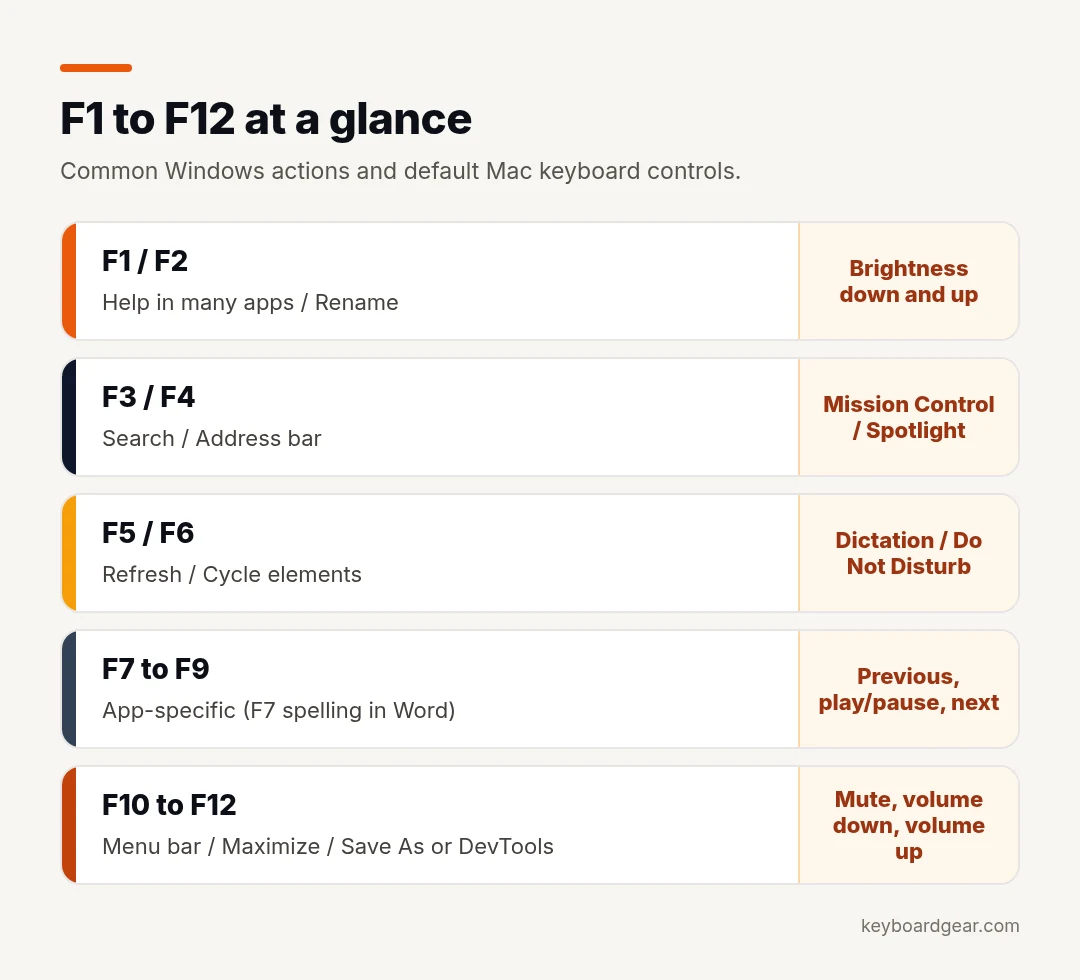
Microsoft lists these as standard F-key shortcuts in Windows and File Explorer. Apps can add or override them.
| Key | What it does in Windows | Useful combo |
|---|---|---|
| F1 | Opens help in many apps | Ctrl + F1 shows or hides the ribbon in Office apps |
| F2 | Renames the selected file or folder | F2 in Excel edits the active cell |
| F3 | Searches for a file or folder in File Explorer | Shift + F3 changes case in Word |
| F4 | Selects the address bar in File Explorer | Alt + F4 closes the active window |
| F5 | Refreshes the active window | F5 starts a slideshow in PowerPoint |
| F6 | Cycles through elements in a window | Moves to the address bar in most browsers |
| F7 | App-specific; spelling and grammar in Word | Caret browsing in some browsers |
| F8 | App-specific | Opened startup options on older Windows PCs |
| F9 | App-specific; recalculates in Excel | Send and receive in Outlook |
| F10 | Activates the menu bar | Shift + F10 opens the context menu |
| F11 | Maximizes or minimizes the window | Full screen in most browsers |
| F12 | Save As in Office apps | Opens developer tools in most browsers |
Alt + F4 closes the active window. If no windows are open, Microsoft says it prompts you to shut down, so it’s worth knowing before you press it repeatedly.
For more combinations, see our Windows keyboard shortcuts list.
Mac function keys
On a Mac, the top row controls Mac features by default. Apple notes that not all keyboards have the same symbols. On the current Magic Keyboard the row typically works like this:
| Key | Default Mac action |
|---|---|
| F1, F2 | Decrease and increase display brightness |
| F3 | Mission Control |
| F4 | Spotlight (Launchpad on some older keyboards) |
| F5 | Dictation |
| F6 | Do Not Disturb |
| F7, F8, F9 | Previous track, play/pause, next track |
| F10 | Mute |
| F11, F12 | Volume down and up |
To send a standard F-key on a Mac, press and hold Fn or the Globe key while pressing it. Apple’s example: Fn + F3 performs the F3 action in your app instead of opening Mission Control. Our Mac keyboard shortcuts guide covers more.
How to use F-keys without pressing Fn
On a Mac
Apple’s steps for macOS Ventura or later: choose Apple menu > System Settings, click Keyboard, click Keyboard Shortcuts, select Function Keys, then turn on Use F1, F2, etc. keys as standard function keys. After that, you’ll hold Fn to get brightness and volume.
On a Windows laptop
Most laptops have an Fn Lock key, often Fn + Esc or a key with a padlock icon, that swaps the default between media controls and F-keys. Some laptops put the setting in the BIOS or the maker’s utility app instead.
Function keys on gaming and compact keyboards
Many 60% and 65% keyboards have no dedicated function row; F1–F12 sit on a layer under the number keys, reached by holding Fn. On QMK or VIA keyboards you can remap them. See keyboard layers explained.
FAQ
What does F5 do?
On Windows it refreshes the active window or web page. On a Mac it starts dictation by default.
What does F12 do?
In Office apps it opens Save As, and in most browsers it opens developer tools. On a Mac it raises the volume by default.
Why do my F-keys change the volume instead?
Your keyboard is in media-key mode. Hold Fn, or turn on Fn Lock or the standard function keys setting.
What does Alt + F4 do?
It closes the active window on Windows. With no windows open, it brings up the shutdown prompt.
Do I need F-keys at all?
Many people rarely use them, but they’re handy for renaming files, refreshing, full screen and app shortcuts in Excel, Word and games.
Final thoughts
F1 to F12 do different jobs on Windows and Mac, and on most laptops they double as media keys. Learn a handful, like F2 to rename, F5 to refresh and Alt + F4 to close, and set Fn Lock or the Mac setting so the row behaves the way you use it most.
Sources
- Microsoft Support: Keyboard shortcuts in Windows
- Apple Support: How to use the function keys on your Mac

Experience is what matters at the end!!
Hi! This is Jacob Jay – founder of Keyboardgear.com! From childhood to adulthood, I’ve always remained passionate about IT, and the revolution in this industry, especially gaming on the PC can’t go out of my way. Since I’m an enthusiastic gamer, and I love to experience various gaming accessories, particularly mechanical keyboards, that really boost my gaming adventure manifolds. So, my nerve cells hit me to transfer my experiences into word form and share with others to identify the ideal keyboards perfectly fit for their gaming modes.
I know very well how hard it is to find the high-quality items available on the internet that ought to be exactly the same as seen as on the screen. But the counterfeiters have ruined the user’s trust. As I have passed all such situations, I’m obliged to deliver the genuinity and express the same as what I am saying.
So, now, I’m working on the mission to provide very helpful and frankly but trustworthy reviews and guides about various mechanical keyboards, mouses, and other gaming accessories as per my personal experiences and sound knowledge.